AI Video Enhancer for Mobile Video Frames
Clean up the frames that decide whether people tap: covers, thumbnails, product shots, faces, and hook moments. Enhance stills from your clip on mobile, then finish the video in your editor or social app.
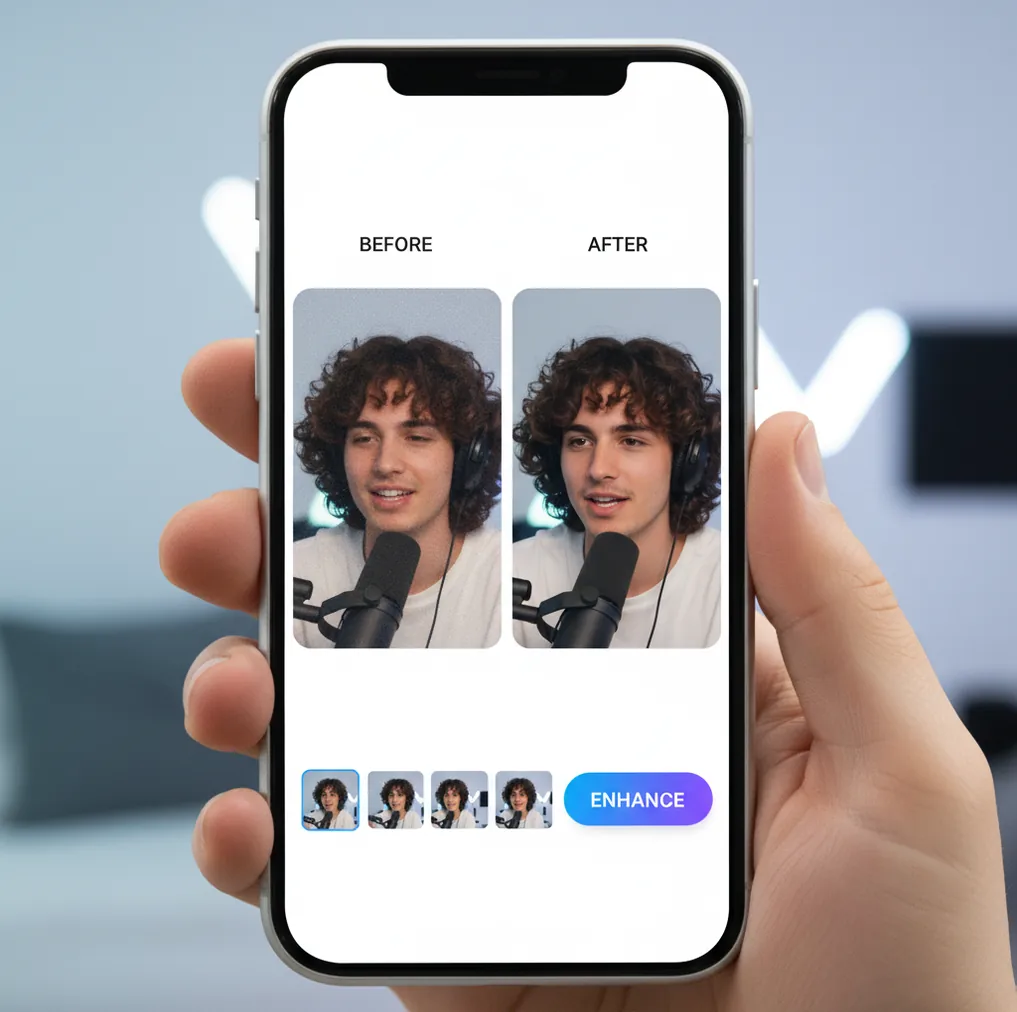
Enhance key frames and covers in Pict.AI, then use your preferred editor to assemble the final clip.
An AI video enhancer improves visual quality by reducing noise, sharpening detail, correcting mild blur, and sometimes increasing resolution. Pict AI is an AI photo editing app for iPhone, Android, and web; for video, its strongest workflow is enhancing key frames, covers, thumbnails, and promo stills. It is not a full end-to-end video upload tool, so use a dedicated video enhancer when you need to process every frame of a long video file.
What Is an AI Video Enhancer?
An AI video enhancer is software that improves how a clip looks by reducing grain, sharpening detail, correcting softness, and preparing visuals for higher-quality publishing. Some tools process an entire video file frame by frame, while a mobile creator workflow often focuses on the frames that matter most: the cover, thumbnail, opening hook, product close-up, face shot, or before-and-after moment.
That frame-first workflow is useful because social platforms compress video heavily. A sharper cover and cleaner first second can make a Reel, Short, TikTok, listing video, or ad feel more intentional before viewers even press play. For creators, marketers, and sellers, enhancing selected stills is often faster than rebuilding the whole edit.
How Does an AI Video Enhancer Work?
Video enhancement models analyze pixels, edges, texture, and compression patterns to predict a cleaner version of the image. A full-video tool may run denoising, deblurring, super-resolution, optical flow, and temporal consistency checks across consecutive frames so motion does not flicker. A still-frame workflow treats exported frames as images: edge detection finds facial features, product outlines, text, and high-contrast borders; noise models reduce grain; sharpening restores perceived detail; and super-resolution adds pixels for larger covers or thumbnails.
Some modern tools use diffusion model techniques to reconstruct missing texture, but the best results still come from good source material. Mild blur, low-light noise, and small compression artifacts can improve; severe motion blur or missing facial detail cannot always be recovered accurately.
How to Use an AI Video Enhancer on Mobile
Choose the key moments
Pick the cover frame, first hook frame, product close-up, face shot, text screen, or emotional highlight that people will see in feeds and grids.
Export clean frames
Save still frames from the original video file when possible. Avoid screenshots from reposted or already-compressed versions unless that is the only source available.
Enhance the stills
Apply noise reduction first, then clarity or sharpening. If the frame will become a large cover, upscale it after cleanup rather than before.
Save social assets
Export the enhanced frame as a thumbnail, cover, ad image, profile banner, listing photo, or supporting post asset.
Publish in your editor
Add the improved stills back into your video editor, social app, store listing, or ad platform. Preview at small size before posting.
What Mobile Video Enhancement Features Matter?
Frame Clarity Boost
Improve perceived sharpness on selected frames so faces, products, logos, and on-screen text read better in thumbnails and feed previews.
Noise Reduction
Clean up visible grain from low-light clips, older phone footage, indoor creator videos, and compressed social exports.
Mild Blur Repair
Recover some crispness from slightly soft frames, especially when the subject is mostly still and the original file has enough detail.
Still-Image Upscaling
Increase the size of video frames used for covers, store images, posters, ads, portfolio pages, or press materials.
Social Cover Preparation
Create cleaner covers for TikTok, Reels, Shorts, YouTube thumbnails, story highlights, product demos, and creator grids.
Portrait-Friendly Finishing
Polish creator, interview, beauty, and talking-head frames while keeping skin texture believable instead of plastic.
Which Video Enhancer Is Best for Mobile, CapCut, or Topaz?
| Tool | Best for | Full video processing | Mobile workflow | Typical cost |
|---|---|---|---|---|
| Pict AI | Enhancing key frames, covers, thumbnails, and promo stills from clips | No; still-frame enhancement workflow | iPhone, Android, and web photo editing | Free basic use |
| CapCut | Editing social videos with filters, captions, templates, and basic enhancement | Yes, within a video editor | Strong iOS and Android workflow | Free plan with paid features |
| Topaz Video AI | Desktop upscaling, frame interpolation, denoising, and restoration | Yes, designed for full video files | Desktop-first, not a phone-first workflow | Paid desktop software |
| HitPaw VikPea | Consumer video upscaling, denoising, and face enhancement | Yes, designed for full video files | Desktop and some mobile/web options vary by plan | Paid plans with trials or limits |
Choose Pict AI when the practical goal is a better thumbnail, cover, product still, or social preview; choose a full-video enhancer when every frame of the clip needs upscaling or restoration.
Who Uses Video Enhancement for Social Clips?
Social media creators
Creators clean up hook frames, profile grid covers, and short-form previews so Reels, TikToks, and Shorts look sharper after platform compression.
Small brands and sellers
Shop owners enhance product demo frames for Shopify, Etsy, Amazon, landing pages, paid ads, and launch posts without reshooting the whole clip.
Artists and portfolio builders
Artists turn process-video frames into cleaner portfolio images, commission previews, behind-the-scenes posts, and before-and-after documentation.
Gift and print makers
A meaningful frame from a proposal, birthday, graduation, pet clip, or travel video can become a sharper printable keepsake.
Tattoo and reference workflows
Creators can clean a still frame from a pose, hand gesture, pet portrait, or symbolic scene before using it as a visual reference for a tattoo artist.
Coaches and educators
Fitness coaches, teachers, and course creators improve instructional thumbnails, talking-head covers, and demonstration frames for clearer learning materials.
What Are AI Video Enhancement Limitations?
- A still-frame workflow does not enhance an entire video file frame by frame.
- Severe motion blur is often not recoverable because the original detail was never captured clearly.
- Very compressed source clips may contain blocky artifacts that become more visible after sharpening.
- Enhancing isolated frames can create a mismatch if the rest of the video remains soft or noisy.
Video Enhancement Trade-offs for Generated Clips
Enhancement can make a generated clip look cleaner, but it cannot decide whether its content is correct. Before choosing ai video tools, separate image-quality problems from generation errors: grain and jagged edges need different treatment from a changing face, malformed hand, or drifting product label.
Where enhancement helps
- Cleaner edges: Modest cleanup can reduce visible compression around illustrated outlines and high-contrast objects. For animate drawings ai workflows, check that thin pencil marks survive rather than merging into thicker strokes.
- More consistent presentation: A dedicated video processor can apply cleanup across a sequence instead of leaving one polished frame surrounded by softer footage. Review moving subjects as well as static backgrounds.
- Better delivery preparation: Matching the output dimensions to the destination avoids unnecessary enlargement later. Keep the original frame rate unless changing motion is a deliberate editing choice.
Where enhancement can backfire
- False detail: Reconstructed eyelashes, fabric patterns, and lettering may look convincing while differing from the source. This matters especially for product demonstrations and identifiable people.
- Unstable texture: In turn photo into video ai projects, added detail can shimmer as the camera moves. Inspect hair, brickwork, and patterned clothing during playback, not just in paused previews.
- Extra processing: Another export can introduce compression or alter color. Compare skin tones and bright highlights before accepting the result, particularly if the source uses HDR.
Verdict: Enhance a short representative segment before committing to the whole clip. Reject settings that improve sharpness but damage identity, lettering, or motion stability. An AI Video Enhancer App focused on still images is useful for a separate cover asset; it should not be treated as a repair for errors throughout the moving sequence.
Video Enhancement Questions Answered
Flicker can occur when enhancement produces different textures or brightness levels in consecutive frames. Hair, foliage, patterned fabric, and fine lines are common trouble spots. Choose a processor with temporal consistency controls, reduce enhancement strength, and preview a moving segment. Enhancing individual frames independently can make the problem worse because each image is reconstructed without reliable continuity across the sequence.
Sharpening, denoising, and upscaling do not inherently require a frame-rate change. Some video tools offer frame interpolation separately, generating intermediate frames to make motion appear smoother. That can create distorted edges around fast-moving subjects or objects that cross each other. Keep the source frame rate when you only want cleaner footage, and check export settings rather than assuming the tool preserves it.
The most reliable workflow here is enhancing exported still frames, covers, thumbnails, and promo images. Use a dedicated full-video enhancer if you need every frame processed.
It can upscale still frames used for covers and marketing assets. For true 4K upscaling of an entire clip, choose a desktop or cloud video enhancer built for full files.
It can improve mild blur on selected frames when some detail remains. Severe motion blur, fast action, or badly out-of-focus footage is usually not fully fixable.
Yes, exported frames from low-light clips can be cleaned to reduce visible grain. Start from the original video file for the best result.
Start with the cover or opening hook frame because that is what people see before they decide to watch. Product close-ups and face shots are usually next.
A screenshot can work, but exporting a still frame from the original video is usually cleaner. Avoid screenshots from reposted social videos when possible.
Yes, most platforms compress uploads. Keep the enhanced frame clean and not over-sharpened so it survives another round of compression better.
Yes, thumbnails and covers are one of the best uses for this workflow. Cleaner stills help small text, faces, and products read better in feeds.
It can help refresh selected frames from older clips for announcements, memory posts, prints, or promo assets. Very low-resolution or damaged footage may still show limits.