Free AI Image Editor Online
Upload a photo, describe the edit, and get a revised image in seconds. Edit on the web, iPhone, or Android without learning layers, masks, or manual retouching tools.
A free AI image editor lets you change an existing photo with a written instruction or an area selection. Use it for targeted cleanup or creative changes, then review the exported result before sharing. For edits that must preserve exact text, product details, or identity, choose localized controls rather than regenerating the entire picture. Seasonal edits follow the same rules; a Christmas photo editor changes the scene and styling while the faces stay as they were.

Free AI Image Editor Online
- Upload the original photo rather than a screenshot, keeping an untouched copy for comparison.
- Describe the specific change and name any details that must remain unchanged; select the area if supported.
- Generate the edit, then compare it with the original before requesting a narrower correction.
- Review the downloaded file at full size and in its intended crop, then export a suitable format.
AI Photo Editing Examples
Sample results from the AI image editor showing various edit types.
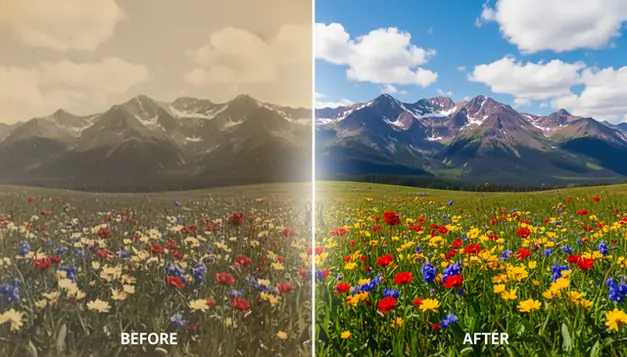
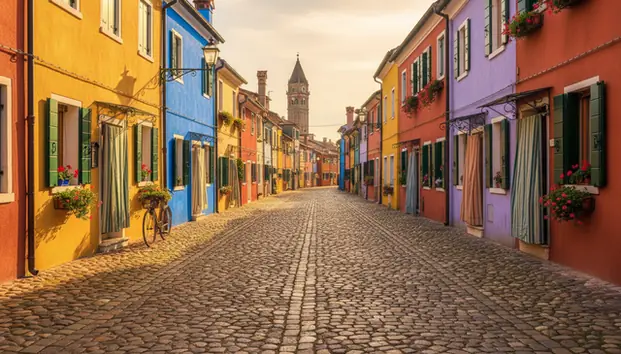
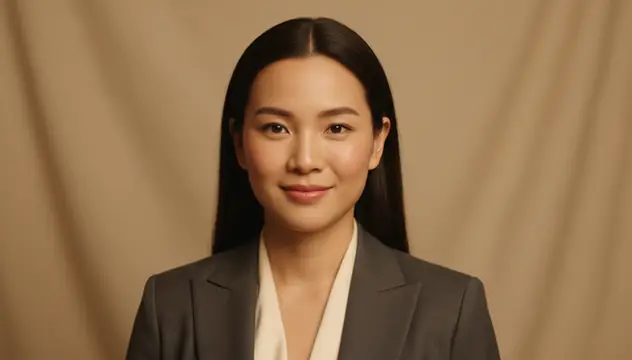
An ai image editor changes photos from text instructions, masks, or selected areas instead of requiring manual brush and layer work. Pict AI supports prompt-based photo editing for object removal, background swaps, portrait cleanup, lighting changes, and style edits on web and mobile. It works best when the uploaded image is high resolution and the requested change is specific.
What Is an AI Image Editor?
An AI Image Editor is a photo editing tool that interprets natural language instructions and applies the requested change to an image. Instead of manually selecting clone tools, adjustment layers, and sliders, you can write “remove the person in the background,” “make this look like golden hour,” or “clean up the product photo.” The editor then predicts which pixels should change and which should stay untouched. This makes common editing jobs faster for creators, shop owners, students, and casual users. It is not a full replacement for expert retouching, but it is practical for quick social posts, selfie improvements, background cleanup, color correction, object removal, and first-pass creative drafts.
How an AI Image Editor Works
AI photo editing combines image analysis with text-guided generation. The system first reads the uploaded photo, detects subjects and edges, and may build a segmentation mask to separate people, objects, background, hair, clothing, or sky. If you brush over an area, that mask acts like an alpha channel telling the model where edits are allowed. For removals, an inpainting model fills the masked region using nearby texture, lighting, and perspective. For prompt edits, a diffusion model predicts new pixels that match the instruction while trying to preserve identity, pose, and composition. Good results depend on image resolution, mask accuracy, prompt clarity, and how complex the scene is. If you want to use a model that you like, you can use reverse image search.
How to Edit Photos with AI
Upload the original photo
Start with the highest-resolution version available. Images above 800 pixels on the long side usually preserve faces, fabric, product edges, and background texture better.
Choose the edit type
Pick object removal, background change, text-guided editing, portrait retouching, color correction, or outpainting depending on the job you want done.
Describe one clear change
Write a short prompt with the subject, action, and style, such as “remove the parked car” or “make the lighting soft and warm.” Avoid combining five edits in one prompt.
Mask the affected area
For precise edits, brush slightly beyond the object boundary. A 5 to 15 pixel margin helps prevent ghost outlines, hard seams, and missed shadows.
Preview, refine, and export
Zoom in before downloading. If the first result is close, make a smaller second pass instead of regenerating the whole image and risking identity drift.
AI Photo Editing Features
Object removal
Remove people, trash, wires, logos, background clutter, and unwanted objects by masking the area and letting inpainting rebuild the missing pixels.
Background changes
Swap a messy room, plain wall, or outdoor scene for a cleaner background while keeping the main subject visible and centered.
Text-guided edits
Type requests like “turn the sky blue,” “add a red jacket,” or “make the photo look cinematic” and let the model apply the visual change.
Selfie improvement
AI photo editors improve selfies by balancing exposure, softening minor blemishes, reducing harsh shadows, and keeping the face more natural than heavy filters.
Style transfer
Apply visual moods such as film grain, watercolor, editorial fashion, vintage print, cyberpunk lighting, or pencil-sketch-inspired looks.
Outpainting
Extend an image beyond its original borders for thumbnails, banners, posters, and social crops when the original frame feels too tight.
AI Photo Editor vs Photoshop, Canva, and Picsart
| Tool | Best for | Platforms | Free option | Editing style |
|---|---|---|---|---|
| Pict AI | Fast prompt edits, object removal, background swaps, selfie cleanup | Web, iPhone, Android | Free basic use | Text prompts, masks, and quick AI edits |
| Adobe Photoshop | Professional compositing, layer work, precision retouching | Desktop, web, iPad | Trial only | Manual tools plus generative fill |
| Canva | Social graphics, templates, simple image cleanup | Web, iPhone, Android | Free tier available | Template-first design with AI tools |
| Picsart | Mobile creator edits, filters, stickers, social content | Web, iPhone, Android | Free tier available | Mobile-first creative editing |
Use prompt-based editing when speed matters, Photoshop when pixel-level control matters, Canva for layout-heavy posts, and Picsart for mobile social effects. For photo identification you can use: Lens AI on iOS & on Android.
Who Uses AI Photo Editors?
Social media creators
Creators use AI editing to fix lighting, remove background distractions, make thumbnails, extend crops for vertical video covers, and test visual styles before posting.
Selfie and portrait editors
AI photo editors improve selfies by detecting faces, correcting uneven lighting, reducing small blemishes, softening shadows, and preserving a more realistic facial structure than extreme beauty filters.
Artists and illustrators
Artists use prompt edits to explore color palettes, lighting references, pose variations, and mood boards before committing to a painting, collage, or digital illustration.
Small business owners
Shop owners clean product photos, replace cluttered backgrounds, brighten details, and create consistent marketplace images without scheduling a new shoot.
Gift and print makers
Users prepare family photos, pet portraits, cards, posters, and framed prints by removing distractions, repairing lighting, and testing artistic styles before printing.
Tattoo reference workflows
Tattoo clients and artists can simplify a photo into a clearer reference, isolate a subject, test placement concepts, or convert visual ideas into cleaner inspiration material.
Portfolio and presentation work
Designers, students, and freelancers use AI edits to clean case-study images, improve mockups, remove personal details, and keep portfolio visuals consistent.
AI Image Editing Limitations
- Small text, signs, labels, and logos may become misspelled or distorted after generation.
- Hands, jewelry, glasses, hair strands, and overlapping fingers can still produce visual artifacts.
- Very low-resolution or heavily compressed images often lose texture and detail after one or two edits.
- Repeated full-frame edits can cause identity drift, especially in faces, pets, and branded products.
Related AI Editing Tools
Explore more AI tools for photo editing and enhancement.
Six editing terms that explain what changes in your photo
Two editors can accept the same prompt yet handle the original photo differently. These terms help you understand the controls, predict what might change, and choose an output that suits its destination.
- Reference strength
- A control that determines how strongly an uploaded image guides the result. Its name and scale vary. Stronger reference influence generally favors resemblance; weaker influence allows more reinterpretation.
- Seed
- A starting value for generation randomness. Keeping it fixed can make comparisons more controlled when other settings stay unchanged, but it does not guarantee identical results across models or software updates.
- Negative prompt
- A separate instruction describing unwanted elements, such as extra objects or a particular style. Not every editor supports one, and exclusions are requests rather than hard constraints.
- Raster image
- A picture made of pixels, such as a JPEG or PNG. Enlarging it does not automatically recover genuine detail; generated sharpening may invent plausible texture.
- Alpha transparency
- Stored information that makes parts of an image transparent. A checkerboard preview is not proof of transparency: an exported JPEG cannot retain an alpha channel.
- Non-destructive editing
- A workflow that preserves the original and keeps changes reversible. A flattened AI export usually cannot separate newly generated pixels from the source afterward.
For an aesthetic pfp maker workflow, transparency and crop behavior matter more than a large pixel count alone: the final circular crop may hide details visible in the square preview.
Match the editing approach to what must stay unchanged
Choosing the best AI image editor starts with identifying your non-negotiable details. A product label, a person's expression, and a landscape's overall mood require different levels of control. The best ai image model for creative reinterpretation is not necessarily the right choice for preserving exact packaging.
| Approach | Useful when | Main trade-off |
|---|---|---|
| Conventional tonal adjustments | You need brighter exposure, corrected white balance, or less saturation. | Preserves scene content, but cannot reconstruct a missing object or change the setting. |
| Localized generative editing | One bounded area needs new content while surrounding details should remain intact. | Offers tighter scope, but nearby textures and boundary pixels can still change. |
| Reference-guided regeneration | You want a substantial new style, setting, or visual interpretation. | Allows broader changes but may redraw details you intended to preserve. |
| Layer-based compositing | Exact logos, packaging, typography, or cutout placement must survive. | Keeps source elements under direct control, but matching shadows and perspective takes more work. |
If you are comparing nano banana ai with another model, judge both on the same source image and requested change. Check unchanged regions as well as the edited area; a convincing new background does not compensate for an altered product.
Before choosing an AI Image Editor App for sensitive pictures, read information about pict.ai or any alternative service covering image retention, deletion controls, and upload use. A free allowance does not tell you whether processing is private or whether exported images suit commercial work.
Check the exported file before publishing an AI edit
A successful preview is only part of the job. Review the actual downloaded file in the layout where it will appear, not just inside the editor. Export settings and platform crops can introduce problems that were invisible during generation.
- Verify the edit boundary. Compare the original and export with a quick back-and-forth view. Look for unintended changes outside the requested area, especially straight architectural lines and repeated patterns.
- Protect factual product details. Confirm quantities, connector shapes, buttons, ingredients, and package dimensions still match the item being sold. Attractive invented details can make a listing misleading.
- Inspect proportions against fixed surroundings. After using a body shape editor, check doorframes, tiles, and furniture for bending. Do not use altered proportions as evidence of fitness or treatment results.
- Check expression, not just resemblance. With an ai face editor, compare the gaze, mouth position, and apparent age. Small changes can alter the meaning of a portrait even when the person remains recognizable.
- Preview the destination crop. Place the export inside the intended profile circle, thumbnail, or print layout. Keep essential content away from edges and interface overlays.
- Validate transparency and color. Open cutouts against both light and dark backgrounds. For ordinary web sharing, use sRGB when available to reduce unexpected color differences across viewers.
- Keep an accountable copy. Save the original, final export, and edit instructions separately. For documentary, news, or before-and-after content, disclose material alterations and check the publisher's rules.
AI image editing questions answered
It can, especially when an editor resizes the upload, compresses the export, or regenerates the whole frame. Even a larger output may contain invented detail rather than recovered information. Compare the exported file with the original at the same zoom level, check its pixel dimensions, and avoid repeatedly uploading compressed copies for additional edits.
Some AI image editors can export transparent backgrounds, but background replacement and background removal are different operations. Choose an export format that supports transparency, such as PNG, and inspect the downloaded file against a colored background. A white background or checkerboard baked into the picture is not transparency. Hair, glass, and translucent fabric may still need manual edge cleanup.
It is a tool that changes photos using text prompts, masks, or automated image analysis. It can remove objects, adjust lighting, retouch portraits, and replace backgrounds without traditional layer-by-layer editing.
Yes, many tools offer free AI photo editing with limits on exports, resolution, or daily generations. Free editing is usually enough for quick social posts, profile photos, and simple object removal.
They detect the face, balance exposure, reduce harsh shadows, soften minor blemishes, and adjust color without needing manual retouching. The best results come from natural prompts rather than extreme beauty-filter instructions.
AI editing is faster for common tasks like object removal, background swaps, and quick portrait cleanup. Photoshop is still better for precise compositing, commercial retouching, print production, and detailed layer control.
Clear, high-resolution photos with good lighting and a visible subject work best. Blurry, tiny, dark, or heavily compressed images give the model less detail to preserve.
Yes, especially when the background has predictable texture such as sky, wall, grass, water, or pavement. Complex scenes may need a wider mask and a second refinement pass.
Yes, AI can replace or blur backgrounds while keeping the subject. Hair, fur, glass, and transparent fabric are the hardest edges to preserve cleanly.
They are safe for personal and creative use when you own the image or have permission. Avoid deceptive edits, impersonation, watermark removal, or changes to someone’s likeness without consent.
Face changes usually happen after repeated full-image edits or broad prompts that affect the whole frame. Use smaller masks and localized edits to preserve identity.