AI Hairstyle Generator iOS & Android App
Preview short hair, long layers, curls, pixie cuts, bobs, wolf cuts, and bangs on your own selfie before you book the cut. Save realistic hairstyle ideas from your phone and bring them to your stylist.
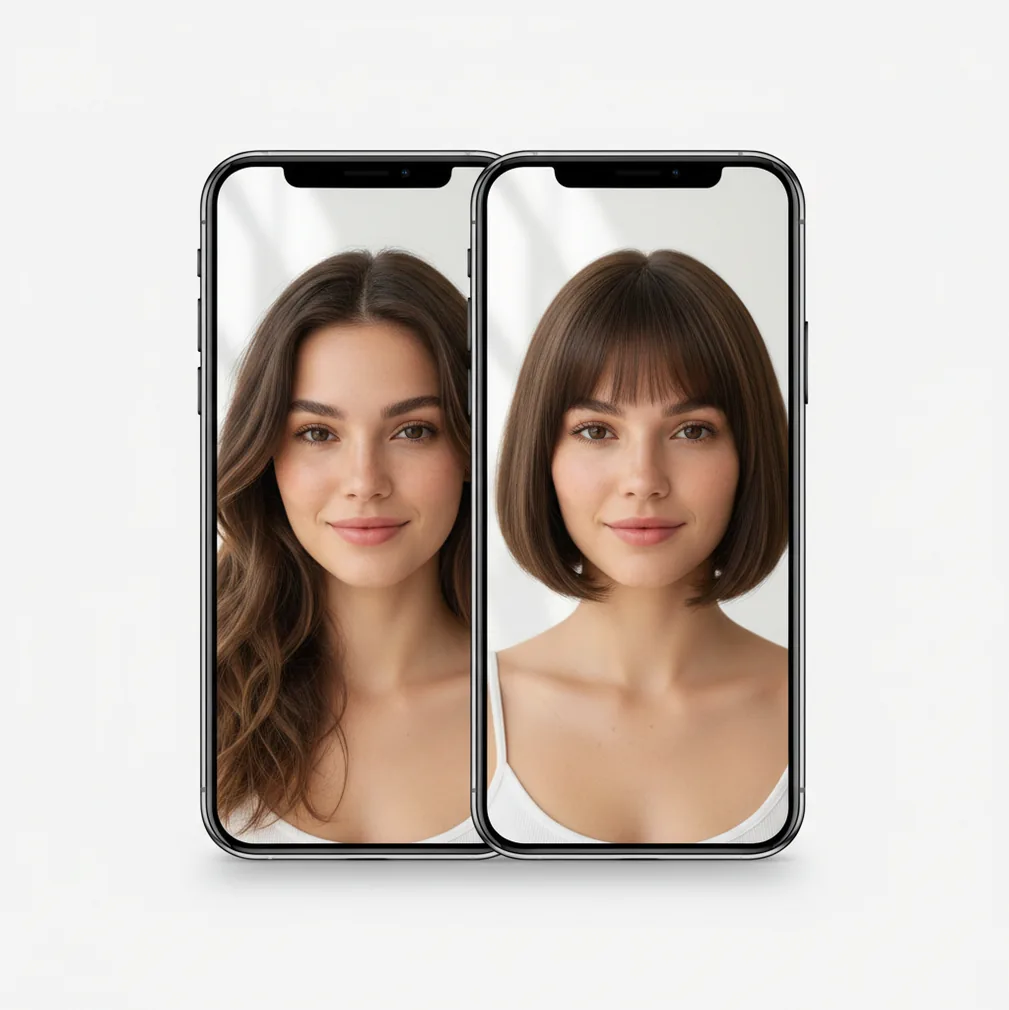
Preview hairstyle changes on your own selfie with face-aware placement and natural-looking blending.
An ai hairstyle generator ios & android app lets you preview haircuts and styling changes on your own photo before making a real change. With Pict AI, you can test bangs, bobs, pixies, curls, wolf cuts, and longer layers from a mobile selfie. The result works best as a visual reference for salons, social posts, mood boards, or personal decision-making.
What Is AI Hairstyle Generator iOS & Android App?
An ai hairstyle generator ios & android app is a mobile tool that creates virtual haircut previews from a selfie. It helps you see how a fringe, bob, pixie cut, wolf cut, curls, or longer layers might frame your face before you commit to scissors, color, heat styling, or a salon appointment.
The best use is decision support, not a promise of the final haircut. A good preview can show whether a blunt bang feels too heavy, whether a bob changes your jawline, or whether volume at the crown suits your face shape. Creators also use hairstyle previews for profile photos, character concepts, fashion content, and before-and-after edits.
How AI Hairstyle Generator iOS & Android App Works
An AI hairstyle app usually starts by detecting the face, hairline, head shape, and visible hair area in the photo. It may use facial landmarks, hair segmentation masks, edge detection, and inpainting to decide where a new style should appear without covering eyes, eyebrows, ears, or the neck unnaturally.
For generated styles, a diffusion model or image-to-image model creates new hair texture, length, volume, and shape while preserving identity cues such as face structure and skin tone. Blending then matters: alpha masking, color matching, shadow consistency, and strand-level edge cleanup help the result look less pasted on. A clear front-facing photo gives the model better boundaries, which is why lighting and a visible hairline strongly affect realism.
How to Try On Hairstyles in the App
Choose a clear selfie
Start with a sharp, front-facing or slight three-quarter photo. Keep your full hairline visible, avoid heavy shadows, and use even window light when possible.
Pick a hairstyle direction
Choose a goal such as curtain bangs, blunt bangs, bob, lob, pixie, wolf cut, curls, waves, long layers, or a shorter men’s cut with tighter sides.
Generate several versions
Create more than one result for the same idea. AI hairstyle previews vary, so comparing three to five versions usually gives a better read than trusting the first output.
Check realism before saving
Look at the hairline, ears, neck, shadows, parting, and texture. A believable result should match the lighting and should not blur the forehead or distort the face.
Save references for decisions
Export your strongest options and keep them in a small album. Bring two or three favorites to a stylist and ask what fits your hair density, curl pattern, and maintenance routine.
AI Hairstyle Try-On Features
Short, Medium, and Long Hair Ideas
Preview major length changes without guessing. Test pixie cuts, bobs, lobs, shoulder-length layers, long waves, and fuller long-hair looks before changing your real hair.
Bangs and Fringe Previews
Try curtain bangs, blunt bangs, wispy fringe, or face-framing pieces. This is useful because fringe changes the forehead, brows, and overall face balance more than most cuts.
Curl and Wave Visualization
Explore smoother, wavier, or curlier styling directions. These previews can guide heat-styling goals, perm discussions, curl routines, or content looks for beauty and fashion posts.
Mobile Editing and Export
Create, compare, and save hairstyle versions from an iPhone or Android workflow. Mobile export makes it easy to share references in messages, camera roll albums, or salon consultations.
Creative Reference Images
Use generated hairstyles for mood boards, character styling, profile images, portfolio tests, and social media concepts. The output can act as a visual sketch before a shoot or makeover.
Variation-Based Selection
Generate multiple options and choose the one with the cleanest hairline, best lighting match, and most believable texture. Iteration is often the difference between a novelty image and a useful reference.
Hairstyle Generator App vs YouCam Makeup, FaceApp, and Fotor
| Tool | Best For | Platform | Hairstyle Workflow | Typical Fit |
|---|---|---|---|---|
| Pict AI | Fast selfie-based hairstyle previews, AI photo edits, and mobile exports | iOS and Android app; broader photo editing across iPhone, Android, and Web | Generate variations, compare results, save references | People who want quick app-first hair ideas and creator-friendly exports |
| YouCam Makeup | Beauty try-ons, makeup filters, hair color, and preset-driven style previews | iOS, Android, and web-based brand tools | Select from guided beauty and hairstyle categories | Users who prefer catalog-style beauty editing with many preset looks |
| FaceApp | Face edits, age filters, beard previews, and some hairstyle-style transformations | iOS and Android | Apply filters and AI transformations to portrait photos | People who want broader face-editing effects rather than salon-specific planning |
| Fotor | Web and app photo editing with AI portrait tools and creative image generation | Web, iOS, and Android | Upload or edit photos, then apply AI image or portrait changes | Users who want a general design and photo-editing workspace |
Pict AI fits best when the main task is quick mobile hairstyle experimentation from a selfie; YouCam Makeup, FaceApp, and Fotor may be better when you want larger beauty catalogs, face filters, or general design tools.
Who Uses a Virtual Hairstyle App
People considering a major cut
A virtual hairstyle app is useful before going from long hair to a bob, lob, pixie, or layered cut. It helps turn a vague idea like “shorter” into a set of images you can compare.
Anyone nervous about bangs
Bangs are hard to undo, so previews help compare curtain bangs, blunt fringe, wispy pieces, and softer face-framing layers before making a permanent change.
Salon clients and stylists
Clients can bring two or three generated references to a consultation. Stylists can then explain what is realistic based on hair density, cowlicks, curl pattern, face shape, and daily styling time.
Creators and social media editors
Beauty creators, fashion accounts, and profile-photo editors use hairstyle previews to test a look before filming, posting, or planning a shoot. It works like a fast visual draft.
Artists and character designers
Artists can use hairstyle outputs as reference material for portraits, avatars, comics, and character boards. The goal is not copying every strand, but exploring silhouette, volume, and personality.
Gift, print, and makeover projects
Generated hair looks can support fun birthday edits, makeover mockups, framed before-and-after prints, or family style experiments, especially when the tone is playful rather than diagnostic.
Tattoo and portfolio references
A hairstyle preview can help portrait artists, tattoo clients, and photographers decide how hair shape affects the face, neckline, shoulders, and overall composition.
AI Hairstyle Preview Limitations
- Photo quality matters. Low resolution, motion blur, dark lighting, or harsh shadows can cause fuzzy edges, warped texture, or unnatural blending.
- Hidden hairlines reduce accuracy. Hats, heavy bangs, sunglasses, hands, or hair covering the forehead make it harder to place a new style cleanly.
- Real hair behavior is not guaranteed. Density, cowlicks, growth direction, curl shrinkage, humidity, and styling skill affect what is possible after a real cut.
- Complex styles may break. Tight braids, intricate updos, shaved designs, very detailed curls, and accessories can be harder to simulate convincingly.
Fix previews that change more than your hairstyle
When learning how to change hairstyle in photo with ai, the hardest part is often keeping everything else unchanged. A free AI hairstyle generator can produce a convincing image that still makes a poor comparison. Use these fixes to separate the haircut from unrelated edits.
- Your face looks slimmer or younger. Changes to cheeks, jaw width, or skin texture can make a haircut seem more flattering than it is. If text instructions are available, request unchanged facial proportions and skin texture. Reject versions that alter your features rather than treating them as evidence for the cut.
- Clothing changes with the hair. Long hair overlaps collars and shoulders, so regenerating it can also redraw fabric. Keep instructions limited to hair; do not add requests to remove clothes or replace the outfit. Where selection controls exist, exclude clothing from the editable area.
- New color hides the effect of the cut. A darker shade can make the same silhouette appear heavier. Request your current color first, then compare color changes separately. This helps distinguish whether you like the length, the shape, or simply the contrast.
- The result adds unrealistic fullness. Generated hair may conceal a sparse part or fill in temples. Specify that visible scalp and existing density should remain. Even then, use the result as a shape reference, not proof that your hair can support that volume.
- A front view leaves the back uncertain. A flattering face-framing preview does not establish the nape length or graduation. Create a separate side-view reference if supported, but ask a stylist to reconcile conflicting views before choosing the cut.
The best AI hairstyle generator for comparisons preserves what you are not changing. When choosing an AI hairstyle generator app, prioritize control over the edited area and consistent facial proportions over dramatic transformations.
AI hairstyle preview questions answered
An AI hairstyle generator can illustrate different lengths, but it cannot reliably predict your haircut’s grow-out stages. Hair growth rate, curl shrinkage, breakage, and the original cutting pattern all affect the result. Treat longer generated versions as separate style ideas. For a practical grow-out plan, ask a stylist which areas will need reshaping and how often trims will be necessary.
Safety depends on how the service stores and uses uploaded images. Before submitting a selfie, check its retention period, deletion options, and whether photos may be used for model training. Avoid images containing other people or identifying details in the background. A hairstyle preview does not require an identity document, home address, or other sensitive information; do not provide those details.
Yes. You can preview curtain bangs, blunt bangs, wispy fringe, or face-framing pieces and compare how each one changes your forehead and eye area.
Yes. Short styles such as pixie cuts, bobs, lobs, and tighter men’s cuts can be previewed, although realism depends on the selfie and visible hairline.
Yes. You can generate wavy or curly looks to explore volume, texture, and face framing before discussing styling, a perm, or a curl routine.
Yes. Men can use hairstyle previews for shorter sides, longer tops, fringe, waves, or general grooming ideas before a barber appointment.
Use a sharp selfie with even lighting, minimal shadows, and a visible hairline. A straight-on or slight three-quarter angle usually gives the cleanest result.
Not exactly. AI previews are visual references, while real results depend on hair density, growth pattern, curl behavior, cut technique, and styling.
Yes. Save two or three realistic options and bring them to your stylist so the conversation starts from visual examples instead of vague descriptions.
This page focuses on the mobile hairstyle workflow for iPhone and Android. If a web upload tool is available separately, use the version that matches your preferred editing workflow.
Generate at least three to five versions of the same style. Small differences in hairline, volume, and shadows can make one result much more useful than the others.