Free AI Image Generator Online
Use an AI image generator to turn prompts or reference photos into portraits, product shots, posters, and social posts. Pict AI is an AI photo editing app for iPhone, Android, and web with free basic creation and no mandatory signup.
A free AI image generator turns a text description or reference photo into a new image, making it useful for illustrations, visual concepts, and draft layouts. Choose text-to-image for a new scene or image-to-image to guide changes from an existing picture. Pict AI offers free basic creation; check each result for accuracy before using it in a finished project. For seasonal work, an AI Christmas photo generator can turn a single phone photo into a festive portrait with snow, lights or a fireplace setting.
Free AI Image Generator Online
- Upload a reference photo for image-to-image generation, or start with a text prompt for a new scene.
- Describe the subject and intended use, then choose a format that fits your final layout.
- Generate a small set of variations and compare them against the details your brief requires.
- Review the selected image at full size, correct visible errors, and export it for your intended use.
AI Generated Image Examples
Sample images created by the AI image generator from text prompts.
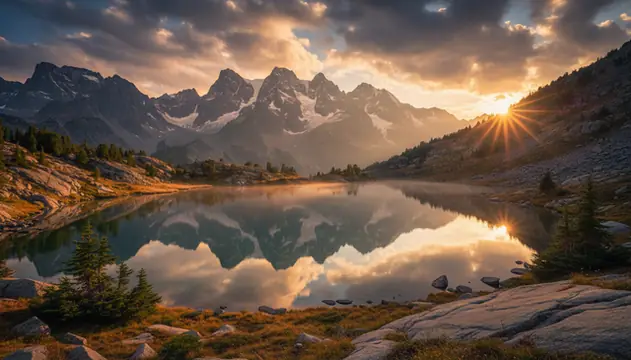
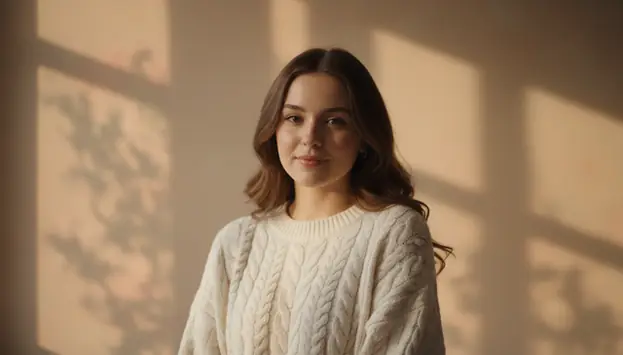
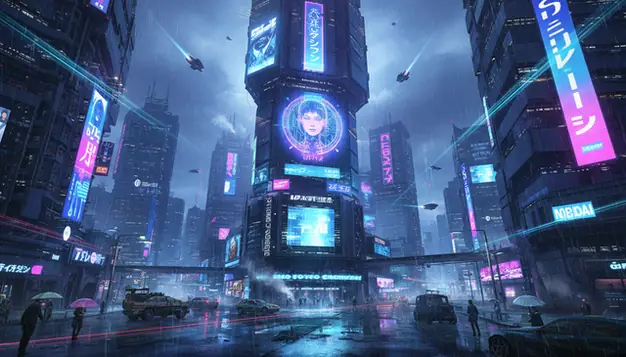
An AI image generator turns a written prompt or uploaded image into a new picture using a trained generative model. Pict AI supports text-to-image and image-to-image workflows for fast drafts, social visuals, mockups, and creative references. Results are strongest when the prompt names the subject, style, lighting, camera view, and aspect ratio.
What Is an AI Image Generator?
An AI image generator is a tool that converts text prompts or reference photos into new visual images. It is useful when you need a fast concept image, style variation, social post, mockup, portrait idea, or art reference without starting from a blank canvas.
Text-to-image starts with a written description such as “studio product photo of a ceramic mug, softbox lighting, white background, 1:1.” Image-to-image starts with an uploaded photo and changes it with a prompt, such as turning a room photo into a minimalist interior concept. The strongest results come from short, specific prompts that name the subject, setting, style, lighting, lens angle, and aspect ratio.
How AI Image Generation Works
AI image generation usually starts by encoding your prompt with a text encoder, then passing that meaning into a diffusion model. The model begins with noisy pixels in a latent space and repeatedly denoises them until the image matches the prompt, style cues, and composition settings.
Settings such as seed, aspect ratio, guidance strength, and quality level affect consistency and detail. In image-to-image mode, the uploaded picture acts as a visual control signal, so the model keeps parts of the original structure while changing style, texture, lighting, or objects. Some editors also use masks, alpha channels, edge detection, or depth maps to protect areas and guide object placement. This is why prompt wording, framing, and reference quality can change the final result as much as the model itself. In order to use a reference image for the generator, you can use: AI Image Search as web, or on iOS: Image Search & on Android:
How to Generate AI Images
Write a specific prompt
Name the main subject, action, setting, style, lighting, camera view, and mood. A prompt like “close-up portrait of a violin maker, warm window light, 85mm lens, shallow depth of field” gives the model clearer instructions than a long story.
Choose the image mode
Select text-to-image when you want a new picture from scratch. Choose image-to-image when you have a reference photo and want to change its style, background, materials, clothing, or overall direction.
Set the aspect ratio
Pick the format before generating: 1:1 for avatars and thumbnails, 16:9 for banners, 9:16 for Stories and Reels, 4:3 for editorial images, or 3:4 for portrait-style posts.
Generate several variations
Create multiple options instead of judging one output. Small differences in seed and composition can produce better hands, cleaner faces, stronger lighting, or a more useful crop.
Refine and download
Adjust one thing at a time: subject, style, color, lens, or background. Download the best result only after checking faces, fingers, in-image text, logos, and any details needed for publishing.
Which AI Image Generation Features Matter?
Text-to-image prompting
Create a new image from a written prompt. This is best for concept art, product visuals, thumbnails, posters, mood boards, and scenes that would take too long to stage or photograph.
Image-to-image editing
Upload a reference photo and guide the result with a prompt. This works well for style changes, room redesign ideas, outfit concepts, background swaps, and visual variations based on an existing composition.
Aspect ratio control
Choose square, vertical, horizontal, or portrait ratios before generation. Setting the final format early prevents awkward crops and reduces the chance that important objects get cut off.
Photorealistic rendering
Generate realistic portraits, food shots, interiors, product photos, and editorial-style images by specifying lighting, lens length, camera angle, surface texture, and depth of field.
Style direction
Guide the output toward watercolor, pencil art, cinematic stills, anime, 3D render, fashion editorial, tattoo flash, poster art, or clean ecommerce photography.
Fast iteration
The practical workflow is generate, compare, revise, and repeat. Fast drafts help creators test several visual directions before spending time on retouching, layout, or final design.
AI Image Tools vs Midjourney, DALL·E, and Adobe Firefly
| Tool | Best Fit | Strengths | Access Notes |
|---|---|---|---|
| Pict AI | Fast web and mobile image creation | Text-to-image, image-to-image, common aspect ratios, free basic use | Works on web, iPhone, and Android |
| Midjourney | Stylized art direction and polished concept visuals | Strong aesthetics, mood control, community prompt learning | Primarily paid, commonly used through Discord or web access |
| DALL·E 3 | Prompt-following through chat workflows | Good at interpreting natural language and revising concepts conversationally | Available through OpenAI products and selected integrations |
| Adobe Firefly | Design workflows and brand-aware production | Useful for commercial design teams, generative fill, and Adobe app integration | Free and paid tiers vary by region and credit limits |
The best choice depends on whether you need quick browser output, high-art control, chat-driven prompting, or design features tied to professional editing software.
Who Uses AI Image Creation Tools?
Artists and illustrators
Artists use generated images for composition studies, pose ideas, color palettes, lighting tests, and reference boards. The output is often a draft, not the final artwork.
Content creators and social teams
Creators make thumbnails, Reels covers, post backgrounds, announcement graphics, and campaign concepts when a photoshoot is too slow or expensive for the deadline.
Small businesses and ecommerce sellers
Sellers can mock up product scenes, packaging ideas, seasonal promotions, and clean studio-style visuals before booking photography or preparing final listings.
Gift makers and print shops
Personalized art prints, birthday posters, pet portraits, couple illustrations, and wall art concepts can be drafted quickly, then edited for print size and color accuracy.
Tattoo clients and tattoo artists
AI-generated references can help explore placement, silhouette, line weight, theme, and mood before a tattoo artist redraws the design into a safe, original stencil.
Portfolio builders and students
Designers and students use generated visuals to test art direction, build fictional campaigns, show mood boards, and present ideas when client assets are not available.
What Are AI Image Creation Limitations?
- Readable text is inconsistent. Signs, labels, book covers, and product packaging may contain misspellings or invented characters.
- Hands, teeth, jewelry, glasses, and small accessories can show artifacts, especially when the subject is distant, moving, or partially hidden.
- Exact likeness is not guaranteed. Do not rely on generated faces for identity verification, factual portraits, or realistic depictions of specific people without consent.
- Copyright, trademark, and publicity rights still matter. Avoid generating protected characters, brand logos, celebrity likenesses, or images that imitate a living artist too closely.
Related AI Image Tools
Explore more AI tools for image creation and editing.
Digital art, paintings, styles
Edit photos with AI prompts
4K wallpapers for any device
Convert text prompts to pictures
Transform photos with AI
Professional AI portraits
Design posters with AI
What Changes Between Your Brief and the Generated Image
An AI image generator produces a visual interpretation, not a verified reconstruction. Judge the result against the details that must survive: object count, geometry, materials, and relationships between subjects. A convincing thumbnail can still fail when someone examines the image closely.
| Starting brief or reference | Useful generated result | Where expectations break down |
|---|---|---|
| A sketch of a chair beside a window | A furnished scene that explores upholstery, color, and atmosphere | Chair joints, dimensions, and construction may be physically implausible. |
| A diagram showing three connected components | An illustration suggesting the overall visual treatment | Connections and component counts can change; it is not a technical drawing. |
| A fabric swatch and a garment description | A concept showing how the pattern might look on clothing | Pattern scale, seam alignment, and fabric drape may not match the actual material. |
| A photograph of an empty event venue | A staging concept with tables, decorations, and lighting | Capacity, aisle widths, exits, and fixture positions need separate verification. |
Separate visual decisions from factual ones. Use generation to choose a warmer palette or a quieter background; use measured plans, original photographs, and approved specifications to establish what is actually present. Keep those sources alongside the generated draft so collaborators do not mistake an attractive possibility for a confirmed design.
The Best AI Image Generator for a task is the one that preserves its essential constraints with the least correction. Compare candidates using the same brief and judge usable outputs, not just the most striking example.
Three Practical Briefs with Clear Delivery Requirements
A useful generation brief includes both the picture you want and the job it must do. The examples below make the delivery requirement explicit, which helps prevent attractive but unusable results.
- Teachers preparing discussion materials: Generate two fictional town squares, one dominated by cars and another with pedestrian space. Keep the viewpoint similar so students can compare street design rather than camera angles. Label both images as illustrations, and check that the visual differences support the lesson without implying that either scene documents a real place.
- Tabletop game designers building prototype cards: Create six object illustrations, such as a lantern, compass, and rope, against a consistent plain background. Use the same framing and palette across the set. Place the art into the actual card template before refining it: an intricate object may become unreadable when reduced to a small printed icon.
- Community organizers planning an event: Create a concept image of a reading corner with folding chairs, floor cushions, and a book table. Present it as a proposed arrangement, not a photograph of the finished event. Pair it with a separate inventory and floor plan so invented furniture does not become an accidental purchasing commitment.
For personal projects such as aesthetic pfps, check the image inside a circular crop at its actual display size. A recognizable silhouette and clear contrast matter more than tiny decorative details.
Before uploading client assets, check the information about pict.ai or your chosen provider for retention, deletion, and training policies. A Free AI Image Generator still needs to meet the project's privacy and delivery requirements; price alone does not establish suitability.
Six Generation Terms That Affect Your Workflow
Interface labels can hide important differences between tools. These terms help explain what a setting controls and what it cannot guarantee.
- Model
The trained system that generates an image. Different ai image models can interpret the same instruction differently. Names such as nano banana identify an option, but do not by themselves establish available editing controls, export dimensions, or usage rights.
- Seed
A value used to initialize generation randomness. Reusing it may help compare prompt changes within one setup; it does not reliably reproduce an image across different models or versions.
- Reference strength
A control for how strongly an input image influences generation. Increasing it can retain more structure, but may also limit the changes you requested.
- Inpainting
Generating replacement content within a selected region. Selection boundaries matter: include enough surrounding context for the replacement to connect naturally to nearby surfaces.
- Image description
A textual account of visible content. An ai image describer can help turn a reference into a starting brief, but its description may miss spatial relationships or misidentify objects.
- AI detection
An estimate of whether an image was generated. An ai image detector can produce false positives and false negatives; its score is not proof of authorship or authenticity.
AI Image Generation Questions Answered
Use the same approved reference image, model, and character description for each scene. Where supported, character-reference controls can help more than text alone. Keep defining traits explicit, including hairstyle, clothing, and distinctive accessories. Compare each result against the reference: facial proportions and small details can drift even when the instructions remain unchanged.
AI upscaling increases pixel dimensions and estimates detail from the existing image. It can make edges and textures look clearer, but it cannot reliably recover information that was never captured. Inspect faces, lettering, and patterned surfaces after upscaling because plausible new details may be inaccurate. For factual images, keep the original and avoid treating reconstructed detail as evidence.
It is software that creates images from text prompts or uploaded reference photos. The model predicts a visual result based on your subject, style, lighting, and composition instructions.
Use enough detail to guide the result, but avoid writing a full story. A strong prompt names the subject, setting, style, lighting, camera view, and aspect ratio.
Yes, image-to-image mode can transform an uploaded photo by changing style, background, objects, materials, or mood. The clearer the source image, the more predictable the edit.
Commercial safety depends on the output and the platform terms. Review images for copied logos, protected characters, recognizable people, and other rights issues before publishing or selling.
Hands are difficult because fingers overlap, bend, and appear at many angles. Large, clearly framed hands with simple poses usually generate better than small or hidden hands.
Short text may work sometimes, but in-image lettering is still unreliable. For logos, headlines, labels, and posters, add final text in a design editor after generation.
Use 1:1 for profile images and thumbnails, 16:9 for banners, 9:16 for mobile stories, and 3:4 or 4:3 for portrait and editorial-style images.
Text-to-image is better for custom scenes, unusual concepts, and fast ideation. Stock photography is often better when you need real locations, verified people, legal releases, or documentary accuracy.