Remove and Replace Clothes With Pict.AI iOS and Android App
Mask the clothing area, describe a new outfit, and generate realistic fashion edits from your phone or browser. Built for consent-safe outfit replacement, not undressing.
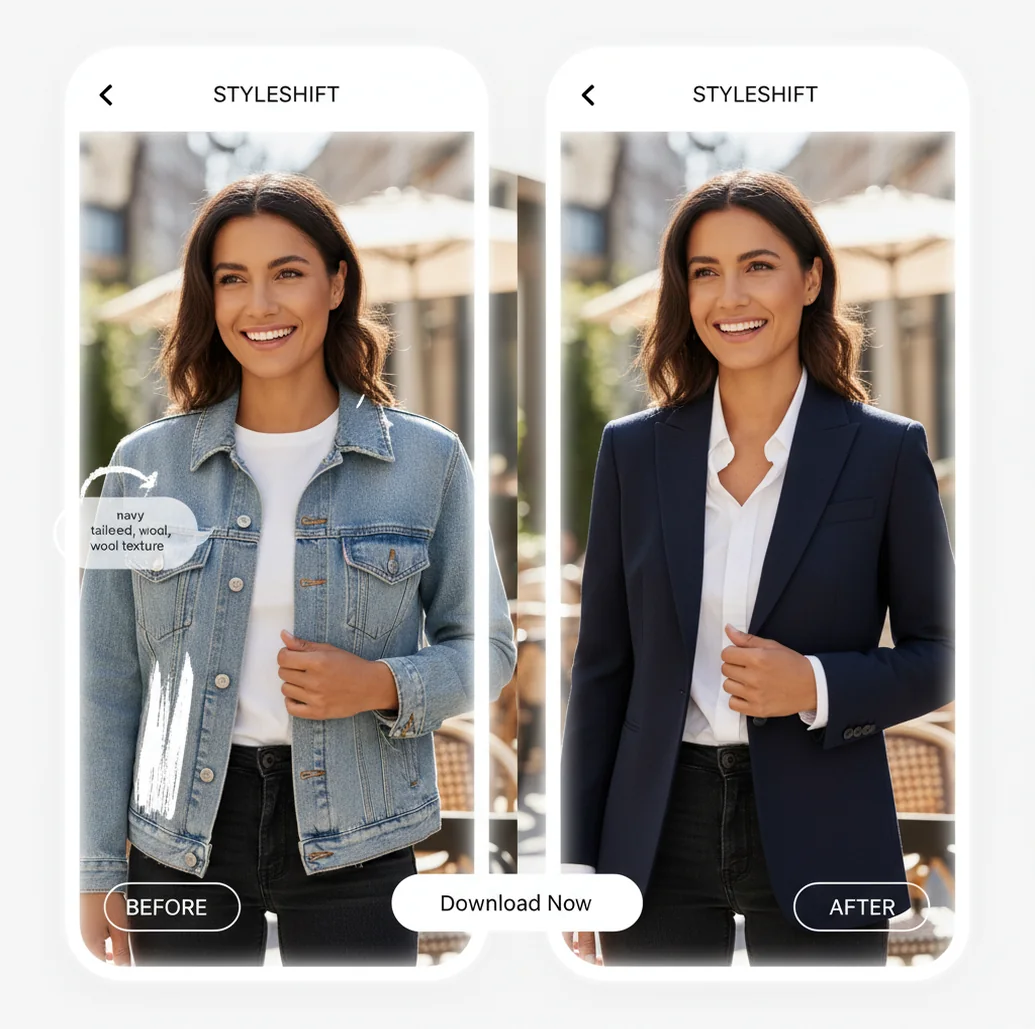
Example: select the outfit area, prompt a new style, and Pict.AI generates a replacement look while keeping the rest of the photo consistent.
The remove and replace clothes with Pict AI iOS and Android app workflow means masking a garment, describing a new outfit, and generating a consent-safe fashion edit. Pict AI is an AI photo editing app for iPhone, Android, and web that works best when you give clear garment, fabric, color, and fit details. Use it for outfit substitution, fashion mockups, creator drafts, and styling concepts on photos you own or have permission to edit.
What Is Remove and Replace Clothes Editing?
Remove and replace clothes editing is the process of selecting an existing garment in a photo and generating a different outfit in the same area. In a consent-safe workflow, the edit changes visible fashion details such as a hoodie into a blazer, a dress into a gown, or jeans into tailored trousers; it is not meant for nudity, undressing, or deceptive identity edits.
A good clothes replacement result preserves the person’s face, pose, hands, background, lighting direction, and camera angle while changing only the outfit region. Creators use it when a reshoot is not practical: testing thumbnail colors, planning cosplay looks, building mood boards, previewing event outfits, or refreshing older social images for a consistent visual theme.
How AI Outfit Replacement Works
AI outfit replacement works by combining a user mask with image generation, so the model edits only the selected clothing pixels while trying to preserve the rest of the photo. The mask acts like an alpha channel: white or selected areas are editable, while unmasked areas such as face, hair, skin, hands, and background are protected.
Behind the editor, an inpainting or diffusion model reads the prompt, analyzes garment boundaries, and generates new texture, folds, seams, shadows, and color inside the masked region. Edge detection and segmentation help the system respect collars, sleeves, waistlines, and body pose. Prompt terms such as “navy wool blazer,” “cropped satin bomber,” or “cream oversized knit sweater” guide material, fit, and style. Results improve when the mask follows the clothing edge and the prompt matches the lighting and camera perspective.
How to Replace Clothes in a Photo
Import the image
Open the editor on iPhone, Android, or web and choose a photo you own or have permission to edit. Use a clear image where the outfit is visible and not heavily blurred.
Mask the garment
Brush or select only the clothing area you want to change, such as a shirt, jacket, skirt, dress, or pants. Avoid face, hair, hands, jewelry, and background edges.
Write a clothing prompt
Describe garment type, color, material, fit, and style. A strong prompt looks like: “navy tailored blazer, slim fit, subtle wool texture, warm indoor lighting.”
Generate variations
Create several results and compare drape, seams, sleeve shape, shadows, and whether the outfit matches the person’s pose.
Refine the edit
Adjust mask edges or rewrite one prompt detail at a time, such as changing “oversized” to “relaxed fit” or adding “buttoned collar.”
Export responsibly
Save the best version for mood boards, social drafts, lookbooks, or concept work, and keep the original when transparency or client review matters.
AI Clothes Changer Features
Outfit Area Masking
Select the exact garment region to edit, including shirts, coats, dresses, pants, skirts, sleeves, or collars, while leaving identity and background details alone.
Prompt-Based Fashion Edits
Control the replacement with plain language: garment type, color, material, pattern, fit, era, and styling references such as streetwear, formalwear, vintage, or cosplay.
Realistic Fabric Details
Generate outfit variations with visual cues like denim grain, satin shine, knit texture, leather highlights, seams, buttons, lapels, and natural folds.
Mobile and Web Workflow
Start edits from a phone during content planning, then export versions for social posts, mood boards, creator thumbnails, portfolio drafts, or client review.
Style Presets and Iteration
Explore common fashion directions such as minimalist, athleisure, business casual, editorial, wedding guest, festival, fantasy, or character-inspired looks.
Consent-Safe Editing Focus
The workflow is designed around outfit substitution and fashion visualization. It should be used only on appropriate photos with permission from identifiable people.
Clothes Replacement App vs YouCam Makeup and Canva
| Tool | Where It Runs | Best For | Main Control Method | Notes |
|---|---|---|---|---|
| Pict AI | iPhone, Android, and web | Fast outfit swaps, creator drafts, fashion mockups | Mask clothing area, write prompt, generate variations | Good for app-first editing when the user wants style control rather than only preset filters |
| YouCam Makeup | Mobile apps and web tools | Beauty edits, virtual styling, retail-style try-on concepts | App tools, templates, and try-on features | Strong for consumer beauty and styling workflows; clothing options may depend on available features |
| Canva Magic Edit | Web and mobile | Simple image edits inside design projects | Brush an area and describe the replacement | Useful for thumbnails, posts, and layouts; less specialized for garment realism |
| Adobe Photoshop Generative Fill | Desktop and web | Professional retouching and detailed image compositing | Selection tools, generative prompts, layers | High control for experts, but slower for quick mobile outfit experiments |
For quick fashion edits, choose the tool that matches the job: mobile prompt iteration for creator drafts, retail try-on tools for product preview, or Photoshop-style editing for layer-level production work.
Who Uses AI Clothes Replacement?
Social media creators
Creators can make an older photo match a new feed color palette, video thumbnail theme, or seasonal campaign without scheduling another shoot.
Fashion students and stylists
Students and stylists can test silhouettes, fabric ideas, and mood-board directions before buying samples or arranging models, lighting, and locations.
Artists and character designers
Artists can turn real poses into costume references, fantasy outfits, cyberpunk jackets, historical garments, or cosplay concepts for later illustration.
Gift and print makers
A family photo can be styled into a coordinated holiday card, framed print, birthday poster, or themed keepsake when everyone’s outfit needs to match.
Tattoo reference planning
Tattoo artists and clients can preview how clothing necklines, sleeves, or formalwear might frame visible tattoos in portrait-style reference images.
Portfolio and personal branding
Freelancers, performers, and founders can test business casual, editorial, or creative wardrobe directions before choosing what to reshoot professionally.
Ecommerce concept testing
Small apparel teams can explore rough campaign styling and garment ideas before committing to samples, studio time, or paid model photography.
Remove and Replace Clothes Limitations
- It is not a precise sizing tool. AI outfit replacement can suggest a look, but it cannot guarantee real-world garment fit, tailoring, or size accuracy.
- Hands, hair, bags, and jewelry crossing the clothing area can confuse the model and may create broken cuffs, warped fingers, or odd fabric edges.
- Very low-resolution, compressed, or motion-blurred photos give the model fewer details for seams, texture, and body pose, so results may look soft.
- Complex patterns such as plaid, lace, sequins, logos, and text may appear inconsistent unless the prompt and mask are refined several times.
Choose outfit replacement by how closely the garment must match
A styling concept and a product listing need different levels of accuracy. A generated jacket can communicate a creative direction while still being unsuitable for selling a specific jacket. Choose the method by what the finished image must prove, not just how convincing it looks.
| Approach | Useful for | Required input | Main trade-off |
|---|---|---|---|
| Prompt-based outfit replacement | Exploring colors, silhouettes, and fictional outfits | Person photo, selection, and garment description | Invents details; cannot establish that a real product has the depicted construction. |
| Garment-reference virtual try-on | Previewing a particular item on a person | Person photo and a clear garment image | Provides a product reference, but may still alter prints, proportions, or fastenings. |
| Manual compositing and retouching | Controlled campaign mockups with supplied assets | Compatible garment photography and an editor with layer controls | Allows deliberate corrections; matching perspective and folds requires skilled work. |
| Photographing the actual outfit | Documenting real fit, construction, and styling | Garment, wearer, and a photo session | Takes more preparation but records the physical item rather than generating its appearance. |
Searches for virtual try on ai clothes usually imply a specific garment reference. Check whether the tool accepts that reference or merely creates an outfit from text. Those workflows answer different questions: “What might this style look like?” is not the same as “How does this exact item appear?”
For motion projects, evaluate outfit replacement separately from tools such as higgsfield ai. An attractive still does not demonstrate that a print, lapel, or hem will remain consistent throughout an animated shot. Budget for frame-by-frame review rather than treating animation as a final export step.
Check product truth and edit scope before publishing
Review the image against its intended use. A mood board can tolerate an invented pocket; a listing for a pocketless garment cannot. Keep the original photo and product reference visible alongside the export so that a polished result does not become its own standard of accuracy.
- Audit identifiable product details. Count buttons and pockets, compare zipper placement, and check whether a repeated print has changed scale. If a visible label or logo has been reconstructed incorrectly, repair it with an authorized asset or reject the result for product use.
- Compare body proportions with the original. Overlay the two images or alternate between them at the same zoom. Look for changes in shoulder width, waist position, limb length, and posture that could falsely suggest a different fit.
- Check garment coverage against the brief. Confirm that the intended neckline, sleeve length, and hem are present. Reject unintended exposure or a styling change the subject did not approve.
- Inspect the clothing background boundary. Check spaces between an arm and torso, beneath loose sleeves, and around an open jacket. Leftover pixels from the old outfit can resemble extra fabric or a false shadow.
- Separate identity edits from wardrobe edits. If the project also includes a face swap video, approve the identity change independently. Permission to alter an outfit does not automatically cover substituting a person's face or publishing the resulting clip.
- Review the final placement and caption. Inspect the image at its actual listing, advertisement, or post size. Ensure captions do not describe generated fabric, fit, or tailoring as a photographed product feature, and disclose the alteration where viewers could otherwise be misled.
For a multi-edit portrait, keep an untouched master before changing hair or clothing. If another step uses an ai hairstyle generator ios android app, save that as a separate version. This makes it easier to identify which operation changed the hairline, collar overlap, or shoulder outline.
Record these facts with every finished outfit edit
A small handoff record helps prevent a concept image from being mistaken for an approved product photograph. Attach these facts to the project files, especially when another person will write captions or publish the image.
- Image purpose
- Identify the output as a styling concept, garment preview, campaign mockup, or approved publication asset.
- Garment source
- Record whether the outfit came from a text description, a supplied product image, or photographed clothing.
- Fit status
- Generated drape is a visual estimate, not a measurement of size, comfort, stretch, or tailoring.
- Export dimensions
- Record the saved pixel dimensions. Enlargement does not establish accurate stitching or fabric detail.
- Approval scope
- Note who approved the wardrobe change and its intended publication context.
- Retained assets
- Keep the original, reference garment, selected output, and any manual corrections together.
Mark unresolved differences explicitly, such as “print simplified” or “back of garment not verified.” This is more useful to a publisher than a general label saying the image looks realistic.
Questions about replacing outfits in photos
Not reliably. A clothes replacement model may redraw lettering, repeat a pattern incorrectly, or move a logo as it generates folds. A garment-reference workflow gives it more visual guidance, but does not guarantee an exact match. For product listings, compare the output with the original garment image and correct or reject any inaccurate branding, print, or construction details.
It can produce related looks, but separate generations may change buttons, pocket positions, fabric texture, or garment length. Use the same garment reference and instructions for each image, then compare the results side by side. For a campaign requiring one exact outfit across multiple angles, photographing the real garment or using carefully controlled compositing is generally more dependable than independent prompt-based edits.
Yes. Import the image, mask the outfit region, describe the new clothing, and generate a replacement directly from an iPhone workflow.
Yes. Android users can follow the same mask-and-prompt process for fashion edits, outfit mockups, and style variations.
It can help preview styling ideas, but it is not a retailer-grade fit simulator. Treat results as visual concepts, not guaranteed sizing or tailoring.
Include garment type, color, fabric, fit, and vibe. For example: “cream oversized knit sweater, ribbed cuffs, soft texture, daylight portrait.”
Mask only the clothing and leave face, hair, hands, and background unselected. Smaller, cleaner masks usually preserve identity better.
Yes. Select just the jacket area and specify the replacement, such as “black leather moto jacket, silver zipper, fitted cut.”
Sleeves often fail when the mask cuts through hands, hair, or folded arms. Refine the mask edge and add sleeve details like “long sleeves” or “rolled cuffs.”
Yes, for concepting, drafts, mood boards, thumbnails, and client previews. For final commercial work, review permissions, model consent, licensing, and image quality.
Outfit substitution is appropriate when you own the image or have consent from identifiable people. Avoid non-consensual, deceptive, explicit, or humiliating edits.