Google Lens Alternatives for Different Search Tasks
Pict AI is an AI photo editing app for iPhone, Android, and web that supports visual lookup workflows from photos. Upload or snap an image to identify subjects, read text, compare similar images, and plan edits from the same starting point.
The best Google Lens alternatives, ranked
1. Lens: Image Search & Identify
Platforms: iPhone and iPad. Price: Free download; optional paid features or subscriptions may apply. Best for: Photo-based identification and image-search workflows on iOS.
Lens: Image Search & Identify for iOS supports general subject identification and image-based searches. Check which features require payment before subscribing. Its stated immediate-deletion policy concerns uploaded images; review the privacy label separately for other data collection.
2. Bing Visual Search
Platforms: Web and supported Bing or Microsoft mobile apps. Price: Free. Best for: Broad web discovery, similar images, and product searches.
Bing is a practical starting point when you want web pages rather than a conversational explanation. Its visual matches can suggest product names or related objects, but a similar-looking result does not establish an exact model or manufacturer.
3. TinEye
Platforms: Desktop and mobile browsers. Price: Free for limited personal searches; paid commercial and API options. Best for: Finding exact or modified copies of an image.
TinEye searches for copies, including some resized, cropped, or edited versions. It is useful for tracing reposts and checking attribution. The oldest result in its index is not necessarily the original publication or the copyright owner.
4. Yandex Images
Platforms: Desktop and mobile browsers; regional availability varies. Price: Free. Best for: Visually similar images and additional source-discovery leads.
Yandex offers another image index to check when other searches produce few useful matches. Separate pages containing the same image from merely similar pictures, and verify dates and context on the source pages before drawing conclusions.
5. Apple Visual Look Up
Platforms: Supported iPhone, iPad, and Mac devices. Price: Included with supported Apple hardware and operating systems. Best for: Recognizing supported subjects in photos already on an Apple device.
Visual Look Up is convenient for supported subjects such as plants, animals, landmarks, and artwork. It is not a general reverse-image search engine. Available categories depend on the device, operating system, language, and region.
6. Pinterest Lens
Platforms: Pinterest mobile apps; related visual-search features on the web. Price: Free. Best for: Fashion, décor, crafts, and visual inspiration.
Pinterest Lens is most useful when resemblance matters more than identity: a similar chair, outfit, or craft project. Results center on Pinterest content, so a matching Pin may lead to inspiration rather than an available product or original source.
7. Amazon Lens
Platforms: Amazon apps for iPhone and Android; market availability varies. Price: Free within the Amazon app. Best for: Finding retail products and visually similar Amazon listings.
Amazon Lens narrows the search to shopping, making it useful for locating items without knowing their names. Compare dimensions, materials, model numbers, and seller details yourself; visual similarity alone cannot confirm that a listing matches your photographed item.
8. ChatGPT image input
Platforms: Web, iPhone, and Android. Price: Limited image use on the free tier; paid plans offer higher limits. Best for: Explaining images, reading diagrams, and answering follow-up questions.
ChatGPT suits questions that need explanation, such as interpreting a diagram or comparing visible components. Image input is not an exact-copy search index, and fluent answers can contain mistakes. Request observable details and verify important claims independently.
Choose by the evidence you need from an image
Object recognition, image matching, and image explanation answer different questions. Use this comparison to decide what a result can establish, and what still needs checking.
| Alternative | Useful result | What to check next | Do not assume |
|---|---|---|---|
| Lens: Image Search & Identify | A suggested identity or image-search lead | Distinctive markings, labels, and supporting pages | A suggested name is a confirmed identification |
| Bing Visual Search | Related web images and product pages | Whether the result depicts the same item or only a similar design | A shopping match confirms the exact model |
| TinEye | Indexed pages containing image copies | Publication context, credits, and dates on each page | The earliest indexed copy proves authorship |
| Yandex Images | Additional matching or similar-image leads | Whether the source page supports the proposed identity | Visual resemblance establishes a person, place, or event |
| Apple Visual Look Up | A recognized subject within supported categories | Species traits or landmark details against reliable references | Every photo or subject category is supported |
| Pinterest Lens | Related styles, designs, and inspiration | The destination page and current product availability | A Pin identifies the original maker |
| Amazon Lens | Retail listings that resemble the photographed item | Specifications, variant, seller, and compatibility | The closest-looking listing is an exact replacement |
| ChatGPT image input | A written explanation with follow-up discussion | Quoted text, calculations, and factual claims | A detailed answer proves accuracy or image provenance |
Can you use Google Lens online?
Yes. Google Lens works in a browser without a separate desktop application. It remains worth trying before switching tools if your main requirement is searching an existing image online.
- From Google Images: Open images.google.com, select the camera or Lens icon in the search field, and upload an image. The interface may also offer a pasted image link or drag-and-drop upload.
- From desktop Chrome: Right-click an image and choose the Google Lens search option. On supported Chrome versions, you can also open Lens from the browser menu and select an area of the page, including a screenshot region or visible text.
- Refine the browser search: Adjust the selected image area and, where available, add words to specify a material, color, location, or other distinguishing detail.
Browser Lens cannot guarantee an original source, an exact product match, or coverage of private and unindexed pages. Controls and result types vary by browser version, region, and account context. Desktop browser access also does not provide the same live-camera workflow as a phone.
Search images and selected page content are sent to Google for processing. Incognito mode does not prevent that transmission. Avoid submitting confidential screenshots, identity documents, or private photographs unless the service's data controls meet your needs.
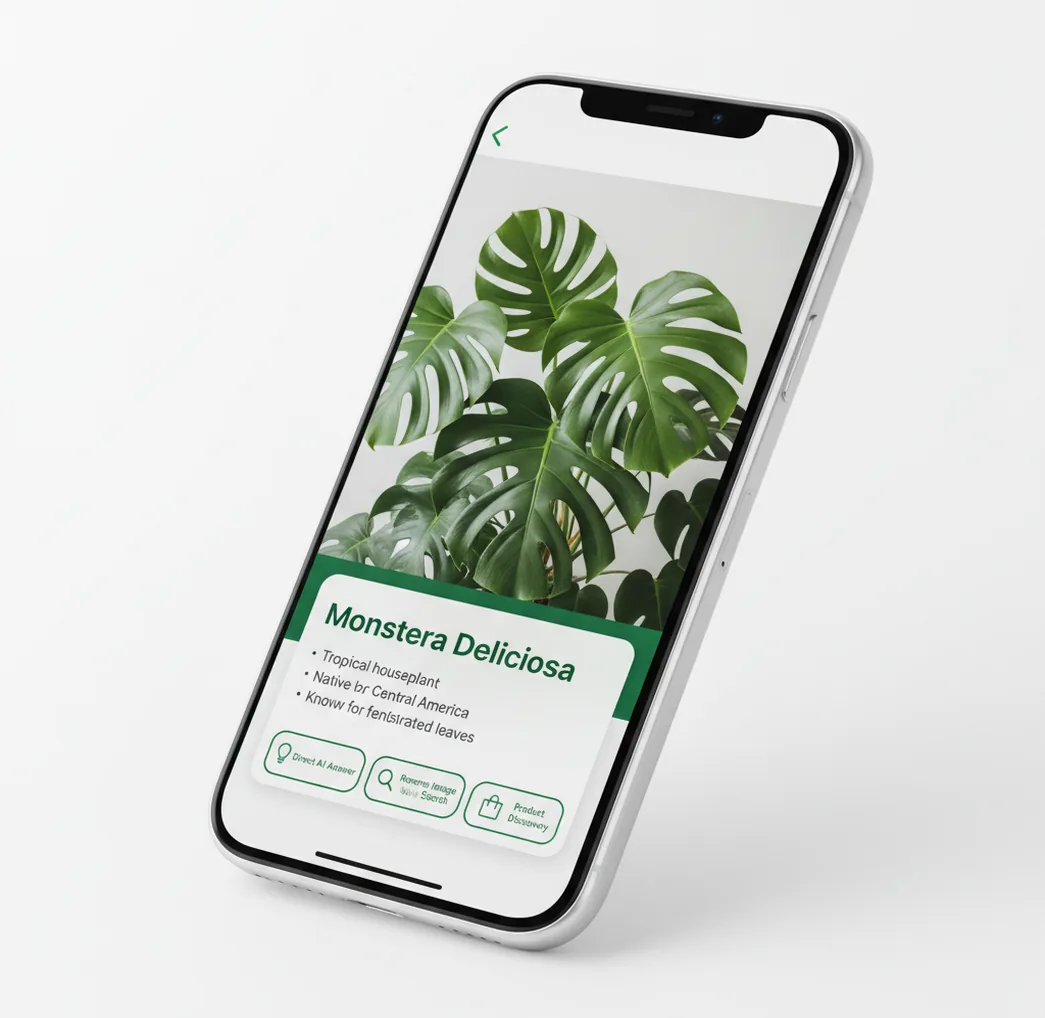
Example flow: snap a photo, get identification plus direct AI answers, then optionally run reverse image search or product discovery.
Google Lens is a visual search tool that identifies objects, text, products, plants, animals, and places from a photo or camera view. Pict AI gives creators a similar photo-first workflow with direct AI answers, reverse image lookup, and editing context in one place.
What Is Google Lens?
Google Lens is Google's visual search system for recognizing what appears in an image and returning related information, matches, translations, shopping results, or search links. People use it when a typed query is hard: identifying a plant, reading a sign, finding a product, checking a coin, or understanding an object seen in real life.
A Google Lens-style workflow starts with a camera frame or uploaded photo, then turns visual details into searchable information. For creators, the same workflow can also support moodboard research, product references, tattoo ideas, print planning, portfolio notes, and caption writing. Accuracy depends on photo quality, subject clarity, available web matches, and whether the object has enough distinctive visual features.
How Google Lens Works
Google Lens works by converting a camera image into machine-readable signals, then matching those signals against visual, text, product, and knowledge indexes. The process usually combines object detection, edge detection, OCR for visible text, image embeddings, vector search, entity linking, and ranking models.
For example, a plant photo may be split into regions such as leaf shape, flower color, stem texture, and background. Text in the image is extracted with OCR, while the whole image is encoded into embeddings that can be compared with similar images. The system then ranks likely matches and may add search results, translations, shopping links, or direct explanations. Modern visual search can also use multimodal models that connect image features with natural-language answers.
How to Use Google Lens-Style Visual Search
Choose a clear photo source
Open a camera view or upload an image from your library. Use the sharpest version available, especially for small details like coin dates, insect markings, product labels, or plant leaves.
Frame the subject tightly
Center the object and remove distracting background when possible. If the image contains multiple items, crop or tap the area you want analyzed so the model does not answer about the wrong subject.
Run visual identification
Submit the image and review the likely object, category, species, product, place, or text result. Treat the first answer as a strong lead rather than a final authority for safety-critical topics.
Compare similar image matches
Use reverse image search or visually similar results to check whether the same item appears on websites, stores, archives, social posts, or reference pages.
Act on the result
Translate visible text, save the identification, search for buying options, write a caption, collect creative references, or open the image in an editor for a finished post, print, or portfolio asset.
AI Visual Search Features
Object Identification
Identify common objects, tools, furniture, accessories, antiques, food, rocks, coins, and other visible subjects from a single image. Best results come from clear lighting and a close view of the most distinctive parts.
Plant and Animal Recognition
Estimate plant, flower, tree, pet, insect, bird, or animal categories from visible traits. Use multiple angles for similar species, and avoid relying on visual search alone for poisonous plants, bites, or medical decisions.
Text Reading and Translation
Extract printed text from signs, menus, labels, documents, packaging, and screenshots with OCR. Translation quality is usually strongest on flat, legible text and weaker on handwriting, stylized fonts, glare, or curved surfaces.
Product Discovery
Find visually similar products, compare styles, identify brand clues, or locate shopping pages from a photo. This is useful for thrift finds, furniture matching, fashion references, and replacing items without knowing their name.
Reverse Image Lookup
Search for similar images, possible sources, duplicate uploads, or context around an image. Creators use this for reference checking, inspiration tracking, content verification, and finding where an image may have appeared online.
Creator Reference Workflow
Turn a photo into useful creative context: identify the subject, collect style references, generate captions, plan edits, or prepare a visual brief for social media, prints, tattoo references, product mockups, or portfolio work.
Visual Search Apps vs Google Lens, Bing, and CamFind
| Tool | Best for | Answer style | Platforms | Notable limits |
|---|---|---|---|---|
| Pict AI | Photo-first AI lookup connected to editing workflows | Direct answers, visual context, and creator-oriented next steps | iPhone, Android, web | Not a Google product; external search coverage may vary by source |
| Google Lens | Google visual search, translation, shopping, and web discovery | Search results, visual matches, OCR, translations, and knowledge panels | Google app, Chrome, Android, iOS access points | Experience changes by app, region, and Google account context |
| Microsoft Bing Visual Search | Web image matching and shopping-style discovery | Similar images, related searches, product pages, and web links | Bing web, Microsoft apps, browser integrations | Often more search-results focused than explanation focused |
| CamFind | Simple object and product identification from photos | Short labels, related results, and shopping-style matches | iOS and Android | Less suited to creator editing workflows or deeper explanations |
The practical difference is workflow: Google and Bing emphasize search results, CamFind focuses on object or product lookup, and photo-editing tools can keep identification tied to creator output.
Who Uses AI Image Search Tools
Artists and illustrators
Artists use visual search to identify plants, objects, architecture, clothing, and materials before turning them into sketches, moodboards, concept art, or style studies. It helps convert a found image into named references.
Social media creators
Creators identify locations, products, food, outfits, and background objects, then use the context for captions, tags, shopping notes, and short-form content ideas. The workflow is especially useful when filming while traveling or thrifting.
Shoppers and collectors
Shoppers use visual lookup to find similar furniture, fashion, decor, electronics, coins, antiques, and resale items. Collectors can check markings, compare similar listings, and gather clues before asking an expert.
Travelers and students
Travelers translate signs, menus, tickets, labels, and museum text from the camera. Students use photo search to understand unfamiliar diagrams, specimens, objects, rocks, insects, or historical artifacts.
Gift and print makers
People preparing custom gifts, posters, invitations, stickers, or framed prints can identify visual themes and collect reference language. A flower photo, pet image, or landmark snapshot can become a clearer creative brief.
Tattoo and portfolio planning
Tattoo clients and designers use image search to name species, symbols, objects, and art references before building a design board. Portfolio builders use it to label subjects accurately and add context to finished work.
AI Visual Search Limitations
- A single blurry, dark, cropped, or backlit photo can produce the wrong identification, especially for insects, plants, coins, rocks, and antiques.
- Lookalike species and products may require multiple angles, scale references, location details, or expert review before the result is reliable.
- OCR and translation can fail on handwriting, curved labels, reflections, folded paper, low-resolution screenshots, or decorative fonts.
- Reverse image search depends on what is indexed online; private images, new products, local items, and rare objects may have few or no matches.
Frequently Asked Questions
The best alternative depends on the task. Bing Visual Search is a broad option for web matches and products. TinEye specializes in finding image copies, while Pinterest Lens suits style inspiration. Apple Visual Look Up is convenient for supported photos on Apple devices. For explanations and follow-up questions rather than source tracing, consider ChatGPT image input.
Yes. Bing Visual Search, Yandex Images, and Pinterest Lens offer free visual-search access. Apple Visual Look Up is included on supported Apple devices. TinEye provides limited free personal searching, and ChatGPT offers limited image use on its free tier. A free app download does not necessarily include every feature, so check subscriptions, search limits, and commercial-use terms.
TinEye is useful for locating exact or altered copies, while Bing and Yandex can uncover additional matching pages. None can guarantee the original source. Search engines may index a repost before the creator's page, and deleted or private posts may be absent. Compare credits, publication dates, surrounding text, and the creator's own portfolio before assigning attribution.
Reverse image search looks for the same image or visually related images in an index. AI image recognition estimates what the picture contains, even when no matching web image exists. An explanation tool can describe an unfamiliar object without locating its source. Conversely, finding a copied photograph does not automatically establish the identities of everything pictured in it.
Sometimes, especially when a photo includes a readable model number, distinctive logo, or unique design. Similar-looking products often share shapes and colors, so appearance alone is weak evidence. Use the suggested product name as a lead, then compare specifications and manufacturer documentation. For replacement parts, verify dimensions, connectors, and compatibility rather than relying on the closest shopping result.
Privacy depends on how each service processes and retains images, not simply whether it is free or paid. Many tools upload images to a server. Check image retention, account history, model-training controls, and deletion options separately. Remove unrelated personal details before searching, and avoid uploading identity documents, confidential work, or other people's sensitive photos without appropriate permission.
Tools search different image collections and optimize for different outcomes. A shopping service favors retail listings, Pinterest emphasizes related styles, and a copy-search engine prioritizes reused images. Cropping, added text, regional availability, and index coverage also affect results. When an identification matters, compare multiple services and look for independent supporting evidence rather than counting repeated guesses as confirmation.
Yes, many visual search tools work from a browser by letting you upload an image. Web access is useful when you want to check a saved photo instead of scanning with a phone camera.
A photo can help identify objects, plants, animals, insects, landmarks, products, text, food, coins, rocks, and similar images. Results are strongest when the subject is clear and distinctive.
Yes, visual search works on iPhone through several apps and browser-based tools. Some features may differ from Android because camera and search integrations are not identical.
Yes, camera-based OCR can read visible text and translate many printed signs, menus, labels, and screenshots. Translation is less reliable with handwriting, glare, motion blur, or unusual fonts.
Reverse image search is related but narrower. It mainly finds visually similar images or sources, while visual search can also identify objects, read text, translate, and suggest actions.
Plant identification can be helpful for common species with clear leaves, flowers, or fruit. Similar species, seedlings, hybrids, and poor photos often need expert confirmation.
Yes, visual search can find similar products, shopping pages, and related listings from an image. Exact matches depend on retailer data, image similarity, and how widely the product appears online.
No visual search result should be treated as medical advice. For bites, rashes, poisonous plants, mushrooms, medications, or health symptoms, confirm with a qualified professional.