Free AI Clothes Changer Online
Pict AI is an AI photo editing app for iPhone, Android, and Web that changes outfits from a photo and a text prompt. Upload a clear portrait, describe the clothing, and generate a new look in seconds.

Free AI Clothes Changer Online
- Upload a portrait that shows the clothing you want replaced, leaving enough space around the garment.
- Describe the replacement garment's color, material, and cut, or choose a clothing reference if supported.
- Generate the outfit swap, then compare garment construction and visible body proportions with the original photograph.
- Review the downloaded image at full size, checking product details and crop before sharing or exporting.
AI Clothes Changer Examples
Sample outfit changes created by the AI clothes changer tool.
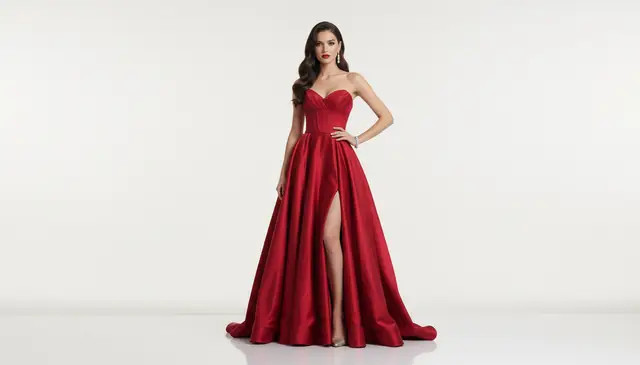
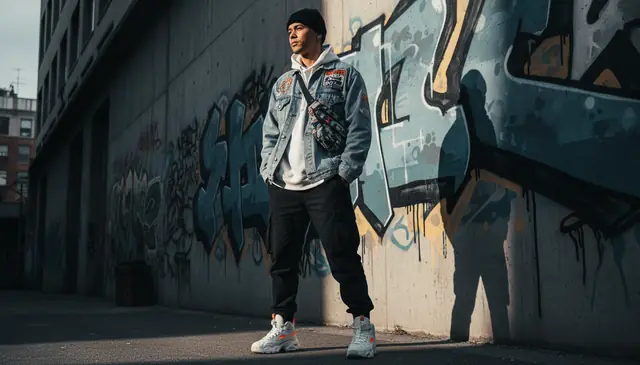

An ai clothes changer replaces a person’s outfit in a photo while preserving the face, pose, body shape, and background. Pict AI lets you upload an image, type a clothing prompt, and create a virtual try-on result without signup. It works best on clear portraits with visible torso, arms, and clothing edges.
What Is an AI Clothes Changer?
An AI clothes changer is a photo-editing tool that redraws clothing on a person from a text prompt or selected style. The goal is not to paste a flat garment on top of the image; the model generates new fabric that follows the person’s pose, torso angle, lighting, and visible body shape.
A typical workflow is simple: upload a portrait, describe the target outfit, and generate a revised image. Prompts such as “navy wool blazer over a white crewneck shirt” usually work better than vague prompts like “business style.” The tool is useful for virtual try-on previews, creator concepts, profile photos, fashion mockups, and quick outfit planning before a shoot.
How AI Clothes Changer Works
AI outfit changing usually combines person segmentation, clothing masks, inpainting, and generative image synthesis. The system detects the subject, separates clothing from face, hands, hair, and background, then builds a mask with soft edges similar to an alpha channel. Edge detection helps preserve collars, sleeves, waistlines, and arm boundaries.
After masking, a diffusion model or image transformer regenerates only the clothing region based on the prompt. It predicts fabric texture, folds, shadows, seams, and color cast so the new garment fits the original lighting. A denim jacket should form stiffer folds than a silk dress, and a black blazer should keep highlights along the shoulders. Results are strongest when the input photo is sharp, front-facing, and above roughly 800 pixels on the short side. If you want to find online products you can use Lens to Identify Clothes.
How to Change Clothes in Photos with AI
Upload a clear portrait
Start with a photo where the torso, shoulders, arms, and current outfit are visible. Front-facing or slight three-quarter poses are easier for the model than side profiles.
Select the person or clothing area
If the editor asks for a target area, confirm the subject and avoid masking the face, hands, hair, or background unless you want those areas changed.
Write a specific outfit prompt
Name the garment type, color, material, and style. For example: “cream linen suit, relaxed fit, white tank top, soft daylight shadows.”
Generate and inspect the result
Check sleeve edges, collars, hands, waistlines, and fabric shadows. These areas reveal most AI clothing errors when zoomed in.
Refine or download
Regenerate with tighter wording if the fit looks wrong. Add constraints such as “plain fabric,” “no logo,” “long sleeves,” or “keep background unchanged.”
AI Outfit Changer Features
Text-to-outfit editing
Describe shirts, dresses, suits, jackets, streetwear, sportswear, or formal outfits instead of manually cutting and pasting clothing.
Clothes changer free no sign up
Create basic outfit swaps in the browser without creating an account, which is useful for quick tests and one-off edits.
Fabric and fit matching
The generator estimates wrinkles, drape, sleeve length, collars, and shadows so the garment follows the body rather than floating over it.
Multiple style variations
Run several prompts to compare casual wear, business attire, event outfits, costume concepts, or editorial fashion directions.
Mobile and web workflow
Creators can test outfit ideas from a phone, then download versions for mood boards, profile images, thumbnails, or client drafts.
Background preservation
The editor is designed to keep the original setting, face identity, pose, and body proportions while changing the clothing region.
AI Outfit Changer vs Bit Studio, NoteGPT, and Fotor
| Tool | Best for | Access | Notable tradeoff |
|---|---|---|---|
| Pict AI | Fast prompt-based outfit swaps, mobile and web editing | Free basic browser use, iPhone, Android, Web | Best results need a clear portrait and specific clothing prompt |
| Bit Studio AI Clothes Changer | Trying fashion swaps and AI portrait edits in a browser workflow | Web-based tool | Output quality can vary with pose, garment complexity, and input resolution |
| NoteGPT AI Clothes Changer | Quick AI utility edits for users already using NoteGPT tools | Web-based tool | May be less focused on creator photo-editing workflows than dedicated image editors |
| Fotor AI Clothes Changer | Template-style edits, fashion previews, and general photo editing | Web and app ecosystem | Some export or advanced options may depend on account limits or paid plans |
For searches such as “bit studio ai clothes changer,” “ai clothes changer bit studio,” and “notegpt ai clothes changer,” the practical difference is workflow: some tools focus on quick utility edits, while others give creators more control over prompts, regeneration, and mobile export.
For best outfit change, see best outfit change.
Who Uses Virtual Try-On and Outfit Swaps
Fashion creators and stylists
Stylists can test silhouettes, color palettes, and layering ideas before sourcing garments or planning a shoot. It is useful for early mood-board work, not final garment approval.
Social media creators
Creators can generate alternate outfits for thumbnails, profile photos, reels covers, and campaign concepts without reshooting the same pose.
Artists and character designers
Artists use outfit swaps as visual references for fabric folds, costume direction, and character wardrobes before painting or 3D modeling.
Gifts, prints, and personal edits
People often test formalwear, wedding looks, cosplay ideas, or birthday portrait styles before making a print or sending a playful edit to friends.
Tattoo and body-art references
A cleaner shirt, tank top, or jacket prompt can expose the right arm or shoulder area for tattoo placement references while keeping the pose consistent.
Portfolio and headshot testing
Actors, freelancers, and job seekers can preview business attire or creative wardrobe directions before booking a real headshot session.
Clothing Swap AI Limitations
- Low-resolution or heavily compressed images often produce blurry fabric, melted collars, and weak seam detail. Use photos above roughly 800 pixels on the short side when possible.
- Crossed arms, hands in pockets, handbags, long hair over shoulders, and scarves can confuse sleeve and lapel boundaries.
- Readable logos, small text, licensed character outfits, and exact brand patterns may not reproduce accurately and may raise rights issues.
- Layered prompts such as “blazer, scarf, necklace, handbag, patterned shirt” can merge straps, shadows, and accessories. Generate the base outfit first, then add one detail at a time.
For most accurate garment replacements, see most accurate garment replacements.
Related AI Photo Tools
Explore more AI tools for photo editing and transformation.
When an outfit swap changes more than the clothing
Learning how to change clothes in photo with ai also means distinguishing a believable edit from a faithful garment preview. A convincing image can still invent construction details, change proportions, or hide parts of the original outfit. Match the correction to the specific error rather than repeatedly generating the same request.
- The reference garment becomes a different product. A jacket may acquire extra pockets, a different fastening, or a shorter hem. If reference-image input is supported, supply an unobstructed product image and identify the details that must remain unchanged. For an ai outfit changer for ecommerce, compare pocket count, seam placement, closures, and proportions against the actual item. Reject mismatches rather than presenting them as product features.
- The person looks slimmer or broader. A fitted outfit can redraw the apparent waist or shoulders. Compare the original and edited images at the same scale, using exposed body landmarks rather than the new clothing outline. Request preservation of body proportions; if the change persists, use a tighter clothing selection or abandon that version.
- The garment continues incorrectly behind an object. A bag across the chest can split a jacket into mismatched panels. Keep the bag outside the editable area where masking is available. Otherwise, choose another source photo; the hidden fabric cannot be reliably recovered from the image.
- The new setting changes the garment color. Colored walls and strong lighting can make a neutral garment appear warmer or cooler. When choosing backgrounds for selling clothes, retain a separate, unedited product photo as the color reference. A generated lifestyle image should not be the only evidence of an item's shade.
Image settings that affect clothing detail and export quality
Compare an AI Clothes Changer App with a browser editor by checking its actual upload and export controls, not just the preview. The following are workflow recommendations, not Pict.AI upload limits. For an ai outfit changer for instagram, decide whether the image is destined for a portrait post or a vertical Story before editing; a later crop can remove the outfit detail you wanted to show.
| Setting | Practical choice | Why it matters |
|---|---|---|
| Source dimensions | Use the original camera file rather than a screenshot or messaging-app copy. | Small seams and fastenings need real source detail; enlarging a compressed copy does not restore it. |
| File format | Use JPEG or PNG when supported; convert HEIC only if the editor requires it. | Compatibility varies. Keep the original file and avoid repeated JPEG saves. |
| Canvas shape | Consider 4:5 for portrait feed images and 9:16 for Stories. | Leave space around hems and shoulders so the final crop does not conceal garment boundaries. |
| Reference image | Where supported, show one garment clearly, with its edges unobstructed. | A collage makes it harder to identify which item and details should transfer. |
| Export resolution | Check downloaded pixel dimensions, not just the on-screen preview. | A larger display preview does not guarantee a larger output file or sharper fabric detail. |
| Video duration | Not applicable to a still-image clothing swap. | Animating the result is a separate step with separate duration and resolution limits. |
A Free AI Clothes Changer may restrict downloads independently of generation. Check export size and watermark options before preparing a batch of images.
Three assumptions that make virtual outfit previews misleading
Myth: A realistic preview proves that a garment will fit. Fact: The editor creates a visual interpretation, not a measurement-based fitting. It cannot establish shoulder ease, stretch, lining bulk, or comfort from a portrait. Use the result to explore styling, then consult measurements and the retailer's size information before buying.
Myth: The Best AI Clothes Changer is the one with the most dramatic transformation. Fact: Accuracy can mean changing less. For an App That Changes Clothes in Photo, useful comparison criteria include consistent identity, faithful garment details, selective editing, and usable exports. A striking result that invents a neckline or reshapes the wearer may be unsuitable for the intended job.
Myth: An accurate still guarantees an accurate fashion video. Fact: Sending an edited image to an ai video generator, including tools such as higgsfield ai, introduces another generation stage. Buttons, patterns, and hems may shift as the subject moves. Review the whole clip, not just its opening frame, and avoid treating generated motion as evidence of how the real fabric behaves.
AI clothing swaps: common questions answered
No. A clothing swap generates an appearance; it does not measure your body or calculate how a particular size will fit. Even a convincing preview may invent fabric tension or garment length. Compare your measurements with the seller's size chart, check garment measurements where available, and use the AI image only to explore styling.
Safety depends on the service's data practices and the photo you upload. Check its retention, deletion, and training policies before submitting identifiable images. Use photos you have permission to edit, crop out unnecessary personal details, and avoid sensitive images. A no-signup workflow does not by itself mean uploads are private or immediately deleted.
Use a sharp portrait with a visible torso, clean lighting, and minimal occlusion. Front-facing or slight three-quarter poses usually produce the most believable clothing edges.
Yes, prompt for a specific garment such as “plain black crewneck shirt” or “white button-down shirt.” If masking is available, select only the upper-body clothing area.
No, this tool is intended for outfit replacement and virtual try-on, not nudity or non-consensual edits. Always get permission before editing images of identifiable people.
Sleeves often fail when arms are crossed, hands cover the fabric, or hair blocks the shoulder line. Try a clearer pose or prompt for a simpler garment.
Use garment type, color, fabric, fit, and style in one sentence. “Oversized olive bomber jacket, ribbed cuffs, white cotton tee, studio lighting” is stronger than “cool outfit.”
The editor is designed to preserve the original face, pose, body shape, and background while changing clothing. Very broad masks or vague prompts can still alter nearby details.
Check the tool terms and avoid prompts involving protected logos, copyrighted costumes, or people who did not consent. Generated fashion previews should not be treated as licensed brand assets.
Bit Studio, NoteGPT, and Fotor offer related AI outfit or photo-editing tools. Compare them by prompt control, export limits, mobile access, and how well they handle your specific photo.