Wolf Cut Hair Filter App
Use a wolf cut hair filter app to test shaggy layers, curtain bangs, and short or long wolf cut ideas on your own photo. Compare natural and bold versions before you cut real length.
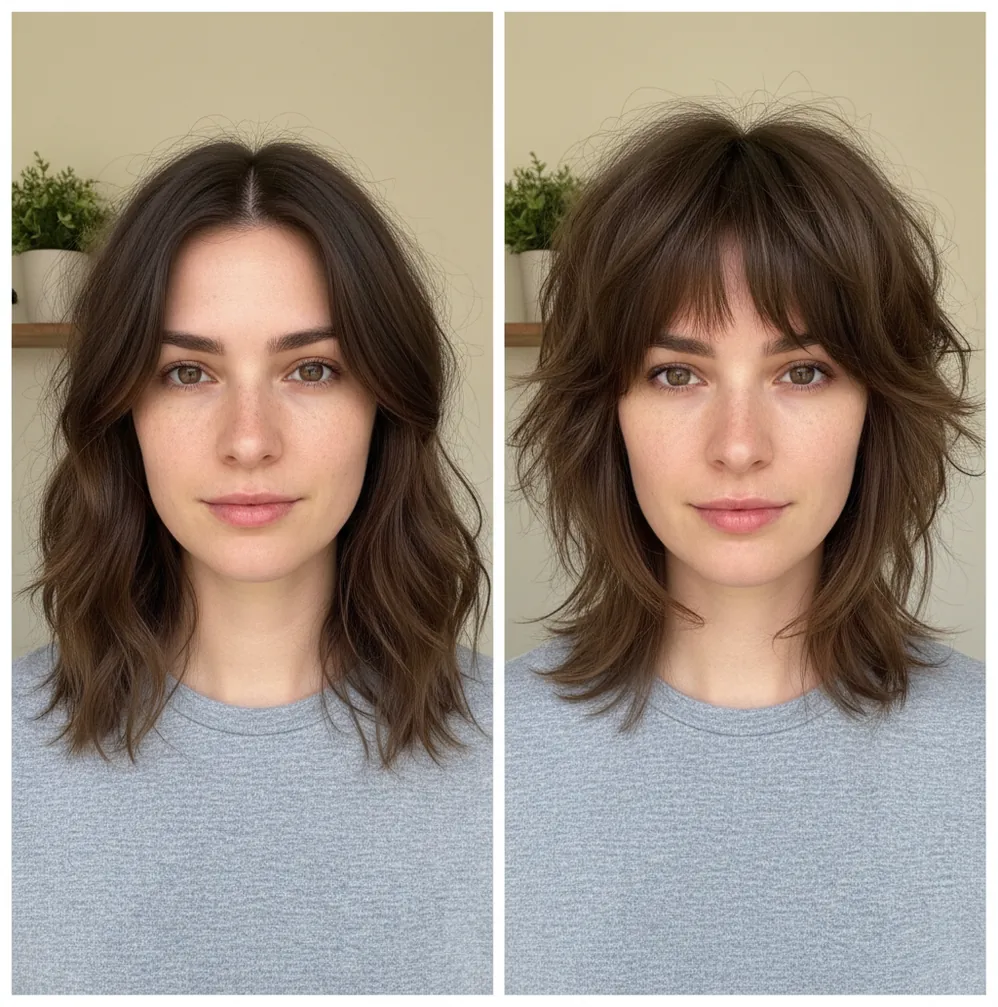
Instant wolf cut preview: adjust length, layers, and fringe for a look that matches your face shape and vibe.
A wolf cut hair filter app lets you preview a layered shag haircut on your own selfie before visiting a stylist. Pict AI can generate short wolf cuts, long wolf cuts, curtain bangs, and softer face-framing variations for iPhone, Android, and Web users. The preview works best as a visual reference, not a guaranteed haircut blueprint.
What Is a Wolf Cut Hair Filter App?
A wolf cut hair filter app is an AI hairstyle try-on tool that edits your selfie to preview the wolf cut trend: shaggy layers, crown volume, textured ends, and optional curtain bangs. The goal is to show how the haircut might frame your face before you commit to scissors.
The wolf cut sits between a modern shag and a soft mullet. In 2026, the most wearable versions are less extreme than early viral examples: longer layers, lighter fringe, and movement around the cheekbones. Pict AI is an AI photo editing app for iPhone, Android, and Web that helps you compare short, long, natural, and editorial wolf cut directions from the same photo.
How Wolf Cut Hair Filter App Works
A wolf cut hair filter app usually combines face detection, hair segmentation, and generative image editing to redraw the hairstyle while preserving your facial identity. The system first estimates face landmarks such as the eyes, jawline, forehead, and cheekbones, then separates hair from skin and background with a segmentation mask.
For the actual style change, the editor may use inpainting, diffusion model guidance, texture synthesis, and alpha channel blending. Those steps help add layered volume, curtain fringe, feathered ends, and realistic shadows without replacing the whole portrait. Good results depend on a visible hairline, even lighting, and a front-facing angle because the model needs enough visual data to place bangs and layers believably.
How to Try a Wolf Cut Hair Preview
Choose a clear selfie
Pick a front-facing photo with your face centered, forehead visible, and hair not covered by hats, hands, or heavy shadows.
Open the hairstyle editor
Go to the hair or AI editing area and select a wolf cut, shag cut, layered haircut, or curtain bangs direction.
Test length first
Generate a long wolf cut and a short wolf cut so you can compare how much real length you are comfortable losing.
Adjust fringe and volume
Try lighter curtain bangs, fuller fringe, higher crown volume, and softer face-framing layers to match your hair goals.
Save reference versions
Export two or three favorites and label them with notes such as “lighter bangs,” “more crown texture,” or “keep collarbone length.”
Wolf Cut Hair Try-On Features
Short and Long Wolf Cut Styles
Compare cropped, chin-to-jaw wolf cuts against longer collarbone or chest-length versions before removing real length.
Shaggy Layer Preview
See how layered texture could sit around your crown, cheeks, jawline, and shoulders instead of judging from model photos.
Curtain Bangs and Fringe Options
Test airy curtain bangs, fuller fringe, or a no-bangs version to check how the front pieces balance your eyes and cheekbones.
Natural or Editorial Texture
Keep the haircut realistic for a salon visit, or push the result into a bolder inspiration-board look for creative shoots.
Save and Compare Looks
Export multiple variations so you can compare them side by side, share with friends, or bring them to a stylist consultation.
Post-Ready Photo Edits
After choosing a hairstyle direction, finish the image with light cleanup, color correction, and framing for social posts.
Wolf Cut Hair Filter App vs YouCam Makeup and FaceApp
| Tool | Best For | Wolf Cut Control | Platforms | Cost Notes |
|---|---|---|---|---|
| Pict AI | Fast hairstyle previews plus AI photo editing | Short and long wolf cut looks, shaggy layers, curtain bangs, shareable edits | iPhone, Android, Web | Free basic use with app-based editing options |
| YouCam Makeup | Beauty try-on, hair color, and guided makeover presets | Strong preset workflows; haircut realism depends on the available catalog | iPhone, Android | Free tier with paid premium features |
| FaceApp | Quick face and style transformations | Useful for broad hairstyle ideas, less focused on salon-specific layer planning | iPhone, Android | Free tier with subscription options |
| Perfect Corp | Enterprise beauty tech and brand try-on systems | Strong virtual try-on technology, often used through partner apps or brand experiences | Web, mobile SDKs, brand platforms | Usually business or partner-based access |
For a wolf cut decision, compare tools by photo realism, control over bangs and length, export quality, and whether the workflow matches how you plan to discuss the cut with a stylist.
Who Uses AI Hairstyle Try-On for Wolf Cuts
People deciding before a haircut
A try-on helps you choose between a subtle layered refresh and a dramatic chop, especially if you are nervous about bangs or losing length.
Stylists and salon clients
Clients can bring saved references with notes about crown volume, fringe density, and layer height, making the consultation more concrete.
Social media creators
Creators use before-and-after hairstyle previews for TikTok, Instagram, and Pinterest posts about trend testing, glow-ups, and style experiments.
Artists and character designers
Illustrators can use the silhouette of a wolf cut preview as a starting reference for character hair, mood boards, or stylized portraits.
Gifts, prints, and personal projects
A polished hairstyle concept can become part of a makeover collage, birthday edit, printed style board, or playful friend-group transformation.
Tattoo and portrait references
When a tattoo or portrait design includes a person with layered hair, a preview can help define the outline, fringe direction, and overall hair shape.
Wolf Cut Preview Limitations
- The preview cannot measure real hair density, cowlicks, breakage, or growth patterns, all of which affect how a wolf cut falls.
- Curly, coily, or very wavy hair may stack differently in real life than it appears in a generated image.
- Heavy shadows, sunglasses, hats, hands near the face, or hair covering the forehead can cause awkward bang placement.
- A filter may make layers look styled with product, heat tools, or salon finishing even if your daily routine is simpler.
Four Wolf Cut Preview Myths That Can Mislead Your Haircut Decision
- Myth: More visible crown volume means the cut will make thin hair look thicker.
Fact: A generated image can add apparent density without accounting for how much hair you actually have. On low-density hair, aggressive layering may leave the perimeter looking sparse. Look at the ends as closely as the crown, and ask a stylist whether a fuller outline with fewer layers would better preserve your existing thickness.
- Myth: A tousled preview shows a wash-and-go haircut.
Fact: The image shows a finished shape, not the effort behind it. Straight hair may need blow-drying or a styling tool to produce bends; wavy hair may need hold to keep its shape. Before choosing a version, decide whether you are comfortable styling the crown and front pieces regularly rather than judging only the finished silhouette.
- Myth: Keeping the overall length makes a wolf cut easy to reverse.
Fact: Short crown layers can take much longer to catch up with the ends, even when the bottom length barely changes. Ask where the shortest layer would sit and how it could grow into a softer shag. A buzz cut filter offers a separate visual comparison for a much more drastic length change, not a solution to uneven layers.
- Myth: If the fringe looks right, the whole haircut is right.
Fact: Fringe can dominate your impression while hiding whether you like the layered outline. Use a bangs filter to consider the front pieces separately, then inspect the wolf cut's width around the ears and its taper toward the shoulders. You may prefer new fringe with your current haircut instead of committing to extensive layering.
Wolf Cut Hairstyle Questions Answered
A wolf cut typically has a shaggier outline, shorter crown layers, and a stronger contrast between the top and longer ends. A butterfly cut usually keeps a fuller long-haired silhouette, with sweeping face-framing layers. The names overlap between salons, so compare the shortest layer, perimeter thickness, and amount of texture rather than relying on the label alone.
Growing out a wolf cut usually means letting the shorter crown and face-framing layers catch up while gradually reshaping the longer ends. Small perimeter trims can reduce the contrast without repeatedly shortening the upper layers. The timeline depends on the starting cut and your target length. Ask for a transition plan toward a softer shag, bob, or long layered style.
A wolf cut is a layered haircut that blends shag texture with mullet-inspired shape. It usually has crown volume, face-framing pieces, and optional curtain bangs.
No. Curtain bangs are common, but a wolf cut can also keep longer front pieces for a softer no-bangs version.
Yes. Testing both lengths is smart because a short wolf cut changes the face shape more dramatically than a longer layered version.
Use a clear, front-facing selfie with even lighting, a visible forehead, and minimal hair covering the eyes or cheeks.
It can help with inspiration, but curl shrinkage and density affect the real cut. Bring the preview to a stylist who understands your curl pattern.
It is best treated as a visual guide. A stylist still needs to adapt the layers, fringe, and length to your hair texture and maintenance routine.
Yes. Try light curtain bangs first, then compare fuller fringe to see which option frames your eyes and cheekbones better.
Yes. Save two or three versions and add notes about what you like, such as softer bangs, less crown volume, or longer face-framing layers.