Bangs Filter
Pict AI is an AI photo editing app for iPhone, Android, and Web that helps you preview fringe styles before a salon visit. Test curtain bangs, wispy bangs, side-swept bangs, and mini fringe on a photo you already like.
A bangs filter adds simulated fringe to your photo so you can preview how bangs change the framing of your face before cutting. Try curtain, wispy, blunt, or side-swept shapes to narrow your preferences. Treat the result as a visual reference, not a prediction of how your own hair will fall or how much styling it will need.
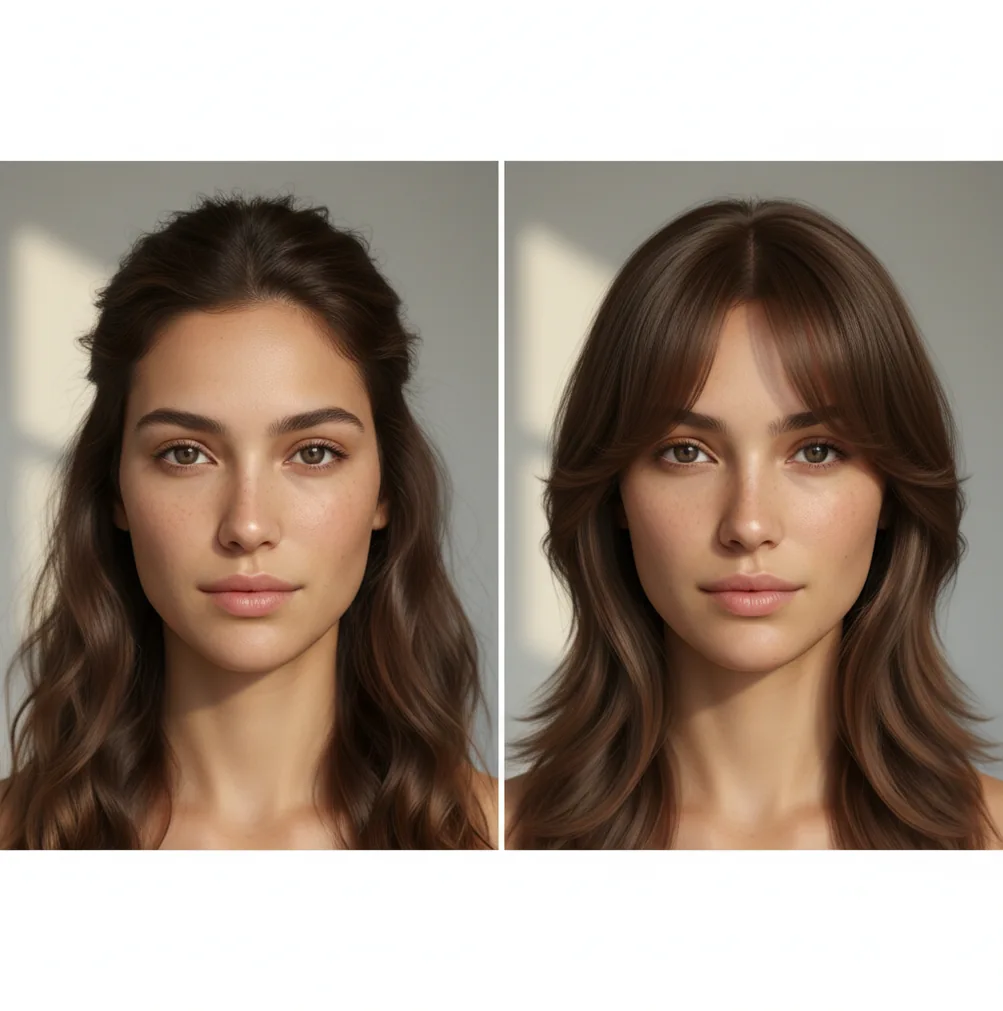
Use Pict.AI to try different bang styles and quickly compare looks before committing to a cut.
A bangs filter digitally adds fringe to your photo so you can judge length, density, and face framing before cutting your hair. Pict AI lets you compare common bang styles, adjust placement, and save reference images for a stylist or group chat.
What Is a Bangs Filter?
A bangs filter is an AI photo effect that previews fringe hairstyles on your face without changing your real hair. It is useful when you want to see whether curtain bangs, wispy bangs, side-swept bangs, or mini fringe balance your forehead, eyebrows, cheekbones, and jawline.
The best try-on result is not just a sticker placed over a selfie. A realistic fringe preview should follow your hairline, match your hair color, respect shadows on the forehead, and blend around the temples. For decision-making, create several versions: one soft and wispy, one fuller, one shorter, and one side-parted. Comparing those images side by side gives you a clearer read before a salon appointment or DIY trim.
How Bangs Filter Works
An AI fringe preview works by detecting the face, mapping the hairline, and generating new hair pixels that fit the photo. Most modern tools combine face landmarks, hair segmentation, edge detection, and an alpha mask so the added bangs can sit behind or over existing strands where needed.
A diffusion model or image-to-image hair editing model then predicts texture, direction, density, and strand shape. Color transfer helps match brunette, blonde, black, red, gray, or dyed hair tones, while lighting estimation keeps shadows from looking pasted on. Placement controls usually adjust scale, rotation, vertical position, and part direction. The result is a simulated hairstyle image, not a measurement of how your real hair will fall after cutting.
How to Try Bangs on a Photo
Choose a clear selfie
Pick a front-facing or slightly angled photo with visible forehead, hairline, eyebrows, and even lighting. Avoid hats, heavy shadows, motion blur, and hair covering the area where fringe should appear.
Select a fringe style
Start with a style goal such as curtain bangs for face framing, wispy bangs for softness, side-swept bangs for asymmetry, or mini fringe for a bold brow-focused look.
Adjust placement and scale
Move the fringe so it lines up with your natural part and hairline. Curtain bangs usually split near the center, while side-swept bangs should follow the direction you actually wear your hair.
Match tone and blending
Tune color, warmth, density, and edge softness until the new hair matches the lighting and texture of the original photo. Check the temples and forehead because those areas reveal bad blending first.
Save comparison versions
Export 3 to 5 variations with small differences in length and density. A stylist can give better feedback when the reference set shows a range instead of one extreme edit.
AI Bangs Try-On Features
Curtain bang previews
Test soft face-framing pieces that open near the center and fall toward the cheekbones. This style is useful for judging whether fringe adds shape without fully covering the forehead.
Wispy fringe options
Create lighter bangs with more forehead visibility. Wispy edits are helpful for fine hair, low-commitment style checks, and softer portraits.
Side-swept styling
Preview a diagonal fringe that changes the visual balance of the face. This works well when you want to compare a middle part against a side part.
Mini fringe experiments
Try a shorter, more graphic cut above or near the brows. Mini fringe previews are especially useful for editorial looks, alt fashion, and tattoo-reference style boards.
Tone matching controls
Adjust warmth, darkness, and saturation so the added hair fits the original image. This matters for dyed shades, highlights, dark roots, and mixed indoor lighting.
Mobile and web exports
Save versions for a salon consultation, private feedback, social posts, or a creative mood board. Exporting several looks makes the decision less dependent on one image.
Bangs Filter vs YouCam Makeup, FaceApp, and Facetune
| Tool | Best For | Bang Style Control | Platform | Pricing Notes |
|---|---|---|---|---|
| Pict AI | Fast hairstyle try-ons, prompt-based photo edits, and shareable references | Curtain, wispy, side-swept, mini fringe, placement, tone, and blending controls | iPhone, Android, and Web | Free basic use with paid options depending on app plan |
| YouCam Makeup | Beauty filters, makeup previews, and hairstyle effects | Strong preset library; controls vary by feature and device | iPhone, Android, and some web experiences | Free app with premium subscriptions and in-app purchases |
| FaceApp | Quick face edits, hair color ideas, and broad portrait transformations | Good for general makeovers; fringe-specific control may be limited | iPhone and Android | Free app with paid Pro features |
| Facetune | Manual portrait retouching and creator-style image edits | More editing flexibility, but less dedicated to hairstyle simulation | iPhone, Android, and web tools | Paid subscription with limited free access |
Choose a dedicated fringe preview when the decision is about cut shape and face framing; choose a broader beauty editor when you need makeup, retouching, and general portrait changes in the same workflow.
Who Uses an AI Fringe Preview
Salon clients planning a cut
People bring edited references to a stylist to discuss length, density, part direction, and how much forehead should remain visible.
Artists building character references
Illustrators and concept artists test fringe shapes on face references before drawing a new hairstyle, portrait, comic character, or fashion sketch.
Creators planning social content
Influencers and short-form video creators preview a hairstyle before filming a reveal, fashion edit, cosplay look, or beauty transformation post.
People considering emotional makeovers
A haircut can mark a breakup, new job, birthday, gender expression shift, or personal reset. A preview reduces anxiety before making the change real.
Gift and print projects
Friends and partners can create playful hairstyle mockups for birthday cards, custom prints, scrapbook pages, or private inside-joke edits.
Tattoo and piercing references
Short fringe changes how brows, forehead tattoos, piercings, and face symmetry read. A preview helps plan the full visual composition.
Portfolio and casting images
Models, actors, and performers can test whether fringe changes their type, era, or styling range before booking new headshots.
Bangs Filter Limitations
- Low-resolution photos, blur, or dim lighting can make strand edges look soft, noisy, or pasted on.
- If your forehead is covered by hats, hands, shadows, or existing heavy bangs, the tool has less information for accurate placement.
- Profile shots and extreme angles are harder than straight-on selfies because the hairline and brow position are partly hidden.
- Very curly, coily, wet, or highly textured hair may need extra manual blending because strand direction is harder to predict.
Fringe Decisions for Glasses, Workouts, and Growing-Out Hair
A bangs filter becomes more useful when you compare a hairstyle against something you do every day, rather than judging whether one edited portrait looks attractive. These examples turn a preview into a specific question you can discuss before cutting.
- People who wear glasses: Someone with thick rectangular frames could compare fringe ending above the frames with longer pieces falling beside them. Keep the same glasses in every image. Look for where the hair meets the top rim, then ask a stylist whether the intended length will catch on the frames or obscure your eyes.
- Runners and gym-goers: A runner who normally ties all their hair back could preview a short fringe and longer face-framing pieces. The useful question is whether the proposed pieces would be long enough to pin back. The image cannot show sweat, movement, or how hair separates during exercise.
- People with limited styling time: Someone who air-dries their hair before an early shift can use a polished preview to identify what they like, then ask what styling would be needed to reproduce it. A smooth generated fringe does not establish that the same shape is achievable without heat or daily restyling.
- People growing out a short haircut: A buzz cut filter shows the opposite endpoint from a fringe preview; neither predicts how quickly hair will grow. For someone considering a layered transition, a wolf cut hair filter app can provide a separate reference for the overall silhouette. Keep that comparison distinct from the question of fringe length.
Six Fringe Terms That Make References Easier to Explain
Style names alone can leave room for interpretation. These terms help describe the difference between the shape you see in an edited image and the cutting choices needed to create it.
- Perimeter
- The outer edge of the fringe, especially its bottom outline. A straight perimeter reads differently from an arched or irregular edge, even when the longest strands reach the same point.
- Section depth
- How far back on the scalp the fringe section begins. A deeper section brings more hair forward. A filter may invent fullness without showing where that hair would come from.
- Density
- The amount of hair within an area. In a preview, density often means how opaque the fringe looks; in a haircut, available hair and section size constrain that appearance.
- Weight line
- The area where the ends create a visible concentration of fullness. A strong weight line looks more solid; softened ends produce a less defined boundary.
- Graduation
- A cutting technique that builds weight through progressively changing lengths. It is not simply another word for layers, and a photograph may not reveal the underlying construction.
- Cowlick
- A growth pattern that directs hair differently from surrounding strands. Near the front hairline, it can lift or split bangs even when a generated preview shows them lying flat.
Use these words to ask questions, not to prescribe a cutting technique. A stylist can translate the visible result into an appropriate section and shape.
AI Previews, Hair Overlays, and Clip-In Bangs Compared
Different approaches answer different questions. A digital preview helps with appearance; a physical trial reveals something about wearing hair against your forehead. None replaces an assessment of your own growth pattern and available hair.
| Approach | Useful for | Main trade-off |
|---|---|---|
| AI-generated bangs filter | Exploring several fringe shapes on the same face without buying a hairpiece. | May alter facial details or invent hair volume. An attractive result does not establish that the cut is practical. |
| Manual photo overlay | Positioning a fixed fringe shape precisely while leaving most of the original photograph unchanged. | The overlay may have the wrong perspective, texture, or lighting. It cannot demonstrate how your own strands would fall. |
| Clip-in bangs | Checking the sensation of hair on your forehead and its interaction with glasses or accessories. | The attachment adds bulk, and the hairpiece may differ from your natural texture, color, or density. |
| Stylist consultation without cutting | Assessing the front hairline, existing length, section size, and likely styling requirements. | Offers practical guidance rather than an exact visual simulation. Consultation availability and fees vary by salon. |
For a decision driven by appearance, start digitally. If forehead contact is the concern, a clip-in trial addresses that more directly. If the uncertainty is whether your hair can hold the shape, prioritize a consultation rather than generating more variations of the same idealized result.
Bangs Filter Questions Before You Commit
A bangs filter cannot reliably predict how a cowlick will affect a real fringe. It may generate strands lying flat even when your hair grows upward or splits at the front. Show a stylist your natural hairline with your hair dry and unstyled, alongside the preview, so they can assess suitable lengths and the styling the cut might require.
Video bangs filters can flicker when face tracking or hair placement changes between frames. Head turns, motion blur, hands near the forehead, and changing light can make the generated fringe shift or vary in density. A stable still image is easier to judge for haircut planning. A convincing video preview still does not predict how real bangs will move or behave.
Common options include curtain bangs, wispy bangs, side-swept bangs, blunt bangs, and mini fringe. The most useful approach is to save several lengths and densities for comparison.
A preview can show how fringe changes balance around your forehead, eyes, and cheekbones. It cannot replace a stylist’s judgment about hair texture, growth pattern, and daily styling.
Yes. Curtain bangs are a good first test because they frame the face without fully covering the forehead, making them easier to compare against your current style.
It can work, but curly and coily textures are harder to simulate accurately. Use a clear photo and check whether the curl pattern, density, and edges look believable.
Use a sharp selfie with even lighting, visible hairline, and a neutral or natural expression. Front-facing photos usually produce more reliable results than profile shots.
Yes. You can create hairstyle previews on iPhone, and you can also use supported Android and web workflows depending on your device.
Yes, especially if you export several versions with small differences in length, density, and part direction. A stylist can use those images to understand the look you want.
Yes. Create separate versions for longer face-framing fringe, eyebrow-length bangs, and shorter mini fringe to see how each changes your features.
Realism depends on photo quality, angle, lighting, hair texture, and color match. A clean selfie with a visible forehead usually gives the most natural preview.