Free AI Image Translator Online
Translate text inside images without retyping it. Upload a sign, menu, screenshot, document, label, or comic panel and get translated text or an edited image output.
An AI image translator reads text in a photo or screenshot and translates it into your chosen language, returning readable text or a translated picture. Use text output to understand the content; choose image replacement when placement matters. Accuracy depends on both character recognition and translation, so check the extracted wording before relying on the finished result.
Free AI Image Translator Online
- Upload a photo or screenshot containing the text you want to translate, keeping complete sentences visible.
- Choose the source and target languages, then select copyable text or a translated image output.
- Generate the translation and compare recognized words with the original, correcting errors where editing controls are available.
- Review meaning, reading order, and text placement, then copy the translation or export the finished image.
AI Image Translation Examples
Sample images with text translated by the AI image translator.
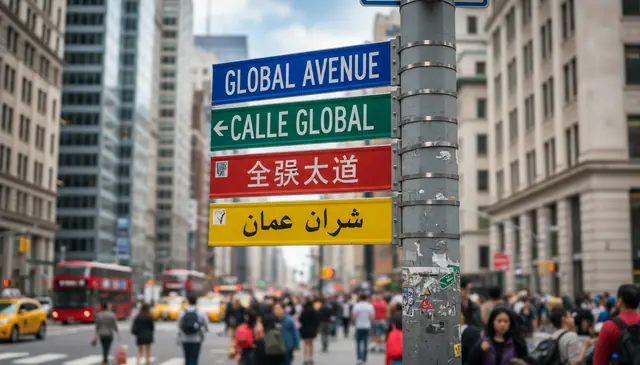
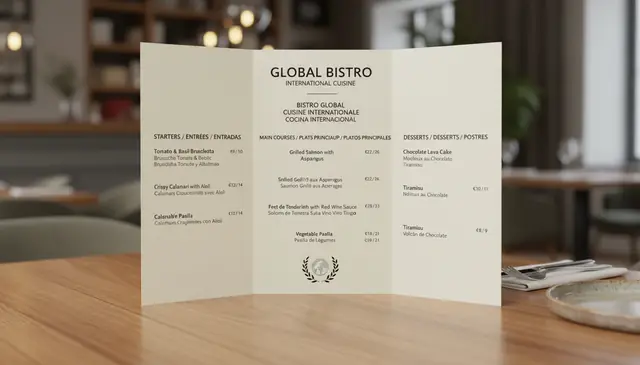
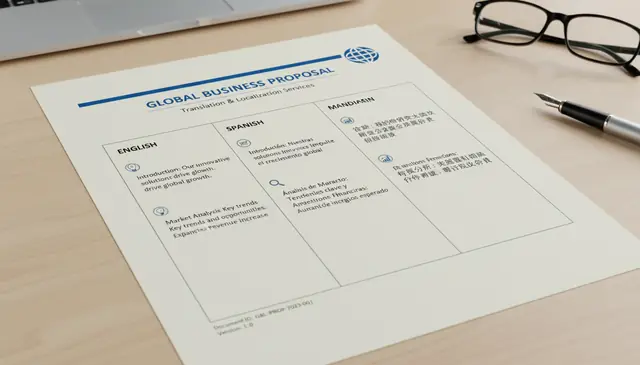
An ai image translator online reads visible text in an image, translates it into a target language, and can place the translation back into the picture. Pict AI supports browser-based image translation for screenshots, signs, menus, documents, labels, and social posts. It works best with clear, high-contrast text and may struggle with blur, tiny lettering, curved type, or stylized fonts.
What Is an AI Image Translator Online?
An AI image translator online is a browser-based tool that detects text inside a picture and converts that text into another language. It removes the slow step of manually typing foreign text from a photo, screenshot, menu, label, sign, comic panel, or scanned document.
The tool usually combines optical character recognition, language detection, machine translation, and optional image editing. Pict AI can return translated text as copyable plain text or create an edited image where the translated wording appears near the original placement. This is useful when the layout matters, such as product packaging, travel photos, manga panels, tutorial screenshots, posters, and social media graphics.
How AI Image Translator Online Works
AI image translation works by separating the visual reading task from the language task. First, OCR analyzes the pixels, detects text regions, estimates line boxes, and recognizes characters using layout analysis and script detection. High-contrast horizontal text is usually the easiest; curved, vertical, handwritten, or compressed text is harder.
Next, a neural machine translation model converts the extracted text into the selected target language while trying to preserve meaning, tone, and context. If image replacement is selected, the system masks the original text area, reconstructs the background with inpainting, and renders the translated text using font size, color, spacing, and alignment estimates. The final output is either translated text, a translated image, or both.
How to Translate Text in Images With AI
Upload a clear image
Choose a photo, screenshot, scanned document, menu, sign, label, comic panel, or social post that contains readable text. For better OCR, crop out unrelated UI elements, timestamps, and empty margins.
Select the source language
Pick the original language if you know it, or use auto-detect for mixed travel photos and quick screenshots. Manual selection is safer for short text, similar scripts, or images with only one or two words.
Choose the target language
Set the language you want the text translated into. For images that will be shared publicly, check names, measurements, prices, dates, idioms, and brand terms after translation.
Run the image translation
Start the translation so the system can extract text, translate it, and optionally rebuild the image with translated text placed over the original lettering.
Review and download
Compare the result against the original image. Download the translated image for visual use, or copy the plain translated text for editing, captions, notes, or manual design work.
AI Photo Translation Features
100+ language support
Translate common and global languages including English, Spanish, French, German, Chinese, Japanese, Korean, Arabic, Hindi, Portuguese, Italian, Turkish, Dutch, Russian, and more.
Photo and screenshot reading
Process real-world images such as street signs, restaurant menus, app screenshots, product labels, store windows, presentation slides, receipts, posters, and travel photos.
OCR text extraction
Detect printed text and many forms of clear handwriting, then return the translated result as editable text for notes, captions, research, customer support, or content localization.
Translated image output
Create a version of the image where translated text is placed near the original position while non-text elements, colors, and overall composition remain mostly unchanged.
Web and mobile workflow
Use image translation in a browser for quick desktop work, or on a phone when translating travel photos, packaging, menus, signs, screenshots, and creator assets on the go.
Creator-friendly layout checks
Use the translated output as a draft for social posts, comic panels, stickers, print mockups, tattoo references, mood boards, or portfolio localization before final design cleanup.
Image Translator AI vs Google Translate, DeepL, Yandex
| Tool | Best For | Image Text Handling | Output Options |
|---|---|---|---|
| Pict AI | Fast photo, screenshot, sign, menu, and document translation on web and mobile | OCR plus translated image replacement for visible text | Copyable text and translated image download |
| Google Translate | Travel translation, live camera translation, and broad language coverage | Strong camera mode and instant visual translation on mobile | Live camera view, photo translation, and text output |
| DeepL | High-quality written translation for supported languages | Best when text is extracted first or uploaded through document workflows | Text and document translation, with limited direct image use |
| Yandex Translate | Quick image translation for many languages and casual web use | Supports image upload and OCR-style photo translation | Translated text and visual image translation depending on file type |
Use camera-first tools for live travel translation, text-first tools for polished writing, and image replacement tools when the translated picture layout matters.
Who Uses AI Image Translation Tools
Travelers reading signs and menus
Translate street signs, train notices, restaurant menus, museum labels, parking instructions, and storefront text when traveling in a language you do not read fluently.
Creators localizing visual posts
Convert text inside social graphics, thumbnails, memes, tutorial screenshots, banners, and product mockups so a post can be adapted for another audience before final design edits.
Artists and comic translators
Translate speech bubbles, captions, reference sheets, manga panels, zines, and visual notes. The output can be used as a rough draft before lettering, redrawing, or cultural adaptation.
Shoppers checking labels
Read ingredient lists, care labels, safety warnings, product packaging, cosmetics instructions, size charts, and imported goods before buying or using them.
Students and researchers
Extract and translate text from scanned pages, classroom handouts, archival photos, diagrams, whiteboards, and screenshots for study notes or preliminary research.
Gift, print, and tattoo planning
Check foreign-language phrases on prints, cards, engravings, tattoos, posters, and custom gifts. For permanent or commercial work, have a fluent speaker verify the final wording.
Support and operations teams
Translate customer screenshots, app error messages, shipping labels, forms, invoices, and field photos when teams need quick context before assigning the issue to a specialist.
AI Image Translator Limitations
- Tiny text often fails because compressed strokes lose detail, especially in screenshots or messaging-app images under roughly 800 pixels wide.
- Blur, glare, shadows, folds, reflections, and low contrast can cause OCR to miss characters or substitute similar-looking letters and numbers.
- Stylized fonts, outlined lettering, gradients, handwriting, calligraphy, and decorative scripts are harder to recognize than plain printed text.
- Auto-detect can choose the wrong source language for short phrases, mixed-language images, or similar scripts such as Japanese kanji and Chinese characters.
More AI Text & Image Tools
Explore AI tools related to text processing and image editing.
When Image Translation Saves Time - and When It Adds Work
The best AI image translator for a quick reference photo may not be the best choice for a finished product graphic. The difference is control: reading the meaning requires less cleanup than producing an image ready to publish.
Advantages worth looking for
- Editable source text: Access to the recognized text lets you fix an OCR mistake before it becomes a translation error. This matters when a single character changes a model number or technical term.
- Reusable translations: Copyable output makes it easier to build a terminology list across related images, keeping recurring product names and instructions consistent.
- Regional editing: A tool that lets you select individual text areas can separate a headline from a caption instead of treating the whole graphic as one passage.
Trade-offs to check
- Flattened exports: A downloaded image may not contain editable text layers. Later wording changes can require another translation pass or manual design work.
- Expanded wording: Translations can occupy more space than the source. Shrinking everything to fit may make a technically correct result unreadable.
- Upload privacy: Check retention, deletion controls, and training policies before submitting customer screenshots or internal documents. Remove information that is unnecessary for translation.
Verdict: Use a free AI image translator for low-risk reading tasks. For repeat localization work, prioritize editable text, consistent terminology, and export control over the number of supported languages.
A Correction-First Workflow for Multi-Block Images
Pages with columns, callouts, or speech bubbles need more than a single translation pass. Use this workflow when the words are readable but their relationships could be misinterpreted.
- Upload a reference copy and map the reading order. Keep the untouched original beside your working image. Identify which blocks belong together, especially captions beside diagrams or replies inside a conversation. Tip: Number the blocks in a separate note rather than drawing numbers over the text.
- Inspect the extracted source text before translating. Look for merged columns, missing punctuation, and words split at line endings. A hyphen introduced by page wrapping should not automatically become part of a word. Tip: If the tool does not expose OCR text, process one block at a time to isolate recognition mistakes.
- Set terminology and translate complete thoughts. Keep related sentences together so pronouns and instructions retain their context. Where controls allow, specify terms that should remain unchanged, such as product codes or brand names. Tip: Maintain a small source-to-target glossary for repeated labels across the project.
- Choose the output after checking the wording. Use plain text when the translation needs rewriting; generate a translated image once the language is stable. This avoids repeatedly rebuilding a background for minor wording changes. Tip: Keep the approved translation separately so a later visual edit does not overwrite it.
- Review at the intended viewing size and export. Check that each translated block still points to the correct illustration, item, or speaker. A readable desktop preview can become cramped on a phone. Tip: Reopen the exported file, not just the preview, to catch clipping or reduced text clarity.
Choose the Translation Method by the Job
Choose an output format before choosing a tool. An AI image translator app is useful for capturing text away from a desk, but camera access alone does not establish whether it can deliver an editable localization file.
- If you only need to understand a passage, choose text output. Rebuilding the image adds no value when the goal is reading an instruction or identifying a message. Keep the original nearby so you can check which line each translation refers to.
- If you are translating a table, work by row or cell. Preserve the connection between headings and values. A paragraph-style translation can scramble which specification belongs to which item, even when every individual word is correct.
- If the image contains multiple languages, separate the regions. Assign a source language to each region where possible. Translating the whole image under one language setting can mishandle borrowed words or text that already matches the target language.
- If you own the editable design file, translate the wording and relayout it there. Replacing text in the original design gives you direct control over line breaks, fonts, and spacing without reconstructing the background.
- If you have many related images, translate one representative sample first. Check recurring terminology, export quality, and correction options before processing the full set. Batch speed is not useful if the same error spreads across every asset.
Image Translation Questions Answered
OCR can detect words correctly while grouping them incorrectly. Columns, overlapping speech bubbles, and captions beside illustrations may be read as one continuous passage. Crop or select related blocks separately, then translate them in their intended sequence. If the tool exposes extracted text, correct the order there before translating rather than trying to repair the finished image.
A translated image does not necessarily contain editable text layers. JPG and PNG exports store the visible result as pixels, so you cannot select the wording as text in a design editor. Look for an explicit layered export option if you need ongoing revisions. Otherwise, save the translated wording separately and place it into your original editable design file.
Yes. AI can detect visible text in a photo with OCR, translate it with machine translation, and return either translated text or an edited image.
Yes, it works well on clear menu photos with readable text. Crop the menu section and avoid glare for better recognition.
Yes. Screenshots are often easier than camera photos because the text is flat and sharp, but cropping out status bars and extra UI improves results.
Most image translation tools support major global languages, often 100 or more. Check the language selector for the exact source and target options.
It can preserve much of the layout when translated text is overlaid or redrawn. Complex backgrounds, long translations, and decorative fonts may still need manual cleanup.
No. Accuracy depends on image quality, text clarity, language pair, context, and whether the content uses slang, technical terms, or ambiguous wording.
It can read some clear handwriting, but printed text is more reliable. Cursive, messy writing, and low-contrast ink are common failure points.
Auto-detect is useful for unknown languages, but manual source selection is better for short text, mixed scripts, or cases where the first result seems wrong.
Yes. It can translate labels, ingredients, warnings, care instructions, and packaging text, but safety-critical information should be verified.
It is useful for quick understanding, but it should not replace certified translation for legal, immigration, medical, or financial documents.