Face Shape Detector App
Estimate your likely face shape from a clear selfie, then use the result for hairstyle planning, selfie angles, glasses ideas, and portrait styling. Built for everyday beauty and photo editing on iPhone, Android, and web workflows.
A face shape detector estimates which category, such as oval, round, square, heart, or diamond, best matches the proportions in your photo. Use a clear, unedited, straight-on portrait, then treat the result as a styling reference rather than a fixed label. The most useful next step is comparing specific haircut or glasses options, not searching for one universally correct shape.
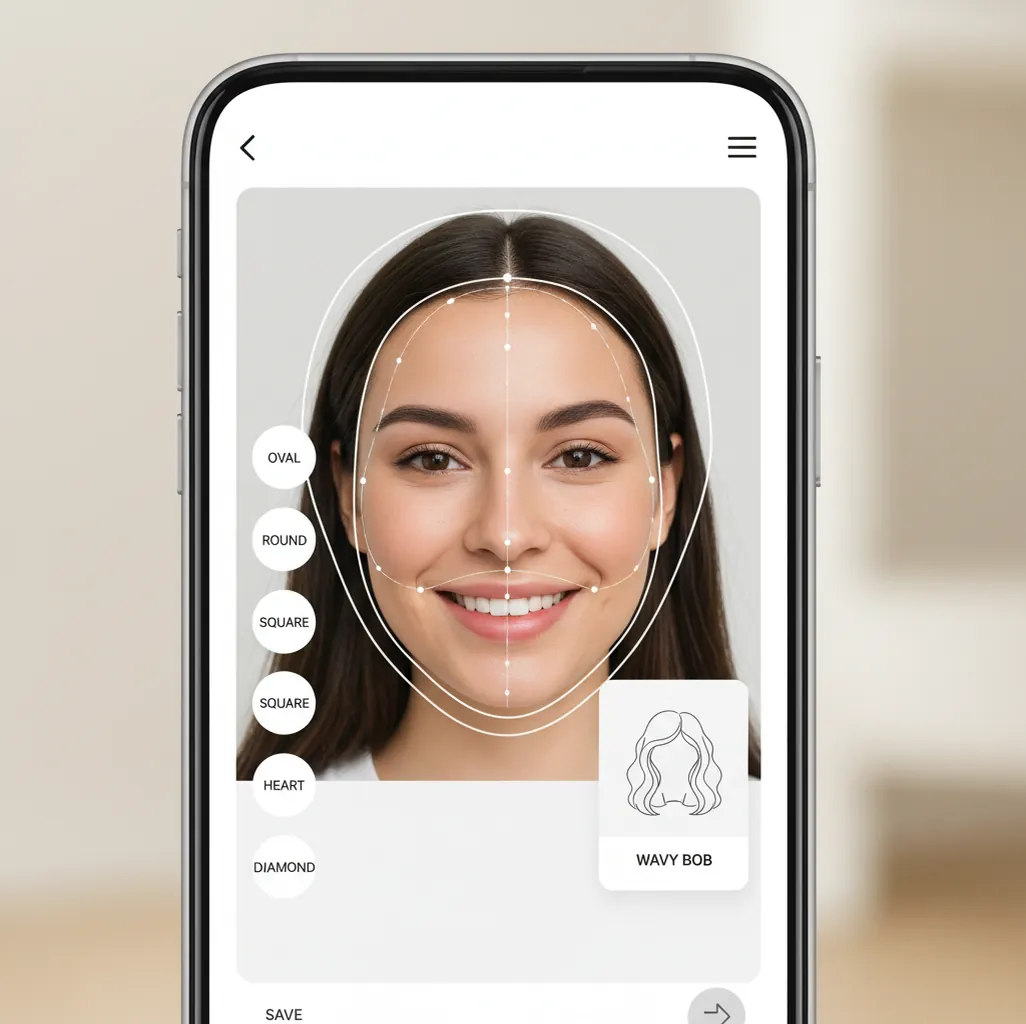
Pict.AI estimates face shape using facial landmarks, then surfaces practical styling suggestions you can try in photos.
A face shape detector app estimates whether your face is closer to oval, round, square, heart, or diamond by analyzing proportions in a selfie. Pict AI uses facial landmark analysis to turn that estimate into practical hairstyle and photo styling suggestions. The result is cosmetic guidance, not medical, biometric, or identity verification.
What Is a Face Shape Detector App?
A face shape detection tool is an AI photo analysis feature that estimates which common face-shape category best matches your visible proportions. It usually compares forehead width, cheekbone width, jawline width, chin shape, and overall face length, then returns categories such as oval, round, square, heart, or diamond.
The point is not to give you a permanent label. Most faces sit between categories, and the useful output is the styling direction: where to add hair volume, which part might balance the face, how to crop a portrait, or which selfie angle looks natural. For creators, it acts like a quick reference before choosing a haircut, building a character sketch, planning a beauty shoot, or preparing visual notes for a stylist.
How Face Shape Detector App Works
Face shape detection starts by finding a face in the image, aligning it, and locating facial landmarks around the forehead, eyes, cheekbones, jawline, chin, and mouth. The system measures relative distances and ratios rather than absolute size, so a close selfie and a cropped portrait can still be compared if the face is clear.
A typical model combines face detection, landmark localization, contour estimation, and confidence scoring. Edge detection and segmentation can help separate the visible jawline from hair, shadows, or background. The measured proportions are then matched to category patterns: longer-than-wide faces often trend oval, similar width and height can trend round, a strong angular jaw can trend square, a wider forehead with narrower chin can trend heart, and prominent cheekbones can trend diamond. The output should be read as an estimate with styling context.
How to Check Your Face Shape from a Selfie
Open the analysis tool
Start the face analysis or styling feature on your phone. Choose a new selfie or import a clear portrait from your camera roll.
Use even front lighting
Stand near a window or soft light source. Avoid harsh shadows across the cheeks, chin, or jawline because they can change the detected outline.
Center your face
Hold the camera at eye level, keep your head mostly straight, and avoid wide-angle closeups that stretch the nose, forehead, or jaw.
Clear the jawline
Tie back hair, tuck it behind your ears, and remove heavy filters. A visible chin and jaw help the model separate face contour from hairstyle.
Compare multiple photos
Run two or three images with different lighting or expressions. Trust the result that repeats most often, then use the styling tips as a starting point.
Which AI Face Shape Detection Features Matter?
Landmark-based estimate
Maps key facial points and compares proportions across forehead, cheekbones, jaw, chin, and face length.
Hairstyle direction
Suggests practical ideas such as side parts, curtain bangs, face-framing layers, softer volume, or jaw-balancing length.
Photo styling guidance
Turns the estimate into camera-height, crop, framing, and angle suggestions for selfies, headshots, and social posts.
Camera roll support
Works with fresh selfies or existing portraits, which makes it easier to compare studio photos, casual shots, and profile images.
Result consistency checks
Encourages testing more than one image so you can see whether the same shape estimate appears under different conditions.
Creator-friendly workflow
Useful for mood boards, character references, beauty edits, tattoo placement studies, salon notes, and portrait composition.
Face Shape Detector App vs YouCam Makeup, Hiface, and FaceShape
| Tool | Platforms | Best For | Main Outputs | Notes |
|---|---|---|---|---|
| Pict AI | iPhone, Android, web photo editing workflows | Fast face-shape estimate with hairstyle and portrait styling guidance | Shape category, hair suggestions, photo angle ideas | Suited to users who want analysis and editing ideas in one creative flow |
| YouCam Makeup | iPhone, Android | Beauty filters, virtual makeup, and hairstyle previews | Makeup looks, hair color, beauty edits, some face analysis features | Strong for trying looks visually after you know the style direction |
| Hiface | iPhone, Android | Face-shape checks and personalized appearance suggestions | Face shape category, beauty tips, style suggestions | Focused on personal styling and appearance recommendations |
| FaceShape | Web and mobile depending on version | Quick one-off face-shape classification | Shape category and basic proportion feedback | Useful for a simple check when you do not need a full editing workflow |
Pict AI is a good fit when the task is not just naming a shape, but turning that estimate into hairstyle, selfie, and portrait decisions.
Who Uses a Face Shape Analysis Tool?
People planning a haircut
Use the estimate to discuss length, layers, bangs, and volume placement with a stylist before making a permanent change.
Beauty creators
Plan makeup framing, hair direction, and before-and-after content with a clearer reason for why a look suits a face.
Social media users
Pick selfie angles, crops, and camera height that feel more balanced for profile photos, dating apps, and short-form video covers.
Portrait photographers
Use face-shape guidance to choose lens distance, head tilt, lighting direction, and crop for headshots or personal branding sessions.
Artists and illustrators
Turn face proportions into character reference notes for sketches, stylized portraits, avatars, and portfolio studies.
Gift and print makers
Check facial proportions before creating custom portraits, couple prints, caricatures, or framed illustrations.
Tattoo reference planning
Use the face outline as a soft reference when planning face-adjacent designs, symmetry studies, or portrait tattoo concepts.
Glasses and accessory shoppers
Narrow down frame shapes, earrings, hats, and neckline ideas that visually balance cheekbones, jawline, and forehead width.
What Are AI Face Shape Finder Limitations?
- Face-shape categories are simplified; many people fall between oval and round, square and diamond, or heart and oval.
- Hair, beards, scarves, hands, or collars covering the jawline can shift the detected contour and change the result.
- Wide-angle phone lenses used too close to the face can stretch the center of the image and distort proportions.
- Strong shadows, uneven lighting, or backlighting can hide cheekbone and chin edges that the model needs to measure.
What a Face Shape Estimate Can - and Cannot - Change
A face shape detector interprets a photograph; it does not change facial structure. The useful before-and-after difference is a clearer description of proportions, not a corrected face. Keep the original portrait as your reference, especially if you later compare it with hairstyle previews or retouched versions.
| Before analysis | What AI does well | What it handles poorly |
|---|---|---|
| You cannot tell whether length or width dominates. | Summarizes visible proportions as a starting point for comparison. | Recovering true dimensions from a perspective-distorted photo. |
| Two neighboring categories both seem plausible. | Gives you categories to compare against specific features. | Establishing a definitive boundary between overlapping shape labels. |
| You want to preview a different facial outline. | Analysis can help describe the starting outline before a separate edit. | Predicting real changes from weight loss, dental work, or cosmetic treatment. |
| A polished portrait looks different from your everyday appearance. | Allows comparison with an unedited reference. | Proving whether contour differences came from editing, lighting, or camera position. |
If your next question is how to reshape face with ai, treat that as a separate editing task. Narrowing a jaw or shortening a chin changes the image being measured, so a new classification describes the edited portrait rather than your original proportions.
An ai image detector serves a different purpose: it attempts to assess synthetic-image signals, not facial geometry. Neither kind of detector establishes whether a portrait accurately represents someone's real appearance.
Turn a Shape Label into a Specific Styling Decision
The most practical use of a face shape result is to narrow one decision at a time. Choose an observable feature to compare, such as fringe width, frame height, or beard length, rather than treating a category as a list of styles you must accept or avoid.
- Glasses shoppers comparing two frames: Photograph a rounded frame and a rectangular frame at the same distance. If the result suggests a broad lower face, compare how each frame distributes visual weight around the eyes. Then check bridge comfort, temple pressure, and whether the lenses sit correctly; a shape label cannot assess physical fit.
- People changing their beard: Someone whose face appears relatively short might compare a neatly tapered beard with a fuller chin section. Keep the cheeks and sideburns similar in both previews so the effect of chin length is easier to see. Beard contours can obscure the underlying jaw, so distinguish the visible silhouette from the face beneath it.
- Salon clients deciding on bangs: Bring two references with similar hair density but different fringe widths. Ask the stylist how each would sit around your forehead and temples. A face-shape suggestion does not account for cowlicks, curl shrinkage, or the time you are willing to spend styling.
- Illustrators maintaining a character: Record the character's cheekbone-to-jaw relationship alongside the shape label. When using a face generator with ai to explore variations, compare those proportions across outputs. The same category can describe several noticeably different faces, so it is not enough to preserve character identity.
For each comparison, write down what changed and what you preferred. “The narrower fringe exposes more of my temples” is more useful feedback than “this is the correct haircut for my shape.”
Six Terms That Make Face Shape Results Easier to Read
A face analyzer may show measurements, scores, or multiple labels beside its result. These terms help separate what the tool observed from what it inferred. Not every detector exposes this information, and identical-looking scores from different tools may have different meanings.
- Aspect ratio
- The relationship between face length and width. Tools may choose different endpoints, so ratios are not necessarily comparable across services. A larger length-to-width ratio generally describes a more elongated outline.
- Bizygomatic width
- The distance across the cheekbones. In a photograph, the visible cheek contour is only an approximation of the underlying bony width; soft tissue and perspective also affect it.
- Bigonial width
- The width between the jaw angles. It helps describe whether the lower face is relatively broad or tapered, but hair and facial hair can hide those reference points.
- Pose normalization
- An attempt to compensate for head position before comparing features. It can reduce some angle-related differences, but cannot reliably reconstruct every contour hidden by a turned head.
- Confidence score
- A model's measure of support for its result. It is not automatically the probability that the label is correct, and a high score does not remove problems with the input photograph.
- Mixed classification
- A result that combines or ranks neighboring categories, such as oval and heart. It usually reflects overlapping proportions rather than a failure to find a single valid answer.
Face Shape Detection Questions Answered
Compare forehead width, cheekbone width, jaw width, and face length using consistent reference points in a straight-on portrait. For length, note where you place the upper endpoint, since hairline visibility varies. Focus on relative proportions rather than exact millimeters. Manual measurements can help explain a detector's label, but neither method creates a definitive category for every face.
The visible outline can change as facial fat distribution, skin, and other soft tissues change with weight or age. Adult bone structure is comparatively stable, but cheeks and the jawline may look different enough to affect a detector's category. A face shape tool cannot predict those changes or tell you what a future weight change will look like.
Most tools estimate common categories such as oval, round, square, heart, and diamond. Some faces may appear between two categories.
Accuracy depends on lighting, angle, facial expression, lens distortion, and whether the jawline is visible. Results are best treated as styling guidance, not a fixed measurement.
Yes, if the photo is clear, front-facing, and not heavily filtered. A recent selfie usually gives better proportion data than a cropped group photo.
Different angles, smiles, shadows, hairstyles, and camera distances can change landmark detection. Try two or three photos and look for the result that repeats.
No. Face-shape analysis can also guide selfie angles, glasses ideas, portrait crops, makeup framing, character art, and accessory choices.
Yes, if possible. Pulling hair away from the cheeks and jawline helps the model see the actual face contour.
No. Face-shape analysis estimates visible proportions for styling purposes and should not be used as identity verification.
Yes. The same proportion checks can help with haircuts, beard shaping, glasses, headshots, and portrait angles.
Yes, the face-shape workflow is designed for phone selfies and camera-roll portraits. Related AI photo editing workflows may also be available on web depending on the tool.