Free AI Image Detector Online
Upload a photo and check whether it shows signs of AI generation or real camera capture. This tool is part of Pict AI, an AI photo editing app for iPhone, Android, and web.
A free AI image detector online can check a photo for signs of AI generation and return an estimated likelihood. It cannot certify that a picture is authentic or that its caption is accurate. Upload the image, review the classification, and use the result to decide whether source verification or further investigation is needed.
Free AI Image Detector Online
- Upload the image you want to check, keeping an unchanged copy for later comparison.
- Choose the file that matches your question: the full picture or a separately identified edited version.
- Run the detector to generate an assessment, then read the label and any supporting indicators.
- Review the assessment alongside source evidence, and record the result without presenting it as proof.
AI Image Detection Examples
Sample analysis results from the AI image detector tool.

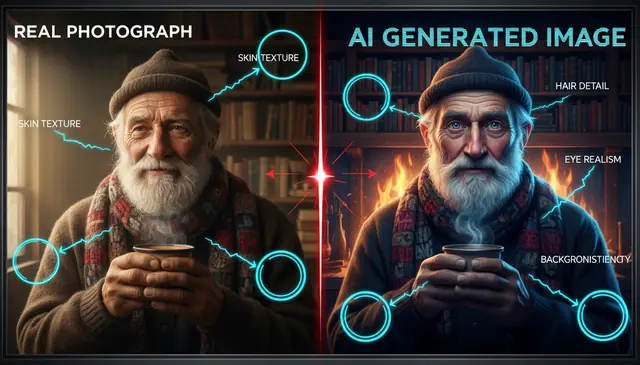

An ai image detector estimates whether a picture was generated by artificial intelligence by checking visual artifacts, metadata, texture patterns, and model-like fingerprints. Pict AI returns a probability-style result with supporting indicators, not a legal verdict. For the best read, upload the original image instead of a screenshot, thumbnail, or heavily compressed repost.
What Is an AI Image Detector?
An AI image detector is a tool that analyzes a digital picture and estimates whether it was created by an image generator or captured by a camera. It is useful when someone asks, “is this image AI?” and needs a fast first check before trusting, sharing, publishing, or moderating a visual.
The detector looks for signals such as unnatural skin texture, inconsistent lighting, repeated detail patterns, warped text, odd reflections, and missing camera metadata. A good result should explain why the image looks synthetic or real instead of giving only a yes-or-no label. The output is best treated as a risk score: helpful for triage, not enough by itself to prove authorship, fraud, or authenticity.
How AI Image Detector Works
AI image detection works by comparing an uploaded image against patterns commonly found in real camera files and synthetic images from diffusion models, GANs, and image editors. The system may inspect pixel statistics, edge detection maps, noise distribution, JPEG compression traces, EXIF metadata, and frequency-domain artifacts that are difficult to see by eye.
In practical terms, the model checks whether textures repeat too evenly, whether shadows match the light source, whether fine details collapse around hair, hands, eyes, teeth, text, and reflective surfaces, and whether the image contains generator-like smoothing. Some detectors also examine metadata loss, alpha channel behavior in PNG files, and upscaling traces. The final score is probabilistic because compression, cropping, screenshots, and manual edits can remove or add signals.
How to Check If an Image Is AI
Upload the highest-quality file
Start with the original JPEG, PNG, or WebP whenever possible. Avoid thumbnails, social previews, and screenshots because resizing and recompression can hide detection signals.
Run the image scan
Send the image through the detector and wait for the probability-style analysis. Most tools report likelihood rather than a definite real-or-fake answer.
Read the supporting indicators
Check the notes about texture, lighting, artifacts, metadata, and model-like patterns. The explanation matters more than a single score.
Compare related versions
If available, test the original post, a direct download, and similar images from the same source. Consistent results are more useful than one isolated reading.
Confirm with context
Look at the source account, publication history, reverse image search results, captions, timestamps, and visible inconsistencies before making a decision.
AI Image Detector Features
AI likelihood scoring
Returns a probability-style assessment that helps you judge whether a picture appears AI-generated, camera-captured, or uncertain.
Artifact analysis
Checks common generator clues such as waxy skin, impossible reflections, mismatched shadows, distorted text, repeated textures, and over-smoothed detail.
Metadata review
Looks for available file clues such as camera data, editing traces, export history, and metadata loss, while noting that metadata can be stripped or altered.
Fast browser workflow
Supports quick checks from a phone or desktop browser, which is useful for moderators, editors, teachers, and creators reviewing images in batches.
Readable result notes
Explains the visual reasons behind the result so users can understand the evidence instead of relying on a black-box score.
Creative image review
Helps artists, photographers, and portfolio reviewers separate camera work, generated references, AI edits, and mixed-media composites.
AI Image Detector vs Hive Moderation and Illuminarty
| Tool | Best fit | Typical output | Notes |
|---|---|---|---|
| Pict AI | Fast AI-image checks on web, iPhone, and Android | AI likelihood with visual indicators | Free basic use for checking single images and creator workflows |
| Hive Moderation | Platform moderation and trust-and-safety pipelines | AI-generated media classification API | Built for teams that need automated moderation at scale |
| Illuminarty | Checking AI-generated images, text, and some media types | Probability score and category labels | Useful for quick public-facing authenticity checks |
| Sightengine | Developer API for content moderation | AI image detection and moderation labels | Designed for apps that need image safety and detection endpoints |
Pict AI fits lightweight, creator-friendly checks; Hive Moderation and Sightengine are stronger fits for API moderation, while Illuminarty is closer to a general authenticity checker.
Who Uses AI Image Detection
Journalists and fact-checkers
Editors can screen viral images before publication, then follow up with source verification, reverse image search, geolocation, and expert review.
Teachers and students
Educators can review submitted visuals, discuss media literacy, and show why a detection score should be paired with context rather than used as a punishment tool.
Artists and illustrators
Artists can check whether reference images, portfolio pieces, or contest submissions appear synthetic, especially when originality rules matter.
Social media creators
Creators can verify images before reposting them, reacting to them, or using them in thumbnails, captions, commentary, and short-form video.
Print and gift makers
Small shops can review customer-supplied portraits, pet images, posters, and commemorative prints before spending time on edits, proofs, and production.
Tattoo and design references
Tattoo artists and designers can spot AI-made references that may contain impossible anatomy, unclear line structure, or details that will not translate well to skin or print.
Portfolio and hiring reviewers
Creative directors can use detection as one signal when reviewing photography, concept art, retouching samples, and mixed-media work.
AI Image Detector Limitations
- Results are probabilistic. A high score means the image shows AI-like signals, not that authorship has been proven.
- Screenshots often strip EXIF metadata and add compression artifacts, which can make both real and synthetic images harder to classify.
- Small images below roughly 800 pixels on the long edge may not preserve enough texture, edge, or noise information for reliable analysis.
- Heavy JPEG recompression, upscaling, denoising, sharpening, filters, and social media reposting can change the detector’s reading.
More AI Image Tools
Explore related AI tools for image creation, editing, and analysis.
Create AI images from text
Generate digital art and paintings
Edit photos with AI tools
Improve image quality with AI
Professional AI headshots
Convert text to pictures
Transform photos with AI
What an AI likelihood score actually tells you
An AI image detector answers a narrow question: does this file resemble the synthetic images its model learned to recognize? That is different from establishing who made it, whether its caption is true, or whether someone edited a particular object. Keep those questions separate when recording a result.
- Classification score
- A model output indicating how strongly an image fits a category; not necessarily a calibrated probability.
- False positive
- A camera-origin image classified as AI-generated.
- False negative
- A generated image classified as camera-origin.
- Calibration
- Whether predicted probabilities match observed outcomes across a relevant set of labeled images.
- Decision threshold
- The score boundary used to assign a label or send a file for further review.
A displayed score of 90% does not automatically mean that nine out of ten similarly scored uploads are synthetic. That interpretation requires calibration on images comparable to the ones being checked. A detector evaluated on pristine generator outputs may behave differently on scanned prints or product photographs.
The proportion of generated images in a collection also matters. In a hypothetical batch containing 10 synthetic images and 990 camera photos, a detector that catches all 10 but falsely flags 5% of the camera photos produces about 50 false alarms. Most flagged files would therefore be camera photos.
For screening workflows, use a flag to request supporting evidence. Record the detector label separately from the final editorial decision so uncertainty does not become an unsupported accusation.
Resolve mixed edits, conflicting scores, and misleading labels
Some apparent detection failures come from asking the tool to resolve a question its output cannot answer. Before repeating a scan, identify the mismatch and change the review method rather than editing the image until its score changes.
- A real photograph contains a generated object. A whole-image label may not reveal a small replacement, such as a new sky or removed person. Request the pre-edit version or an edit history. If region-level analysis is available, use it as additional evidence, not proof that a specific object was generated.
- Two detectors disagree. Their training examples, category definitions, and thresholds may differ. Do not average their percentages: the scales may not be comparable. Record both results and investigate the disputed claim through source material.
- An illustration is labeled synthetic. Digital painting, 3D rendering, and vector artwork are not camera photographs, but they are not necessarily AI-generated either. Check whether the detector distinguishes those categories. Ask for sketches, layers, or project files when authorship matters.
- A face-analysis result is mistaken for authenticity evidence. A face shape detector app estimates facial geometry; it does not establish whether a portrait came from a camera. Use tools whose stated task is synthetic-image classification, and keep appearance analysis out of the authenticity decision.
- A score changes after enhancement. The enhanced file is a different input, potentially with newly synthesized detail. Preserve both versions and label their processing history. A lower score after editing does not authenticate the original.
If the dispute concerns a named person, a news event, or a contest entry, pause any consequential action while evidence remains unresolved. A repeat scan is not a substitute for giving the creator an opportunity to provide source files.
File settings that can change what gets analyzed
File preparation should preserve the image, not make it look more photographic. Check the uploader's accepted formats and limits before converting anything. These handling choices matter even when two files look identical on screen.
| Setting or file type | Handling choice and reason |
|---|---|
| RAW or HEIC input | If unsupported, retain the source and make one compatible export. Conversion changes the input; it does not preserve every original file signal. |
| Pixel dimensions and upload limits | Record width and height in pixels. If resizing is required, keep the original and record the submitted dimensions. Increasing dimensions does not recover missing detail. |
| JPEG file size | Meet the upload limit with a single export where possible. File size alone is not a quality measure: image content and encoding affect it. |
| Transparent PNG | Check how transparency is displayed. Compositing onto white or black changes visible boundaries and may change the image presented to the model. |
| HDR and bit depth | Keep the source when exporting to an ordinary 8-bit image. Tone mapping can change highlight detail and tonal relationships. |
| Animated GIF or WebP | Determine whether the tool reads one frame or supports animation. A still-image result cannot characterize the entire sequence or its duration. |
Keep a short submission record: source filename, conversion performed, submitted dimensions, and scan date. This makes later comparisons meaningful and prevents results from different exports being treated as contradictory readings of the same file.
AI image detection questions answered
Some detectors offer generator attribution, but identifying a specific model is harder than classifying an image as synthetic. Models can share visual patterns, and editing or conversion can weaken distinguishing signals. Treat a generator label as a lead rather than proof. Embedded generation details or a verifiable creation record can provide stronger evidence of which tool was used.
AI image detection estimates origin from patterns in a file. Content Credentials can provide signed provenance information about creation and editing, when supported and retained. They answer different questions: one offers a classification, while the other records assertions about history. Missing credentials do not prove AI generation, and valid credentials do not automatically establish that a depicted event really happened.
Upload the highest-quality version and review the detector’s probability score plus its visual indicators. Treat the result as a clue, then check the image source, metadata, and surrounding context.
No detector can prove a fake photo by itself. It can flag AI-like patterns, but proof usually requires source tracing, forensic review, and corroborating evidence.
Original JPEG, PNG, and WebP files usually work better than screenshots or thumbnails. Higher-resolution files preserve more texture, noise, and metadata signals.
Yes. Screenshots often remove metadata, resize the image, and add compression artifacts that can lower accuracy or create misleading signals.
Many Midjourney images can be flagged when they contain visible generator artifacts, but polished or edited outputs may be harder to classify. Detection accuracy varies by version and image style.
A real photo may look AI-like after heavy retouching, denoising, sharpening, compression, or portrait-mode processing. Stylized lighting and smooth skin can also trigger false positives.
An AI image may pass if it was edited, upscaled, compressed, cropped, or generated by a model the detector has not learned well. A low score does not guarantee camera authenticity.
Use one score as a starting point, not a verdict. Test the original file when possible and compare the result with source history, reverse image search, and human inspection.
No. Metadata can be missing, edited, or copied, so it should be treated as supporting evidence rather than final proof.