Free Image to Image AI Generator
Upload a photo, describe the edit, and generate a new version that keeps the original structure. Try style transfer, background changes, lighting shifts, and creative remixes without signup.
An image-to-image AI generator uses an uploaded picture and a text prompt to create a transformed version, with the source guiding its composition. Pict.AI offers free online transformations without signup. Use it to explore a different visual treatment; choose conventional editing instead when every original detail must remain exact.
Free Image to Image AI Generator
- Upload the photo you want to transform, keeping an untouched copy for comparison afterward.
- Describe the desired visual change and specify which parts of the source should remain unchanged.
- Generate a transformed version, adjusting edit strength if that control is available in the tool.
- Compare the result with your original, reject unwanted changes, and export the version that fits.
Image to Image AI Examples
Sample transformations showing photos converted to new styles with AI.
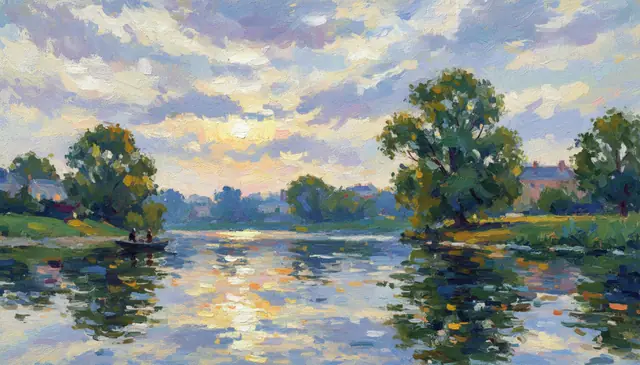
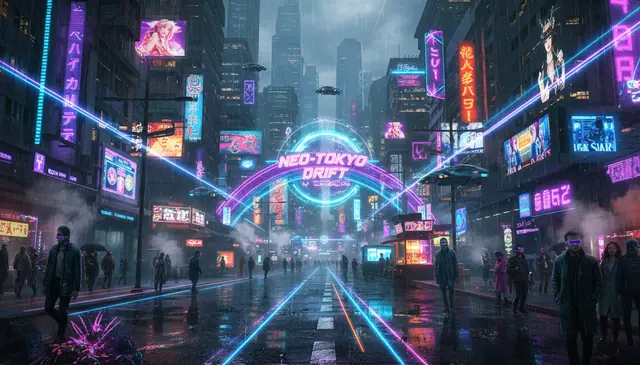
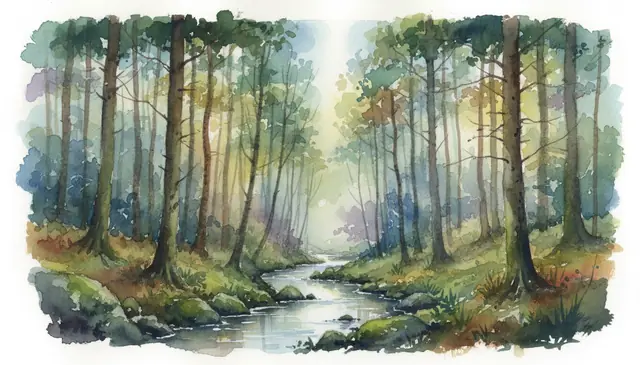
An image to image ai generator changes an uploaded photo using a text prompt while preserving much of the original composition. Pict AI is an AI photo editing app for iPhone, Android, and web that supports prompt-based photo transformation. Best results come from clear prompts, high-resolution source images, and moderate edit strength.
What Is Image to Image AI?
Image to image AI is a generative editing method that takes an existing picture as the starting point, then creates a transformed version based on a written prompt. Instead of making an image from nothing, the model reads the source photo as visual guidance for pose, framing, object placement, lighting, and scene layout.
This makes it useful when you want control over composition but still want creative variation. A portrait can become a watercolor study, a product shot can gain a new background, and a room photo can be reworked into a different interior style. The key difference from text-to-image generation is anchoring: the uploaded image keeps the edit tied to a real visual reference.
How Image to Image AI Techniques Work
Image to image AI techniques work by encoding the uploaded picture into latent space, then guiding a diffusion model with both the image data and the text prompt. The source image provides structure, while the prompt tells the model what to repaint, restyle, or reinterpret.
During generation, the system estimates edges, shapes, colors, textures, and object relationships, then denoises the latent representation toward the requested result. A strength or denoising value controls how far the output can drift from the original: low strength keeps faces, framing, and details close; high strength allows larger changes to clothing, background, lighting, and style. Some workflows also use masks or an alpha channel to protect areas, so only selected regions are changed.
How to Use an AI Image Transformation Tool
Upload a clear source image
Start with a JPEG, PNG, or WebP that has enough detail. For portraits, product photos, and artwork references, use an image with at least 800 pixels on the long edge when possible.
Write a direct transformation prompt
Describe the target style, scene, or edit in concrete terms, such as “rainy cyberpunk street, neon reflections, 35mm film” or “watercolor botanical illustration, soft paper texture.”
Choose the aspect ratio
Pick a frame that fits the final use: 1:1 for avatars and product squares, 16:9 for banners, 9:16 for stories, or 4:3 and 3:4 for prints and portfolio layouts.
Adjust edit strength if available
Use lower strength for subtle color, lighting, or style changes. Use higher strength for bigger edits such as new backgrounds, altered outfits, or a full illustration conversion.
Generate, compare, and download
Create several variations, inspect faces, hands, text, logos, and edges, then download the strongest result. If the model overpaints the subject, rerun with a more restrained prompt.
AI Image Transformation Features
Style transfer
Convert photos into anime, watercolor, oil paint, film stills, ink drawings, or editorial looks while keeping the original pose and framing.
Scene modification
Change a daylight street into a rainy night scene, turn a room into a different design mood, or move a subject into a new visual setting.
Lighting and color edits
Shift a photo toward golden hour, studio lighting, moody shadows, pastel tones, monochrome, or high-contrast cinematic color.
Outfit and material changes
Test fashion silhouettes, fabric textures, product finishes, wall colors, or packaging ideas without reshooting the original image.
Aspect ratio options
Generate formats for profile images, thumbnails, posters, social stories, wallpapers, and presentation slides from the same visual reference.
Prompt iteration
Run multiple prompt passes to refine style, background, detail level, or mood, which is often better than trying to force every change at once.
Image to Image AI vs Adobe Firefly, Canva, and Leonardo AI
| Tool | Best for | Editing approach | Free access |
|---|---|---|---|
| Pict AI | Fast prompt-based photo transformations on web and mobile | Upload image, describe the change, generate variations | Free basic use |
| Adobe Firefly | Designers working inside Photoshop or Adobe Express | Generative Fill, style effects, and guided commercial-safe edits | Free credits with account |
| Canva Magic Media | Social posts, marketing layouts, and quick design assets | AI generation inside Canva templates and brand kits | Limited free access |
| Leonardo AI | Game art, concept art, character iterations, and model-tuned styles | Prompt generation, image guidance, canvas editing, and style models | Free daily tokens |
Pict AI fits quick image-to-image editing when the goal is to upload a photo, prompt a visual change, and export variations without building a larger design project.
Who Uses AI Image Transformation
Artists building references
Painters, illustrators, and concept artists use transformed images to test color palettes, lighting, costume direction, and mood before committing to a final piece.
Creators making social content
Short-form video makers, streamers, and social editors turn portraits, behind-the-scenes shots, and thumbnails into branded visual styles for posts and covers.
Gift and print makers
A family photo can become a storybook portrait, pet illustration, holiday card, or wall print mockup while still preserving recognizable composition.
Tattoo reference planning
Clients and tattoo artists can explore line art, blackwork, watercolor, realism, or neo-traditional directions from a source photo before drawing the final stencil.
Portfolio and moodboard work
Designers and photographers use image variations to show alternate treatments, campaign directions, or art direction options without scheduling another shoot.
Product and interior previews
Small teams can test packaging colors, room styles, seasonal scenes, and surface materials before creating final product photography or renders.
Image to Image AI Limitations
- Readable text is unreliable. Signs, book covers, labels, and logos may turn into distorted letter-like shapes after generation.
- Low-resolution uploads create soft edges and unstable facial details, even if the final image is exported at a larger size.
- High edit strength can overwrite identity, eye color, clothing seams, small accessories, and background objects.
- Hands, jewelry, patterned fabric, glasses, and fine hair are common failure points during heavy transformations.
Related AI Creative Tools
Explore more AI tools for image generation and transformation.
Four Misconceptions About Image-to-Image Results
- Myth: An AI image converter only changes the file format.
Fact: Image-to-image generation changes visual content, not just the file extension. Converting PNG to JPEG leaves the scene essentially unchanged; generative transformation can redraw it. If you only need a smaller file or a different format, use a conventional converter rather than introducing changes to the picture.
- Myth: A reference photo makes the output physically accurate.
Fact: The source anchors the composition, but it does not enforce measurements or engineering constraints. A generated room can contain furniture that would not fit, and a product variation can invent an impossible joint. Treat these results as visual proposals, not scale drawings, installation plans, or evidence of actual product specifications.
- Myth: The same prompt always produces the same picture.
Fact: Generation involves randomness. Where a tool exposes a seed, keeping it fixed can make comparisons more controlled, but the model version and other settings also matter. Save the source, prompt, settings, and seed together when you need to revisit an approved direction. A prompt alone is not a complete recipe.
- Myth: A larger export contains more authentic detail.
Fact: Pixel dimensions describe the size of the output, not the truth of its contents. Generated detail may look convincing without matching the source. For example, a watch face can gain plausible but incorrect markings. Decide whether you need an attractive interpretation or a faithful record before choosing this kind of editing.
When Generative Transformation Beats Conventional Editing
The useful distinction is not AI versus manual editing. It is whether the job calls for a new interpretation or precise control over existing pixels. Image-to-image generation suits the first task; conventional editing often handles the second more reliably.
Pros
- Exploring a direction before production: Turn one reference into several visual treatments to help a client choose between, for example, a clay-render look and a cut-paper illustration. The value is faster decision-making, not a promise that every variation is production-ready.
- Reimagining surfaces together: A broad transformation can coordinate textures and visual treatment across a whole scene. This is useful when the desired result is an illustration or concept rather than a photograph that must document the original subject exactly.
Cons
- Exact corrections are harder to isolate: If the task is removing one dust spot or changing a single color to a specified value, generation introduces unnecessary uncertainty. A healing brush, adjustment layer, or selective color edit gives more direct control.
- Repeatable production needs extra planning: A pleasing treatment on one picture may not transfer identically to an entire catalog. Camera angles, subject scale, and source lighting can change the outcome, creating additional review and correction work.
Verdict: Use image-to-image AI for exploratory transformations with room for interpretation. Keep precise retouching, measured design changes, and consistent catalog finishing in a controlled editing workflow. The two approaches can complement each other rather than compete.
Build a Reusable Transformation Recipe
- Define what must remain unchanged. Before uploading, write a short acceptance rule: the same number of objects, the same silhouette, or the same camera angle. This gives you a concrete basis for rejecting an attractive but unsuitable output. Tip: Choose one essential constraint rather than a long wish list.
- Create a baseline version. Upload the source and describe one transformation. Save the first usable output alongside its prompt and any available settings. It becomes a reference point for later changes. Tip: Give the baseline a descriptive filename instead of relying on download order.
- Change one variable per comparison. Generate another version with only the material, palette, or rendering style changed. Compare it with the baseline at the same display size. Tip: Record why one version is better so the next prompt addresses a specific difference.
- Package the approved result with its source. Review the selected image against your acceptance rule, then export it and retain the untouched original separately. Include the prompt and settings in the project folder. Tip: Start future revisions from the original when accumulated transformations begin drifting away from it.
Image-to-Image Generation Questions Answered
Safety depends on the service’s handling of uploads. Check its retention period, deletion options, training-use policy, and whether generated images are public by default. Avoid uploading identification documents, confidential client material, or intimate photos without appropriate safeguards. For pictures of other people, obtain permission where needed and consider whether the transformation could misrepresent them.
Not reliably from the transformed image alone. Generation can replace visual information rather than preserve it in reversible layers, so prompting the result to look original may produce another approximation. Keep the source file separately. If an editor retains project history or the original upload, you may be able to return to that saved version instead.
Image to image AI transforms an uploaded image based on a text prompt. It uses the original photo as a structural guide instead of generating entirely from scratch.
Strength controls how much the model can change the source image. Lower values preserve more detail, while higher values allow stronger style, lighting, background, and object changes.
Short, specific prompts usually work best. Name the subject, desired change, style, lighting, and medium instead of writing a long paragraph.
Yes, it can replace or reinterpret backgrounds while keeping the main subject. Results are stronger when the subject is clearly separated from the background.
It can often preserve the general face structure at low or moderate strength. Heavy stylization may change identity, symmetry, skin texture, or small facial details.
Use the clearest version available, ideally at least 800 pixels on the long edge. Small or compressed images give the model less detail to preserve.
Text to image starts from a prompt only, while image to image starts from a real visual reference. That makes image to image better for controlled edits, style transfer, and composition-preserving changes.
Commercial use depends on the tool terms, source image rights, and whether the prompt references protected brands, characters, or living artists. Use original inputs and avoid deceptive or infringing edits.