Free Photo to Sketch AI Converter
Turn portraits, pets, landscapes, and product photos into pencil sketches, charcoal drawings, and clean line art. Works in your browser and as an AI photo editing app for iPhone and Android.
A free photo to sketch converter turns a photograph into pencil shading, charcoal marks, or simplified outlines. Choose a filter when preserving exact shapes matters most, or a generative sketch tool for a more interpretive drawing. The useful result is not necessarily the most detailed one: it should retain the subject's defining features and suit its final display size.
Free Photo to Sketch AI Converter
- Upload the original photograph and frame the subject so its defining contours remain visible.
- Choose pencil, charcoal, or line art, and describe which features and proportions should remain unchanged.
- Generate the sketch, then compare its structure and shading with the source photograph side by side.
- Review the drawing at its intended display size, correct distracting marks, and export a clean master.
AI Photo to Sketch Examples
Sample pencil sketches converted from photographs by the AI sketch converter.
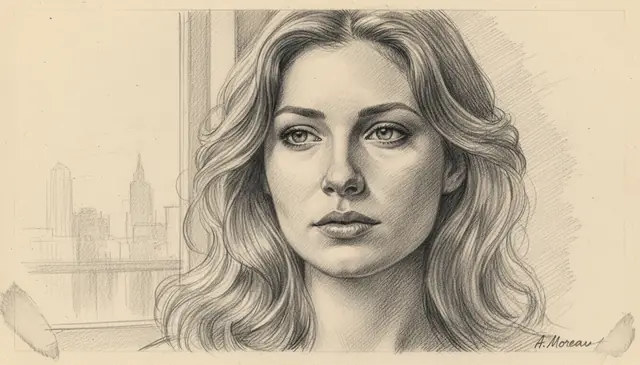
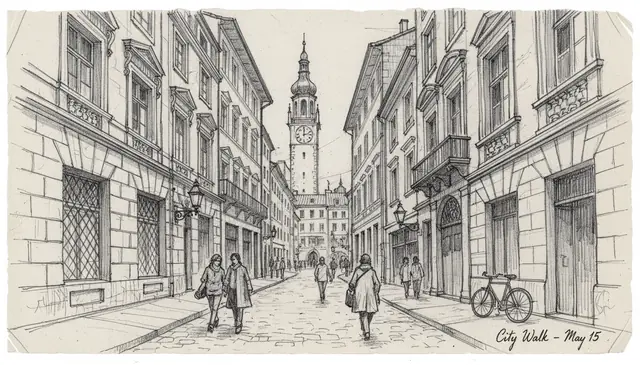
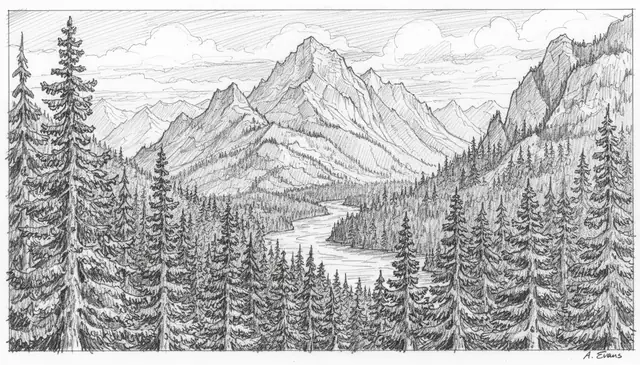
A photo to sketch AI converter turns a photograph into a drawing-style image using edge detection, tonal mapping, and learned sketch textures. Pict AI can create pencil sketches, charcoal looks, contour drawings, and clean line art from portraits, landscapes, architecture, and everyday photos. For the best results, start with a sharp image above 800 pixels on the short side and avoid busy backgrounds when you need clean outlines.
What Is a Photo to Sketch AI Converter?
A photo-to-sketch tool converts a normal image into artwork that resembles pencil, charcoal, ink, or line drawing. Instead of only adding a gray filter, it interprets edges, light direction, facial structure, background texture, and tonal contrast, then redraws the scene with strokes and shading patterns that match traditional sketching.
The strongest results usually come from clear portraits, pets, buildings, landscapes, fashion references, and objects with visible contours. A portrait can become a soft graphite study, a city street can become architectural line art, and a landscape can become a crosshatched field sketch. The tool is useful when you want a handmade look without tracing the photo manually.
How Photo to Sketch AI Works
Photo to sketch AI works by separating a photo into structure, tone, and texture, then rebuilding it as a drawing. The system detects edges around faces, hair, clothing, buildings, and objects; maps shadows into graphite-like tonal values; and applies learned stroke patterns such as crosshatching, contour lines, smudged charcoal, or fine pencil grain.
Modern converters often combine image-to-image neural networks with style-transfer methods and diffusion model refinement. Edge detection preserves the main silhouette, while semantic segmentation helps the model treat skin, eyes, fabric, sky, and background differently. Detail controls usually change how much original texture survives. Higher settings keep wrinkles, eyelashes, brickwork, and jewelry, while lower settings simplify the image into clean line art.
How to Convert a Photo to a Sketch Online
Upload a clear photo
Choose an image you own or have permission to edit. Use the original camera file when possible, especially for faces, pets, jewelry, and architecture.
Pick a sketch direction
Select or describe a style such as realistic pencil, charcoal portrait, clean line art, ink outline, crosshatch drawing, or loose gesture sketch.
Crop for the subject
Frame the face, object, building, or scene before generation. Cropping out clutter helps the converter focus on the lines that matter.
Adjust detail or strength
Use higher detail for photorealistic pencil sketches and lower detail for minimalist outlines, tattoo references, coloring pages, or icon-style drawings.
Generate and review
Check the eyes, hands, small text, logos, and background texture. If the result is too noisy, try a cleaner prompt or a tighter crop.
Download the sketch
Save the final drawing for social posts, print mockups, portfolio studies, gift art, or further editing in a design app.
Photo to Sketch AI Features
Realistic Pencil Texture
Creates graphite-style strokes, soft shading, darker line weight, and tonal gradients that look closer to a drawn study than a simple grayscale filter.
Line Art and Contour Modes
Turns photos into clean outlines for coloring pages, tattoo references, logo concepts, stickers, and simplified character references.
Charcoal and High-Contrast Looks
Adds dramatic shadow blocks, smudged texture, and expressive contrast for portraits, fashion images, posters, and moody landscape sketches.
Style Prompt Control
Lets you guide the result with phrases such as "sharp jawline pencil portrait," "soft hair shading," or "architectural ink line drawing."
Aspect Ratio Options
Supports common crops such as 1:1, 16:9, 9:16, 4:3, and 3:4 for profile images, prints, stories, thumbnails, and portfolio layouts.
Web and Mobile Access
Works for quick browser edits and mobile creator workflows, including turning camera-roll photos into sketches before posting or printing.
Free Photo to Sketch AI Tools Comparison
| Tool | Best for | Style control | Free access | Commercial use notes |
|---|---|---|---|---|
| Pict AI | Fast photo-to-sketch edits on web, iPhone, and Android | Pencil, charcoal, line art, aspect ratios, and style descriptions | Free basic use without mandatory signup for simple edits | Check output rights and source-image permissions before selling designs |
| Fotor | Casual sketch filters and quick browser edits | Preset-heavy controls with several art filter options | Free tier available, with some premium exports or effects | Commercial terms depend on account plan and asset source |
| Canva | Design layouts that include sketch effects inside posters or social posts | Good layout tools; sketch effect control varies by app and filter | Free design tools with Pro-only assets and features | Review Canva licensing for templates, stock content, and Pro elements |
| Picsart | Mobile-first creative edits with filters, stickers, and social formats | Many effects, overlays, and manual editing controls | Free tier with app-based limits, ads, or paid features | Check subscription terms and avoid using copyrighted source images |
For free photo to sketch AI tools, the main differences are not only output quality; signup friction, watermark policy, mobile support, style control, and licensing clarity matter just as much.
Who Uses an AI Sketch Generator
Portrait artists and illustrators
Artists use sketch conversion to study values, simplify facial planes, test line weight, or create a rough base before redrawing by hand.
Social media creators
Creators turn selfies, travel photos, pet images, and outfit shots into pencil or ink posts that feel different from standard photo filters.
Gift and print makers
A family photo, wedding portrait, pet image, or house photo can become a printable sketch for cards, framed gifts, mugs, and keepsakes.
Tattoo reference workflows
Clean line art versions of faces, flowers, animals, and objects help clients and tattoo artists discuss placement, contrast, and silhouette.
Architecture and product portfolios
Designers convert buildings, interiors, furniture, and product shots into sketch-style presentation images for mood boards and portfolio pages.
Education and practice
Students compare the original photo with the sketch output to understand edges, negative space, shadow grouping, and contour simplification.
Photo to Sketch Conversion Limitations
- Very small images, especially below about 800 pixels on the short side, can turn faces, eyes, teeth, and hair into soft blur.
- Tiny text, shirt prints, street signs, and logos are often treated as texture, so they may become scribbles instead of readable lettering.
- Busy backgrounds such as leaves, brick walls, patterned curtains, and crowds can create too many edges in line-art modes.
- Hands, overlapping fingers, glasses, jewelry, and hair strands may lose accuracy when the source photo is compressed or partially blocked.
More AI Creative Tools
Explore AI tools related to artistic conversion and image creation.
Choose a sketch method by how much detail must stay unchanged
A picture to sketch converter can produce very different results depending on whether it filters existing pixels or redraws the scene. Choose the method around what must survive: a person's likeness, a product's proportions, a building's geometry, or simply the mood of the photograph.
| Approach | Best use | Honest trade-off |
|---|---|---|
| Conventional sketch filter | Keeping the original composition and object positions | Usually preserves geometry, but can turn every surface texture into distracting marks. |
| Generative photo-to-sketch AI | Creating expressive strokes and more convincing drawn shading | Can reinterpret features or invent details rather than faithfully trace the source. |
| Edge extraction with manual cleanup | Technical outlines and simplified object drawings | Offers control over contours, but needs cleanup where shadows become false edges. |
| Manual tracing over a photo | Precise silhouettes and selected details | Requires more time and drawing judgment; the result depends on the editor's choices. |
For a house portrait, straight window frames may matter more than expressive shading. For a pet illustration, distinctive coat markings may matter more than preserving every blade of grass. Decide which details are non-negotiable before choosing the approach.
Compare versions at the same crop and display size. A darker result can appear more detailed without actually preserving more information. If enlargement is necessary, an hd photo converter may help prepare the file, but it cannot reliably recover missing detail or correct shapes invented during sketch generation.
Check the finished drawing at its intended viewing size
Review the sketch where it will actually be used, not only in the converter's preview. A drawing that looks balanced on a phone can have weak lines on paper, while dense graphite texture can become a muddy patch in a small profile image. Keep the original beside the export for comparison.
- Check identity-defining relationships. Compare the distance between the eyes, the shape of the hairline, distinctive pet markings, or the spacing of a building's windows. These relationships matter more than decorative pencil grain.
- Look for false contours. A cast shadow should not accidentally become a second jawline, an extra roof edge, or an outline across a product's smooth surface. Remove marks that describe lighting rather than structure when they confuse the drawing.
- Check white areas against the destination. Place the image on the intended page or background. A white rectangular border may disappear on paper but remain conspicuous on a colored website or slide.
- Inspect at final size. Reduce the sketch to its planned dimensions. Confirm that important lines remain visible and neighboring hatch marks do not merge into solid blocks.
- Proof the print layout. Check margins and disable automatic cropping if it cuts off strokes. When using image to pdf for a printable sheet, confirm the page size and image placement before saving.
- Keep a clean master. Save an untouched export before resizing, compressing, or adding captions. Make delivery copies from that file rather than repeatedly saving an already compressed version.
When reviewing a print document through a pdf to image converter, inspect the rendered page for clipping and layout changes. Use the original sketch file for later edits; extracting it from the PDF may introduce resampling or compression that was not present in the master.
Export facts for sketch prints, web images, and editable outlines
Export settings should follow the destination. A filename ending in PNG does not make a drawing editable as paths, and changing the resolution label alone does not add pixels. These distinctions apply whether the result comes from a Photo to Sketch App, a browser converter, or a desktop editor.
- Raster versus vector
- JPEG and PNG store pixels. True vector outlines require paths; placing a raster sketch inside an SVG does not convert its strokes into editable curves.
- Print dimensions
- Required pixels equal print size in inches multiplied by pixels per inch. An 8 × 10-inch image at 300 ppi needs 2400 × 3000 pixels.
- PNG versus JPEG
- PNG avoids lossy compression and supports transparency. JPEG produces smaller files but can add visible artifacts around fine, high-contrast lines.
- Transparent background
- White paper texture is not transparency. Removing it may also erase pale shading, so inspect soft strokes after background removal.
For website integration, an image to base64 converter encodes the exported file as text; it does not improve the sketch. Base64 encoding adds roughly one-third to the binary file size, so an ordinary image file is generally simpler for larger drawings.
Photo-to-sketch questions answered
Most photo-to-sketch results are raster images made of pixels, even when they resemble clean ink outlines. A vector drawing contains editable paths that can scale without pixelation. To create one, trace the exported sketch with vector software and clean up the paths manually. Automatic tracing works best on simple, high-contrast outlines; pencil shading often produces too many shapes.
Yes, but a shared style prompt alone does not guarantee consistency. Use similar framing, lighting, background treatment, and export dimensions across the source photos. Keep the same sketch settings where available, then compare line weight and shading side by side. Generative tools can still vary between images, so a coordinated series may need manual tonal adjustments or selective regeneration.
It is a tool that turns a photograph into a drawing-style image, such as a pencil sketch, charcoal drawing, ink outline, or clean line art.
It detects edges, maps light and shadow, identifies major subjects, and redraws the photo with learned pencil, charcoal, or ink textures.
Yes, clear photos can produce realistic graphite shading, crosshatching, and line weight variation. Results depend heavily on image resolution and lighting.
Sharp portraits, pets, buildings, products, and landscapes with clear subject separation work best. Avoid dark, blurry, tiny, or overly cluttered images.
Commercial use depends on the tool’s terms and whether you own the source photo. Avoid copyrighted characters, private faces without consent, and protected brand assets.
Small text is often interpreted as visual texture rather than editable lettering. Convert the image first, then add important text back afterward.
Yes, clean line-art settings can help create tattoo references. A tattoo artist should still refine line weight, spacing, and skin placement before inking.
Yes, many sketch converters work in mobile browsers, and some also offer iPhone or Android app workflows for camera-roll edits.