Free AI Poster Generator Online
Create posters from prompts, uploaded images, or both. Make event flyers, product promos, concert art, classroom visuals, and printable wall designs in common poster ratios.
An AI poster generator turns a written idea or reference image into poster artwork for events, promotions, and prints. Describe the main subject and the space needed for your message, then generate a visual draft. For a usable final poster, add exact information in an editor and check the exported dimensions against your screen or print requirements.
Free AI Poster Generator Online
- Upload a clear product photo, portrait, or cropped reference if the poster needs a specific visual subject.
- Describe the poster’s purpose, visual treatment, and blank text areas, then choose a ratio matching its destination.
- Generate a draft and refine the composition, keeping essential details away from trim edges and busy artwork.
- Review the artwork, add verified text and QR codes, then export at the dimensions your printer or platform requires.
AI Generated Poster Examples
Sample poster designs created by the AI poster generator from text prompts.
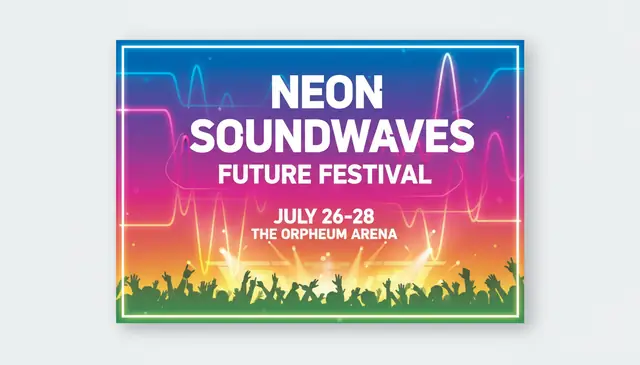
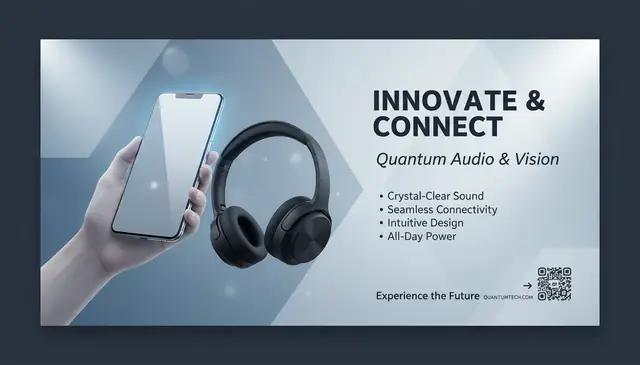
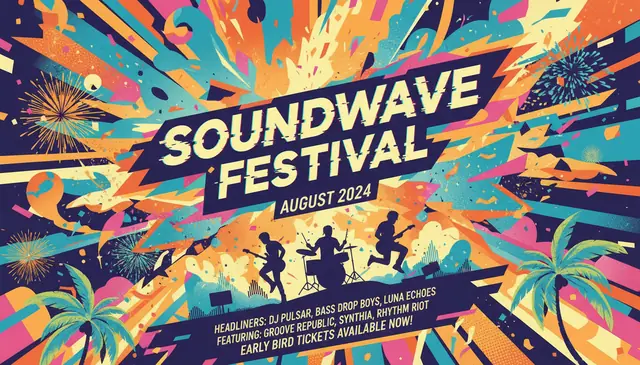
An AI poster generator creates poster-style graphics from text prompts, uploaded images, or a mix of both. Pict AI is an AI photo editing app for iPhone, Android, and web that can turn prompts or photos into downloadable poster designs. The best results come from short prompts that specify purpose, format, style, color palette, and the main visual subject.
What Is an AI Poster Generator?
An AI poster generator is a design tool that creates poster images from plain-language instructions. Instead of starting with a blank canvas, you describe the poster’s purpose, subject, mood, color palette, and format, then the model generates visual layouts for events, ads, art prints, or social posts.
A useful poster prompt is specific but not overloaded. “Neon jazz concert flyer, saxophone silhouette, dark purple background, bold title area, 9:16” gives the model a clearer design target than a long schedule with every detail. For final production, many creators generate the artwork first, then add exact dates, venue names, prices, QR codes, and legal copy in a design editor so the typography stays readable.
How an AI Poster Generator Works
AI poster generation works by translating a prompt into visual instructions, then using an image model to synthesize composition, subject matter, color, texture, and poster-like layout. The system parses nouns, style tags, aspect ratio, and design cues, then builds an image through a diffusion model or similar generative process.
When an uploaded photo is included, the model may use image conditioning, edge detection, subject segmentation, and alpha channel handling to preserve key objects while changing the background or graphic treatment. Poster-specific training patterns help with centered titles, dramatic lighting, negative space, and visual hierarchy. Text rendering is improving, but small lettering can still distort, so AI output is best treated as the visual base rather than the final typeset file.
How to Create AI Posters Online
Write the poster goal
Start with the job the poster must do: announce a concert, sell a product, promote a class, decorate a room, or create a social graphic.
Describe the visual direction
Name the subject, style, color palette, mood, and layout, such as “minimal product launch poster, white background, blue accents, large headline area.”
Upload a reference image
Add a logo, product photo, portrait, or background image if the design needs to include a specific visual asset.
Choose the poster ratio
Pick a format such as 1:1 for feeds, 9:16 for stories, 16:9 for screens, or 3:4 and 4:3 for printable poster layouts.
Generate and compare variations
Review several outputs, keep the strongest composition, and adjust one variable at a time: color, subject, style, or amount of blank space.
Add final text manually
Download the poster art, then retype exact names, times, URLs, QR codes, and disclaimers in a design editor for clean production.
AI Poster Maker Features
Text-to-poster prompts
Generate poster concepts from short prompts for events, campaigns, wall art, product ads, movie-style designs, and social announcements.
Image plus text input
Upload a product shot, logo, portrait, or reference image and describe how it should appear inside the finished poster composition.
Multiple aspect ratios
Create square, vertical, horizontal, and print-friendly compositions for feeds, stories, digital signage, flyers, and framed prints.
Style control
Prompt for retro, minimalist, cyberpunk, editorial, cinematic, collage, hand-drawn, luxury, festival, or educational design directions.
Fast visual iteration
Generate several directions quickly, then refine the best one instead of building every background, illustration, and layout by hand.
Web and mobile workflow
Start a poster in a browser, or create quick drafts from a phone when you need a concept for a post, event, or client preview.
AI Poster Maker vs Canva, Adobe Express, and Microsoft Designer
| Tool | Best fit | Input style | Free access | Important note |
|---|---|---|---|---|
| Pict AI | Prompt-based poster art, image remixing, mobile and web drafting | Text prompts and uploaded images | Free basic use | Good for fast poster concepts before final typesetting |
| Canva | Template editing, brand kits, social and print layouts | Templates, drag-and-drop assets, some AI tools | Free tier with paid Pro assets | Strong for manual layout control and brand consistency |
| Adobe Express | Marketing graphics, Adobe asset workflows, quick campaign pieces | Templates, generative tools, stock assets | Free tier with premium features | Useful when final files need Adobe ecosystem compatibility |
| Microsoft Designer | Simple promotional graphics and social media designs | Prompts, templates, Microsoft account workflow | Free availability varies by region and account | Good for quick drafts tied to Microsoft services |
Pict AI is strongest when the first task is generating original poster imagery from a prompt; template tools are stronger when exact brand typography, reusable layouts, and manual spacing control matter most.
Who Uses AI Poster Design Tools
Event organizers
Create first drafts for concerts, open mics, markets, school events, fundraisers, workshops, and club nights before adding final logistics.
Small business marketers
Make product promo posters, sale announcements, window signs, launch graphics, and seasonal campaign visuals without booking a full design cycle.
Musicians and performers
Test visual identities for album release flyers, gig announcements, DJ sets, theater posters, and tour-date graphics.
Artists and illustrators
Use generated layouts as mood boards, composition studies, color references, or starting points for hand-finished poster artwork.
Social media creators
Turn quotes, announcements, podcast episodes, livestream dates, and community posts into high-impact vertical or square graphics.
Gift and print makers
Create custom wall prints for birthdays, anniversaries, dorm rooms, home offices, fandom-inspired decor, or personalized party themes.
Tattoo and portfolio references
Generate poster-like reference sheets for visual themes, character mood, lighting, typography experiments, or stylized composition ideas.
AI Poster Generation Limitations
- Small text can appear misspelled, warped, or inconsistent, especially in schedules, addresses, ticket links, and dense event details.
- Exact brand fonts, logo placement rules, color values, and spacing systems may not match a formal brand guide without manual editing.
- Uploaded images under roughly 800 pixels on the short edge can create muddy faces, noisy gradients, and weak print detail.
- AI layouts may place important elements too close to the edge, which can be cut off during printing unless you add bleed and safe margins.
More AI Creative Tools
Explore AI tools related to poster design and visual creation.
Fix Poster Mockups, QR Codes, and Reference-Image Problems
A convincing poster preview can still fail as a usable design. Before regenerating everything, identify whether the problem is in the artwork, the layout, or the export. Different ai image generation models interpret layout instructions differently, so a precise correction is more useful than simply requesting a better poster.
- The result shows a poster hanging on a wall. Words such as “gallery print” or “street poster” can produce a photographed mockup instead of flat artwork. Request “flat, front-facing poster artwork, edge-to-edge composition, no frame, no wall, no perspective.” Keep presentation mockups separate from the file intended for printing.
- The QR code looks plausible but does not scan. Generated squares are not a reliable encoding of your destination. Remove the imitation code and insert one created from the actual URL. Preserve its clear border, then scan a printed proof with more than one phone before distributing the poster.
- A reference image becomes unwanted poster content. A mood-board screenshot may introduce stray captions, borders, or interface buttons. Crop references to the relevant artwork and explain which features to borrow. An ai image describer can help turn a reference into concrete instructions about shapes, lighting, and composition without uploading the entire screenshot.
- A portrait treatment overpowers the announcement. Effects suitable for an aesthetic pfp maker can work at avatar size but compete with event information on a poster. Reduce decorative detail around the face and reserve a separate, quiet area for the announcement. Judge the whole layout at its intended viewing distance.
Poster Export Sizes and File Settings Worth Checking
Choose the final destination before committing to a composition. Aspect ratio determines the shape; pixel dimensions determine how much image detail is available. The sizes below are production targets, not a promise that every generator exports them natively. Changing a resolution label alone does not add pixels.
| Destination or setting | Practical target | What to check |
|---|---|---|
| Square digital announcement | 1080 × 1080 pixels, 1:1 | Inspect at phone size; fine decorative detail may disappear. |
| 11 × 17-inch print | 3300 × 5100 pixels at 300 ppi | This covers the trimmed page only; add the printer’s specified bleed separately. |
| A3 print | About 3508 × 4961 pixels at 300 ppi | Use an A3 document rather than stretching a 3:4 image to fit. |
| 18 × 24-inch print | 5400 × 7200 pixels at 300 ppi | A 1800 × 2400 image provides only 100 ppi at this size. |
| Artwork export | PNG for lossless raster output; JPEG for smaller files | Avoid repeated JPEG saves, which can introduce artifacts around lettering. |
| Printer handoff | PDF with the printer’s requested color profile and bleed | Assemble it in a layout editor; placing a raster image in a PDF does not make it vector artwork. |
For a Free AI Poster Generator, inspect the actual download dimensions before designing around a large print size. An AI Poster Generator App may show a sharp preview while exporting fewer pixels. Ask the print provider about acceptable effective resolution, paper stock, and color conversion; large posters viewed from a distance may not need 300 ppi.
Four AI Poster Assumptions That Cause Production Mistakes
- Myth: The Best AI Poster Generator is whichever produces the largest image.
Fact: Resolution is only one requirement. Useful controls include selective editing, reference-image handling, and predictable exports. Choose around the job: an illustration-led art print needs different capabilities from a sponsor-heavy event announcement.
- Myth: An AI detector can certify a poster as human-made.
Fact: An ai image detector estimates patterns; it does not establish authorship or ownership. Compression, edits, and mixed human-and-generated content can affect results. Keep source assets, generation records, and editing files when provenance matters.
- Myth: Translating the wording makes a poster ready for another market.
Fact: An image translator online can help interpret existing copy, but localization also changes line lengths, reading direction, date conventions, and font requirements. Have a fluent reviewer check the final layout, not just a separate text document.
- Myth: Free access includes every production permission.
Fact: Download access, commercial licensing, image privacy, and rights to uploaded assets are separate questions. When reading about pict.ai or another service, check those terms individually. A tool’s permission to use its output does not grant rights to a depicted trademark or someone else’s photograph.
AI Poster Design and Export Questions
Many AI poster generators produce flattened raster images rather than editable vector layouts. A PNG or JPEG does not contain separate text boxes, paths, or movable design elements. Some tools offer vector output, but check whether lettering and shapes remain editable. For a reusable poster template, place the generated artwork in a layout editor and build text, logos, and other recurring elements separately.
Use strong contrast between text and its background, avoid putting essential information over busy artwork, and do not rely on color alone to communicate meaning. Check the design at its actual display size. For online sharing, provide the event details as selectable text alongside the image and add useful alt text. A QR code should supplement, not replace, a readable destination or contact method.
Yes, AI can create printable poster artwork, but you should check resolution, bleed, margins, and text clarity before sending it to print.
Use a short prompt with the poster purpose, main subject, style, color palette, mood, and aspect ratio. Avoid adding full schedules or long copy inside the image prompt.
Yes, many poster tools accept uploaded images so a product, portrait, logo, or background can guide the generated design.
Generative image models still struggle with exact lettering, especially small copy. Generate the visual design first, then add final text manually in an editor.
Common digital ratios include 1:1, 9:16, 16:9, 4:3, and 3:4. For print, export the largest available file and confirm the printer’s required dimensions.
Yes, concert flyers are one of the strongest use cases because prompts can specify genre, venue mood, lighting, typography style, and vertical format.
You do not need advanced design skills to create a first draft. Basic judgment about readability, contrast, margins, and final text placement still helps.
Commercial use may be allowed depending on the tool terms and source materials, but campaigns should still go through rights clearance, brand review, and legal review when needed.