Free AI LinkedIn Photo Generator
Create a clean business headshot from a selfie or prompt in minutes. Adjust background, outfit style, crop, and lighting for a LinkedIn-ready profile photo.
An AI LinkedIn photo generator can turn an existing portrait into a cleaner professional profile picture by adjusting lighting, background, and clothing. The useful result is not the most glamorous one: it is a recognizable, current-looking image of you. Start with a real photo, request restrained changes, and reject versions that alter your facial proportions or apparent age.
Free AI LinkedIn Photo Generator
- Upload a recent portrait with visible facial detail and enough space around your head for a profile crop.
- Choose a restrained professional style and describe the background or lighting change while requesting unchanged facial features.
- Generate a few candidates, keeping the original portrait available for a direct comparison of facial proportions.
- Review likeness and the circular profile preview, then export the most recognizable version for your LinkedIn profile.
AI LinkedIn Photo Examples
Sample professional headshots created by the AI LinkedIn photo generator.
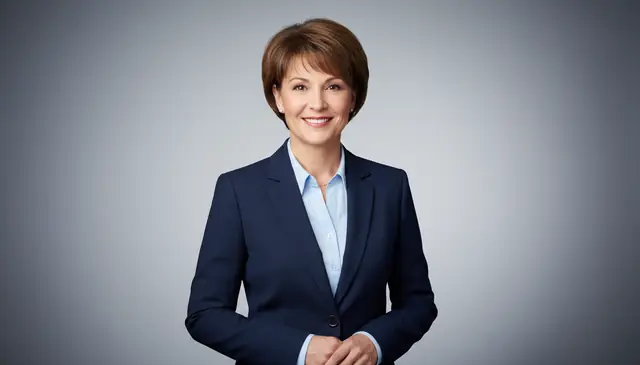

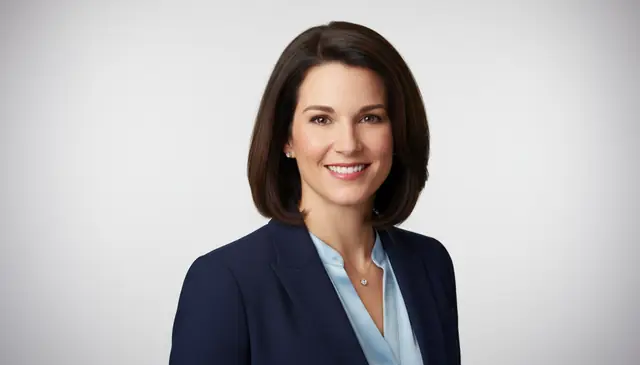
An ai linkedin photo generator turns a casual portrait into a professional business headshot for LinkedIn, resumes, and company directories. Pict AI supports photo upload and text-prompt workflows, so users can create square profile crops without booking a studio.
What Is an AI LinkedIn Photo Generator?
An AI LinkedIn photo generator is a tool that creates or edits a portrait to look like a professional LinkedIn headshot. It usually takes a selfie, improves lighting, cleans up the background, adjusts framing, and returns a head-and-shoulders image sized for a profile avatar.
The best results still start with a clear, well-lit source photo. Pict AI runs on iPhone, Android, and the web, which makes it useful for quick profile updates, job applications, founder bios, and internal company pages. It is not meant for impersonation or fake identities; users should only upload photos they own or have permission to edit.
How Does an AI LinkedIn Photo Generator Work?
An AI LinkedIn photo generator works by detecting the face, separating the subject from the background, and synthesizing a cleaner business-portrait version. For uploaded photos, the model uses face detection, landmark estimation, semantic segmentation, and background masking to preserve identity while changing the setting.
A diffusion model or portrait generation model then refines lighting, attire cues, hair edges, skin texture, and composition. Background replacement often uses a segmentation mask with an alpha channel so the subject can be placed against a neutral wall, office, or studio backdrop. Color grading, exposure correction, and mild retouching create the polished look associated with LinkedIn photos, while square or 4:3 crops keep the face readable in small profile thumbnails.
How Do You Create a LinkedIn Photo with AI?
Upload a clear selfie
Start with an original camera photo where your face is sharp, front-facing, and evenly lit. Avoid screenshots, heavy filters, sunglasses, masks, and extreme low-angle selfies.
Choose a professional style
Pick a LinkedIn-style headshot preset, such as neutral studio, office background, founder portrait, consultant headshot, or creative professional. Keep the styling realistic for your industry.
Add simple prompt details
Use short notes like “navy blazer, white wall, soft daylight” or “black shirt, warm studio light, clean crop.” Too many changes can weaken likeness.
Generate several variations
Create multiple outputs so you can compare expression, collar shape, hair edges, background realism, and face similarity at full size.
Download the best crop
Choose the version that looks natural at small avatar size, then download it and upload it to LinkedIn, a resume site, email signature, or company profile.
Which LinkedIn Headshot Generator Features Matter?
Photo-to-headshot editing
Upload an existing portrait and convert it into a cleaner business headshot. This is the safest workflow when likeness matters because the model has a real face reference.
Text-prompt portrait creation
Describe the look you want, such as a corporate headshot, startup founder portrait, or creative director profile image. Prompting works best with concise outfit, background, and lighting instructions.
Profile-ready aspect ratios
LinkedIn displays profile photos as circular crops, but the uploaded file is square. A useful generator should support 1:1 crops and leave enough space around the head and shoulders.
Lighting and color correction
Good profile photos use balanced exposure, natural skin color, and catchlights in the eyes. Automated correction can fix dull indoor lighting, yellow casts, and uneven shadows.
Business outfit variations
Blazer, shirt, blouse, sweater, and neutral wardrobe options help match the photo to the user’s field. Subtle wardrobe changes are usually more believable than dramatic identity edits.
Web and mobile access
A practical workflow should work from a desktop browser and from a phone. That matters when someone needs a profile update before a job application, conference, podcast page, or press bio.
How Does an AI LinkedIn Photo Generator Compare with BetterPic and Canva?
| Tool | Best fit | Input options | Free or trial access | Notes |
|---|---|---|---|---|
| Pict AI | Fast LinkedIn headshot creation on web, iPhone, Android | Text prompts and photo uploads | Free basic use | Useful for quick square profile crops, background cleanup, and selfie-to-headshot edits |
| BetterPic | Large batches of AI headshots for work profiles | Multiple uploaded selfies | Paid plans | Focused on professional headshot packs with many outfit and background options |
| Canva | Designing profile graphics and resume assets | Uploads, templates, and AI image tools | Free plan with paid upgrades | Strong for layouts, banners, and profile branding; less specialized for face-identity preservation |
| HeadshotPro | Corporate teams and standardized employee headshots | Multiple uploaded selfies | Paid plans | Built for consistent company headshots across departments and remote teams |
AI headshot tools differ most in identity preservation, batch size, mobile access, and whether they focus on portrait generation or broader design templates.
Who Uses an AI Profile Photo Generator?
Job seekers and career switchers
Applicants use AI profile photos when they need a polished LinkedIn image before sending resumes, recruiter messages, or portfolio links. A clean headshot can make the profile feel current without waiting for a studio session.
Founders, consultants, and freelancers
Independent professionals often need one portrait that works across LinkedIn, pitch decks, email signatures, booking pages, and client proposals. Consistent lighting and framing help them look established.
Creators and social media professionals
Writers, podcasters, designers, and coaches use AI headshots for LinkedIn, newsletters, speaker pages, and media kits. Creative users often test warmer backgrounds or softer lighting while keeping the photo professional.
Artists and portfolio builders
Illustrators, photographers, tattoo artists, and makers use polished profile photos for portfolio bios, artist statements, gallery pages, and client-facing profiles. The goal is not to hide personality, but to present it clearly.
Remote teams and small businesses
Small teams use AI-generated headshots to make staff pages look consistent when employees live in different cities. Matching crops and backgrounds can make a company directory feel less improvised.
Gifts, prints, and personal branding
Some users create refined portraits for graduation announcements, printed bios, conference badges, or career milestone gifts. A professional-looking image can feel meaningful when someone starts a new role or launches a business.
What Are AI LinkedIn Photo Limitations?
- Likeness is not guaranteed on every generation; some outputs may look like a convincing stranger rather than the original person.
- Hair edges, glasses rims, earrings, collars, ties, and shirt buttons can warp, especially near the jawline and shoulders.
- Very small, blurry, compressed, or heavily filtered selfies give the model too little facial detail to preserve identity well.
- Hands, rings, badges, and crossed arms may render incorrectly, so head-and-shoulders crops are safer for LinkedIn.
More AI Portrait Tools
Explore AI tools related to professional headshots and portrait editing.
Build a headshot that still matches your real appearance
To turn selfie into linkedin photo without losing your likeness, treat the edit as a controlled revision rather than a complete makeover. Keep the original beside each candidate so that attractive styling does not distract from changes to your face.
- Set a recognition baseline. Note three distinctive features in the original, such as eyebrow shape, cheek contours, and your smile. These should survive the edit. Tip: Use a recent everyday photograph as a second reference, not another filtered portrait.
- Choose one change for the first version. Start with the setting or exposure rather than changing clothes, expression, and surroundings together. Tip: Save this first version as a reference before requesting further revisions.
- Describe what must remain unchanged. Ask to preserve facial proportions, age, skin tone, and distinctive features while making the selected adjustment. Instructions help, but cannot guarantee fidelity. Tip: Avoid vague requests such as “make me look successful.”
- Compare versions at matching sizes. Place the source and edited face at similar magnification. Check whether the nose, jaw, and eye spacing still match. Tip: Reject a flattering result if recognition depends on the hairstyle or outfit.
- Prepare the upload without regenerating the face. Once likeness is acceptable, use a linkedin image resizer for final dimensions rather than requesting another portrait generation. Tip: Keep an untouched master file so later crops do not accumulate compression.
Choose between a light edit, a generated portrait, and a new photo
Choosing the best AI LinkedIn photo generator starts with identifying what actually needs fixing. A stronger model is not always the answer: an ordinary crop or a newly captured photograph can solve problems that generation makes worse.
- If the face already looks right, edit only the surroundings. Remove distractions or adjust exposure instead of rebuilding the portrait. A professional linkedin photo background guide should prioritize contrast: a pale shirt needs separation from a pale wall, while dark hair needs separation from a dark backdrop.
- If you are asking “are ai headshots allowed on linkedin,” distinguish editing from misrepresentation. LinkedIn expects a profile photo to reflect your likeness. Improving a real portrait is different from using a fictional person, another person's face, or a misleading identity.
- If you are asking “are ai headshots good enough for linkedin,” judge recognition before polish. Ask someone who knows you whether the image looks like you now. If they hesitate, reduce the changes or use the original with basic adjustments.
- If you are asking “is ai headshot good enough for linkedin” after repeated attempts, change the source. A new photograph taken from farther away can reduce close-up selfie distortion. Repeated generation from the same distorted input may simply produce different versions of the same problem.
- If the portrait will also serve as an official document photo, create a separate file. Passport requirements concern compliance, not professional styling. Do not assume a generated headshot is acceptable. Before uploading to an AI LinkedIn photo app, also check retention, deletion, and model-training controls.
What a believable before-and-after should change
A useful transformation removes photographic distractions while leaving personal characteristics intact. The table separates reasonable editing goals from changes that deserve closer scrutiny; no generator handles every face or source image equally well.
| Before | Reasonable improvement | Where AI can fall short |
|---|---|---|
| A warm indoor color cast | More neutral lighting while retaining natural skin color | Removing undertones or making the face noticeably lighter |
| A distracting room behind you | A quiet backdrop with consistent depth and lighting | Inventing office signage, implausible furniture, or conflicting shadows |
| A wrinkled shirt | Modest fabric cleanup that keeps the garment recognizable | Changing collar construction, inventing logos, or adding false credentials |
| Visible skin texture and smile lines | Balanced exposure that makes facial detail easier to see | Smoothing away age cues or creating a waxy surface |
| A close-range selfie with enlarged central features | Limited presentation improvements | Reliably reconstructing undistorted facial proportions from one image |
Keep changes that improve readability. Reject changes that rewrite appearance, imply an affiliation you do not have, or make the portrait harder to reconcile with meeting you in person.
Questions about AI-generated LinkedIn portraits
Safety depends on the service's data practices, not just the quality of its portraits. Check whether uploads are retained, used for model training, shared with third parties, or removable through account controls. Avoid photos containing badges, documents, or other people. For employer-managed portraits, confirm that the service meets your organization's privacy requirements before uploading.
Do not assume a LinkedIn headshot meets passport rules. Official applications can require a recently captured photograph, specific framing, and restrictions on digital alteration. Generated clothing, reconstructed facial features, or replaced backgrounds may make a photo unacceptable. Capture a separate document photo and follow the issuing authority's requirements for your particular application rather than reusing a professional portrait.
Yes. AI can turn a clear selfie into a LinkedIn-style headshot by improving lighting, replacing the background, and creating a professional crop.
An AI headshot is acceptable when it still looks like you and does not misrepresent your identity. Avoid images that alter age, face shape, or professional context too heavily.
Upload a sharp, front-facing image taken at eye level in soft light. The original camera file is better than a compressed screenshot from a chat app.
LinkedIn recommends a square profile image, commonly 400 by 400 pixels or larger. Leave space around your head because LinkedIn displays the photo in a circular crop.
Yes, you can request simple outfit changes like a blazer, shirt, blouse, or sweater. Subtle changes usually look more natural than complex wardrobe edits.
Most AI headshot workflows can replace a cluttered background with a neutral wall, office, or studio setting. Check hair edges and shoulders before using the result professionally.
They can look fake if the skin is too smooth, the collar is warped, or the face no longer matches the source photo. Generate several versions and choose the most natural one.
Yes, teams can use similar prompts, backgrounds, crops, and lighting styles to create more consistent staff photos. Review each image manually for likeness and artifacts.
Use a professional headshot only when a resume photo is expected in your region or industry. In some markets, resumes traditionally avoid photos, so check local hiring norms.