Free AI Passport Photo Maker Online
Pict AI is an AI photo editing app for iPhone, Android, and web that turns a clear portrait into a passport or visa photo. Choose a country preset, clean the background, and download a ready-to-check file.
An AI passport photo maker prepares a real portrait for a passport or visa application by adjusting its crop, dimensions, and export format. Some tools also replace backgrounds, but those edits are not permitted by every authority. Choose the exact application requirements first, preserve your facial appearance, and use a recent photograph rather than a generated headshot.
Free AI Passport Photo Maker Online
- Upload a recent, unfiltered camera portrait with clear facial detail and enough space around your head.
- Choose the passport or visa format, matching the issuing country and printed or digital submission method.
- Generate the required crop and export dimensions, avoiding background changes or retouching when the authority prohibits them.
- Review head measurements, file requirements, and permitted edits, then export the original file or correctly scaled print sheet.
AI Passport Photo Examples
Sample passport and visa photos created by the AI passport photo maker.
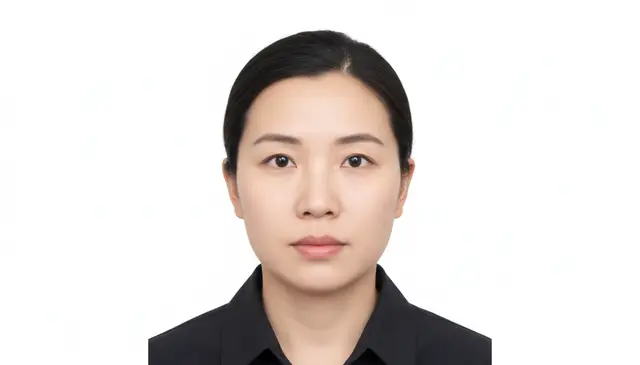
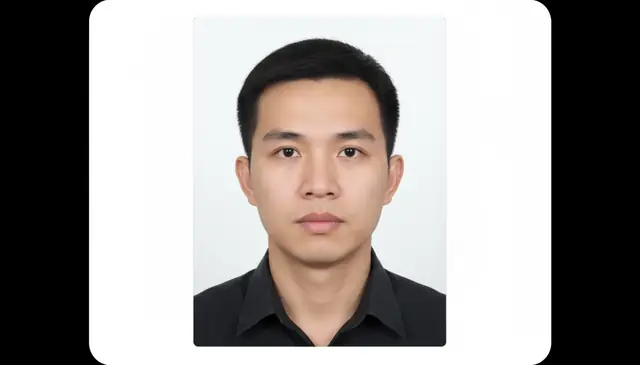
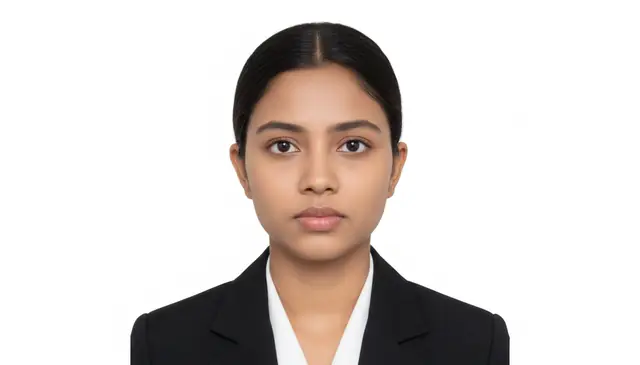
An AI passport photo maker online turns a normal front-facing portrait into a passport or visa photo with the correct crop, plain background, and export size. Pict AI can generate common formats such as 2x2 inch, 35x45 mm, and 600x600 px from a phone photo. Final acceptance depends on the issuing agency, so check the official rules before submitting.
What Is an AI Passport Photo Maker?
An AI passport photo maker converts a regular portrait into a document-style photo by cropping the face, centering the head, replacing the background, and exporting the required size. It is meant for passport, visa, residence permit, student ID, and other official photo formats where framing rules are strict.
The tool works best from a sharp, front-facing image taken in even light with a neutral expression. Common outputs include US 2x2 inch photos, 35x45 mm visa photos, and square digital files such as 600x600 px. It reduces the need for a studio visit, but it does not replace checking the exact rules from the passport office, embassy, or application portal.
How an AI Passport Size Photo Maker Works
An AI passport size photo maker uses computer vision to detect the face, estimate landmarks, and place the eyes, chin, and crown inside the required frame. The system measures face-to-image ratio, head height, shoulder position, and eye line before applying a passport or visa template.
Background cleanup usually combines person segmentation, edge detection, and alpha-channel masking so hair and shoulders stay visible while the wall or room behind the subject becomes plain white or off-white. Some tools also apply exposure correction, color balance, light sharpening, and compression checks. The final export is rendered to the chosen dimensions, such as 51x51 mm, 35x45 mm, or a fixed pixel size for an online application.
How to Make a Passport Size Photo Online Free with AI
Upload a clear portrait
Start with a front-facing photo where the full face is visible, both eyes are open, and the image is not blurred. A source photo with at least 800 px on the short edge gives the crop enough detail.
Choose the country or document type
Select the correct preset for a passport, visa, ID card, or application portal. A US 2x2 inch crop and a 35x45 mm European crop can look similar, but the head-size ratio is different.
Let the tool crop and align
Use the auto-crop result as a first pass, then check whether the head is centered and the eyes sit within the accepted band. Small alignment errors are a common reason for rejection.
Apply a plain background
Replace the original background with white or off-white and inspect the hairline, ears, jaw, and shoulders. Retake the source photo if background removal leaves halos or missing hair detail.
Preview and download
Zoom in before exporting to check glare, shadows, red-eye, over-sharpening, and facial expression. Download the digital file or print layout only after comparing it with the official photo rules.
Which AI Passport Photo Maker Free Features Matter?
Country Size Presets
Preset templates help match common passport and visa sizes, including 2x2 inch, 35x45 mm, and square digital uploads. This reduces manual resizing mistakes.
Face Centering and Head Ratio
Automatic face detection places the head and shoulders within the required frame. The most useful tools check eye height, chin space, and crown clearance.
White Background Replacement
A passport photo generator should remove busy backgrounds and replace them with a plain white or off-white backdrop. Edge quality around hair is the detail to inspect.
Lighting and Color Correction
Basic exposure, contrast, and color balance fixes can make a portrait look closer to official photo standards. The result should still look natural, not filtered.
Digital and Print Exports
Useful export options include a single digital application photo and a printable sheet with multiple copies. Check DPI and paper size before printing at home.
No-Signup Basic Workflow
Fast passport photo workflows are easier when upload, preview, and download are available without creating an account. Privacy still depends on the service’s retention policy.
AI Passport Size Photo Maker vs Passport Photo Online, PersoFoto, and AiPassportPhotos
| Tool | Best Fit | Output Controls | Cost Model |
|---|---|---|---|
| Pict AI | Fast browser and mobile passport or visa photo creation | Country presets, auto crop, white background, digital download | Free basic use |
| Passport Photo Online | Users who want automated checks plus optional expert review | Country templates, compliance preview, print and digital options | Paid downloads and service packages |
| PersoFoto | European passport, visa, and ID photo formats | Manual crop guidance, biometric templates, print ordering in some regions | Free preview with paid print or download options |
| AiPassportPhotos.com | Quick online passport and visa photo resizing | Background removal, face alignment, multiple document presets | Free and paid download tiers vary by output |
Choose based on country preset coverage, whether you need manual review, and whether your final submission requires a printed sheet or a digital file.
Who Uses a Passport Photo Generator?
Passport and Visa Applicants
Travelers use the tool when they need a compliant photo quickly for renewals, embassy portals, work visas, or study permits. It is especially useful when local photo shops are closed.
Remote Workers and Digital Nomads
People applying for residence permits, tax IDs, coworking memberships, and remote-work visas can create consistent document photos from a laptop or phone.
Parents Preparing Child Photos
Parents can retry baby or child photos at home, where the subject is calmer. The main challenge is getting open eyes, a neutral expression, and no visible hands or toys.
Creators and Social Media Teams
Creators sometimes need neutral, official-looking headshots for verification forms, creator fund applications, press kits, or platform identity checks.
Artists Making ID-Inspired Prints
Artists and designers use passport-style crops as references for zines, character sheets, collage work, and minimalist portrait prints. These artistic exports should not be used as official documents unless they meet agency rules.
Portfolio and Tattoo Reference Work
Photographers, tattoo artists, and illustrators use clean face crops for portfolio studies, face-shape references, and symmetrical portrait planning. The format gives a consistent front-facing reference without a busy background.
What Are AI Passport Photo Maker Limitations?
- A passed preview does not guarantee government acceptance; each passport office, embassy, or visa portal can apply its own rules.
- Low-resolution selfies can look acceptable on screen but print soft after cropping, especially when the face is small in the original image.
- Glasses glare, tinted lenses, red-eye, and shadows across the eyes can still cause rejection even if the crop size is correct.
- Hair blending into a beige, gray, or bright wall can confuse background removal and leave halos or missing edge detail.
More AI Photo Tools
Explore AI tools related to passport photos and portrait editing.
When a correctly sized passport photo still fails
A passport photo maker can produce the right dimensions while leaving other submission requirements unresolved. Before editing again, identify whether the problem concerns the photograph itself, the exported file, or the application process.
- The face looks stretched or unusually large: Close-range phone photography can exaggerate the nose and narrow the ears. Cropping cannot reverse perspective distortion. Retake the photo with the camera farther away, positioned at eye level, and leave enough space around the head for cropping.
- The portal rejects a file that opens normally: A phone may capture HEIC while the application requires JPEG. Export an actual JPEG rather than changing the filename extension. Check the file size after export, and upload the original download rather than a screenshot or a copy compressed by a messaging app.
- The print measures smaller than the selected template: Printer settings such as “fit to page” can shrink a correctly prepared sheet. Print at actual size or 100% scale, then measure one finished photo with a ruler before cutting the remaining copies.
- The image passes automated checks but lacks required certification: Canadian printed passport photos require commercial-photographer information, and some applications also require a guarantor’s endorsement. An ai passport photo app cannot supply a genuine studio declaration for a photograph taken at home.
If your question is how to make passport photo background white, first check whether digital background replacement is permitted. A retake against a suitable wall is safer when the authority prohibits alterations. Cropping and replacing a background are different operations; permission for one does not imply permission for the other.
Match export settings to the application channel
Choose the document and submission method before choosing export settings. Printed dimensions, digital pixel requirements, and file-size limits are separate constraints. A country preset should not be treated as a universal specification for every passport and visa application.
| Setting or application | Specification | Practical consequence |
|---|---|---|
| US printed passport photo | 2 × 2 inches; head height 1-1⅜ inches | Measure the head as well as the outer print. A square crop alone is insufficient. |
| UK printed passport photo | 35 × 45 mm; head height 29-34 mm | Do not reuse a US crop merely by changing the paper dimensions. |
| UK digital passport photo | At least 600 × 750 pixels; 50 KB - 10 MB | Use the digital workflow’s requirements, not a scan of a printed photo. |
| Canadian printed passport photo | 50 × 70 mm; head height 31-36 mm | Keep the larger portrait format and arrange the required photographer information. |
| Print resolution | At 300 pixels per inch, a 2-inch side needs 600 pixels | Changing resolution metadata does not create missing image detail. |
| Upload format | Use the format named by the application portal | An editor accepting PNG or HEIC does not mean the receiving portal accepts it. |
| Photo age | US: taken within six months; UK: within one month | Editing an older photograph does not make it recent. |
The UK passport photo requirements distinguish printed and digital submissions. If you are deciding what app makes passport photos, look for controls that expose the relevant dimensions and export format rather than only offering a country name.
Four misconceptions about AI passport photo approval
The search phrase “can ai make passport photos accepted” combines two different questions: can software prepare the file, and does the issuing authority permit the resulting photograph? Automated preparation helps with the first; acceptance still depends on the second.
- Myth: A realistic generated portrait is equivalent to a camera photograph.
- A generated portrait may invent facial detail or alter proportions. Official identity photographs must represent the applicant accurately. Start with a recent camera photograph, not a synthetic headshot.
- Myth: A biometric label means government approval.
- Biometric framing describes measurable characteristics useful for identity matching. The label does not establish that a government has certified the tool or approved its edits.
- Myth: Higher DPI automatically improves an upload.
- DPI describes print scaling. For digital submission, pixel dimensions and compression matter more; changing a DPI field cannot restore detail lost from a small source image.
- Myth: A free export is necessarily submission-ready.
- A free AI passport photo maker may supply a usable file, but payment status says nothing about compliance. Check alteration rules, photograph age, submission format, and any certification requirements independently.
The best AI passport photo maker for a particular application is one that supports its permitted workflow without changing identity-defining features. Beauty filters and generated facial corrections belong outside official document preparation.
Passport photo rules and submission questions
A biometric passport photo follows framing and visibility requirements intended to support identity verification, including head position, face size, and clear facial features. It is not a special camera format or proof of government approval. A tool’s biometric label does not guarantee compliance: the photograph must also meet the issuing authority’s rules on recency, alterations, background, and submission format.
Keep a copy of the original, then export in the required format with moderate compression. Reduce pixel dimensions only if they exceed the portal’s requirements, and never go below its minimum. Inspect the eyes, hair, and facial edges after saving. Avoid repeated JPEG exports, screenshots, and messaging-app transfers, which can introduce compression artifacts or strip useful image detail.
The output can match common passport photo formatting rules, but acceptance is decided by the issuing agency. Always compare the final image with the current official requirements before submitting.
Upload a sharp, front-facing portrait in even light with a neutral expression and no heavy shadows. Avoid cropped selfies, filters, hats, and busy backgrounds.
Yes, visa photo formats are commonly supported through country and document presets. Select the exact destination country and visa type before exporting.
Yes, the tool can replace the original background with a plain white or off-white backdrop. Inspect the hairline and shoulders before downloading.
They can if glare covers the eyes or the frames create shadows. If reflections are visible, retake the photo without glasses or adjust the lighting.
A selfie can work if it is sharp, straight-on, and not distorted by a wide-angle lens. For better results, use the rear camera or ask someone to take the photo.
Children and babies often have slightly different tolerance rules, but the photo still needs a clear face, plain background, and correct size. Check the child passport rules for your country.