Pixar-Style Filter App
Turn portraits, pet photos, and everyday shots into a friendly 3D cartoon look with expressive features, smooth shading, and bright cinematic color. Designed for mobile editing on iPhone and Android.
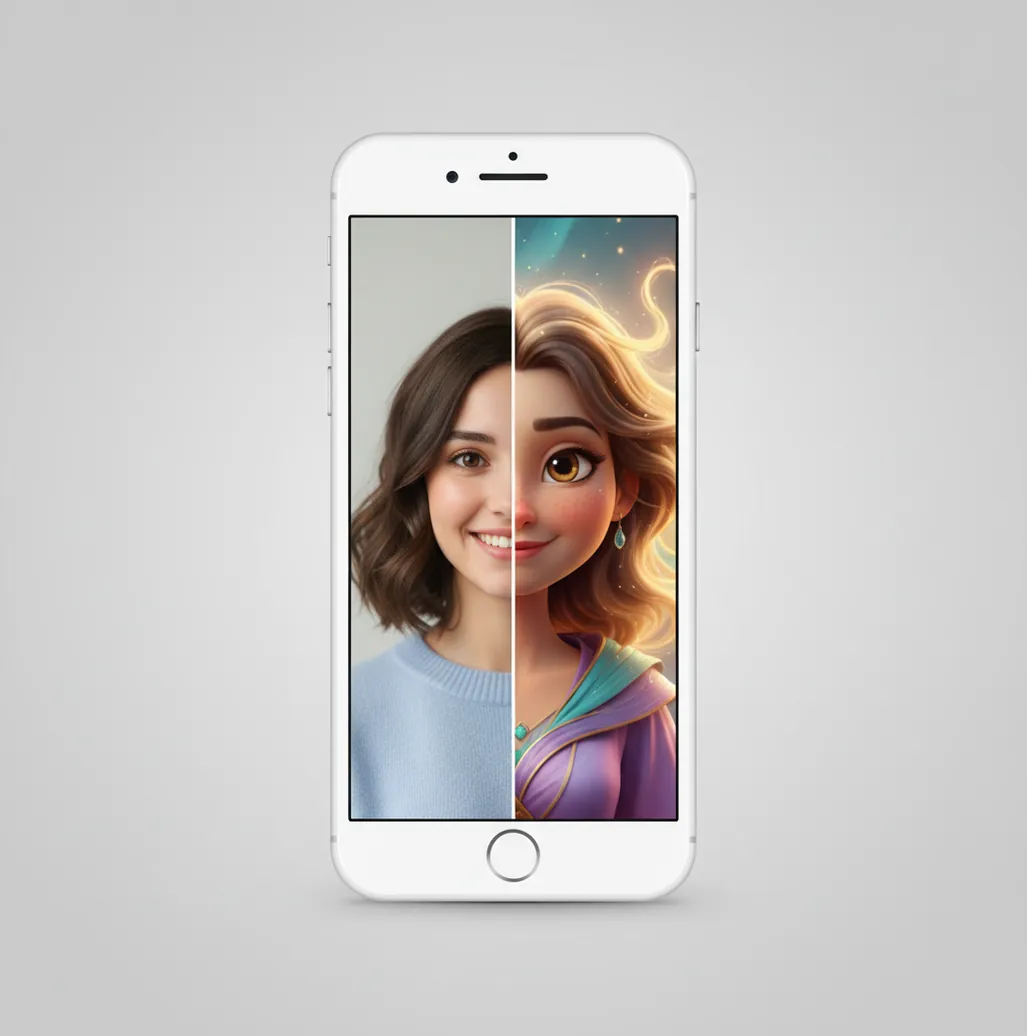
Example: photo to cartoon-style, animated movie style in the Pict.AI app (results vary by photo and settings).
A pixar-style filter app turns a normal photo into an animated movie style image with rounded facial proportions, polished lighting, and cartoon-like detail. Pict AI offers this as a creative photo-editing workflow for mobile users, not as an official Pixar or Disney product. The effect works best on clear, well-lit portraits with visible faces and simple backgrounds.
What Is Pixar-Style Filter App?
A pixar-style filter app is a photo editor that changes a real image into a high-detail animated movie style portrait. People usually use the phrase to describe a warm 3D cartoon aesthetic: larger expressive eyes, softened skin texture, rounded face shapes, controlled highlights, and saturated color grading.
The term is descriptive, not official. It does not mean the tool is connected to Pixar or Disney, and it should not be used to copy protected characters or a studio’s exact visual identity. In practical editing, the goal is a family-friendly cartoon portrait, pet illustration, profile image, gift print, or social post that feels inspired by modern animation rather than tied to a specific film.
How Pixar-Style Filter App Works
A pixar-style filter app typically analyzes the photo, identifies the subject, and redraws the image with an animation-oriented model. The workflow may include face detection, facial landmark mapping, subject segmentation, edge detection, depth estimation, and color grading before the final stylized render is produced.
In an AI version, a diffusion model or image-to-image transformer keeps the broad pose and composition while changing surface detail: skin becomes smoother, eyes gain catchlights, hair is simplified into shaped clusters, and the background may be softened. Some apps also use masks or an alpha channel to separate the subject from the background, which helps preserve clean edges around hair, glasses, ears, and clothing.
How to Make Animated Movie Style Photos
Choose a clear photo
Start with a sharp portrait, pet photo, or couple image. Front-facing photos with soft light and minimal motion blur usually produce cleaner cartoon facial features.
Open the mobile editor
Import the image from your camera roll in the iPhone or Android app. Crop first if the face is too small or the background distracts from the subject.
Select an animated style
Pick a cartoon, 3D character, or animated movie style preset. Avoid prompts that ask for exact copyrighted characters or a specific studio replica.
Adjust strength and detail
Use a lower intensity when identity accuracy matters, such as profile photos or family prints. Use stronger settings for playful social posts, thumbnails, and fantasy characters.
Export and review
Save the best version, then check eyes, teeth, glasses, hands, and hair edges. If those areas look distorted, rerun with a cleaner crop or softer style strength.
Pixar-Style Filter App Features
Animated portrait styling
Transforms selfies and portraits into rounded, expressive cartoon characters with smoother skin, brighter eyes, and a polished 3D illustration feel.
Pet-friendly cartoon looks
Works on many dog and cat photos, especially when the animal is well lit and facing the camera with visible eyes and fur shape.
Adjustable style strength
Lets creators choose between a subtle animated retouch and a more dramatic character transformation, depending on the final use.
Mobile-first workflow
Designed for quick edits from a phone camera roll, making it practical for profile pictures, stories, group chats, and creator assets.
Share-ready exports
Produces finished images suitable for social posts, avatars, digital invitations, small prints, and mood boards without needing desktop editing.
Pixar-Style Filter App vs Lensa, ToonMe, and Picsart
| Tool | Best For | Workflow | Control Level | Notable Limits |
|---|---|---|---|---|
| Pict AI | Fast animated movie style portraits, pets, and social images | Mobile app editing with style selection and export | Low to moderate, depending on style settings | Results vary by lighting, face angle, and photo clarity |
| Lensa | AI avatars and polished portrait variations | Upload photos, generate stylized portrait sets | Moderate preset control | Often focused on avatar packs rather than single-photo cartoon correction |
| ToonMe | One-tap cartoon and caricature transformations | Template-based mobile cartoon effects | Low preset control | Can look playful but less consistent for refined animated movie realism |
| Picsart | General editing, filters, backgrounds, and social graphics | Mobile and web editor with many manual and AI tools | Moderate to high | More flexible, but cartoon results depend heavily on chosen effects |
Pict AI fits users who want a quick mobile route to an animated portrait, while Lensa, ToonMe, and Picsart may suit avatar packs, novelty cartoons, or broader graphic editing.
Who Uses Animated Movie Photo Filters
Artists exploring character ideas
Illustrators and hobby artists use cartoonized portraits as loose references for facial proportions, color palettes, and mood before drawing an original character.
Creators making thumbnails
YouTubers, streamers, and short-form creators use animated portraits for eye-catching thumbnails, channel icons, reaction images, and recurring visual identities.
Families creating gifts and prints
Parents and partners turn family, couple, or baby photos into playful portraits for birthday cards, holiday prints, invitations, and framed keepsakes.
Pet owners making cute edits
Dog and cat photos often become cartoon avatars, memorial images, stickers, or personalized gifts when the pet’s eyes and face shape are clear.
Social media users refreshing profiles
People use animated movie style edits for friendly profile pictures that feel more personal than a stock avatar but less formal than a normal selfie.
Tattoo and portfolio reference planning
Some creators use the output as a mood reference for soft character poses, pet memorial tattoos, or portfolio studies, then redraw the final artwork manually.
Animated Movie Style Filter Limitations
- Results are strongly affected by source quality; blurry photos, harsh shadows, and low-resolution screenshots usually produce weaker renders.
- The effect may change identity details such as nose shape, jawline, eye spacing, age cues, freckles, or hair texture.
- Hands, teeth, glasses, earrings, and complex hair edges can show artifacts because these areas are harder for AI stylization models to preserve.
- Side profiles, covered faces, extreme expressions, group photos, and busy backgrounds can reduce likeness and create uneven cartoon proportions.
Image Sizes and Export Formats for Animated Portraits
A convincing animated portrait can still look soft after uploading or printing. Check the saved file’s pixel dimensions rather than relying on its appearance in the editor preview. The figures below are practical targets, not guaranteed export options in every filter app.
| Setting | Practical target | Why it matters |
|---|---|---|
| Square avatar | 1024 × 1024 pixels; 1:1 ratio | Leaves room for circular cropping without cutting off hair or ears. |
| Portrait feed image | 1080 × 1350 pixels; 4:5 ratio | Uses a taller frame while keeping the face prominent. |
| Full-screen story | 1080 × 1920 pixels; 9:16 ratio | Allows space above and below the subject for interface overlays. |
| Small photo print | 1200 × 1800 pixels for 4 × 6 inches at 300 ppi | Provides a useful print-resolution target without assuming the filter generates that size. |
| JPEG export | High-quality setting, if available | Suitable for sharing opaque portraits; repeated saving can introduce compression artifacts. |
| PNG export | Use when transparency is needed and supported | Preserves an existing transparent background; choosing PNG does not remove the background. |
Keep the original export and make resized copies for each destination. Enlarging a small image changes its dimensions but does not automatically recover missing facial detail. Inspect an enlarged version at full size before ordering a print.
When planning how to make disney pixar style portraits with ai, separate the visual brief from the delivery specifications. A studio ghibli filter points toward a different animation aesthetic; the search phrase “ai ジブリ フィルターで写真を変換” likewise concerns Ghibli-style photo conversion, not file quality. The phrase “flower language filter in pict.ai app” also concerns an effect rather than an export specification. Define the intended look first, then choose dimensions and format for the destination.
Pixar-Style Photo Filter Questions
Use the same style preset, crop proportions, and lighting conditions across the set. If the editor supports a reference image or saved settings, reuse them. Avoid changing several prompt details between portraits. Generative filters can still vary facial proportions, clothing, and colors, so compare the finished images together rather than approving each one separately.
A photo filter processes a still image; it does not necessarily support video. Applying it separately to extracted frames can produce flickering faces, shifting textures, and inconsistent backgrounds. For moving footage, choose a video stylization tool with temporal consistency controls, then preview a short clip before processing the full recording. Check its duration and export-resolution limits.
No. The phrase is used descriptively for a general animated movie style, not to claim any Pixar or Disney affiliation.
No. The intended use is creative cartoon-style photo transformation, not exact replication of protected characters or studio-owned designs.
Use sharp, well-lit portraits where the face is visible and not covered. Simple backgrounds and natural expressions usually give the cleanest results.
Yes, pet photos can work well, especially front-facing images with clear eyes and good lighting. Long fur and dark shadows may need a second attempt.
This specific animated movie style workflow is described for mobile app use. Check the product page for current iPhone, Android, and web feature availability.
Usually, but strong style settings can change identity details. If likeness matters, choose a clear photo and keep the effect intensity moderate.
Review the app’s license terms and avoid protected characters, trademarks, or unapproved likenesses. For paid campaigns, get permission from people shown in the image.
Glasses combine transparent lenses, reflections, and thin frames, which are difficult for stylization models. A sharper photo or lower style strength can help.
Yes, but group images are harder than single portraits because each face may receive different detail quality. For best results, use a clear, evenly lit photo.