AI Product Photos vs Photographer in 2026: Which Should You Choose?
AI product photos are best when you already have sharp source images and need fast, consistent catalog outputs. A product photographer is still the better choice when lighting, reflections, texture, color accuracy, or high-end campaign styling directly affect buyer trust.
AI Product Photos vs Photographer in 2026: Which Should You Choose?
- Upload a sharp product photograph with readable packaging, accurate color, and all edges visible in the frame.
- Choose a background or describe the scene, specifying which product details must remain unchanged.
- Generate a small batch of variations using the same framing and lighting instructions for each SKU.
- Review labels, proportions, accessories, and shadows against the source, then export approved images at your store’s required dimensions.
Example prompt: Create a clean ecommerce product photo: replace background with seamless pure white, add a soft realistic contact shadow under the product, keep label text sharp, preserve true colors, natural lighting, 1:1 square crop, high resolution
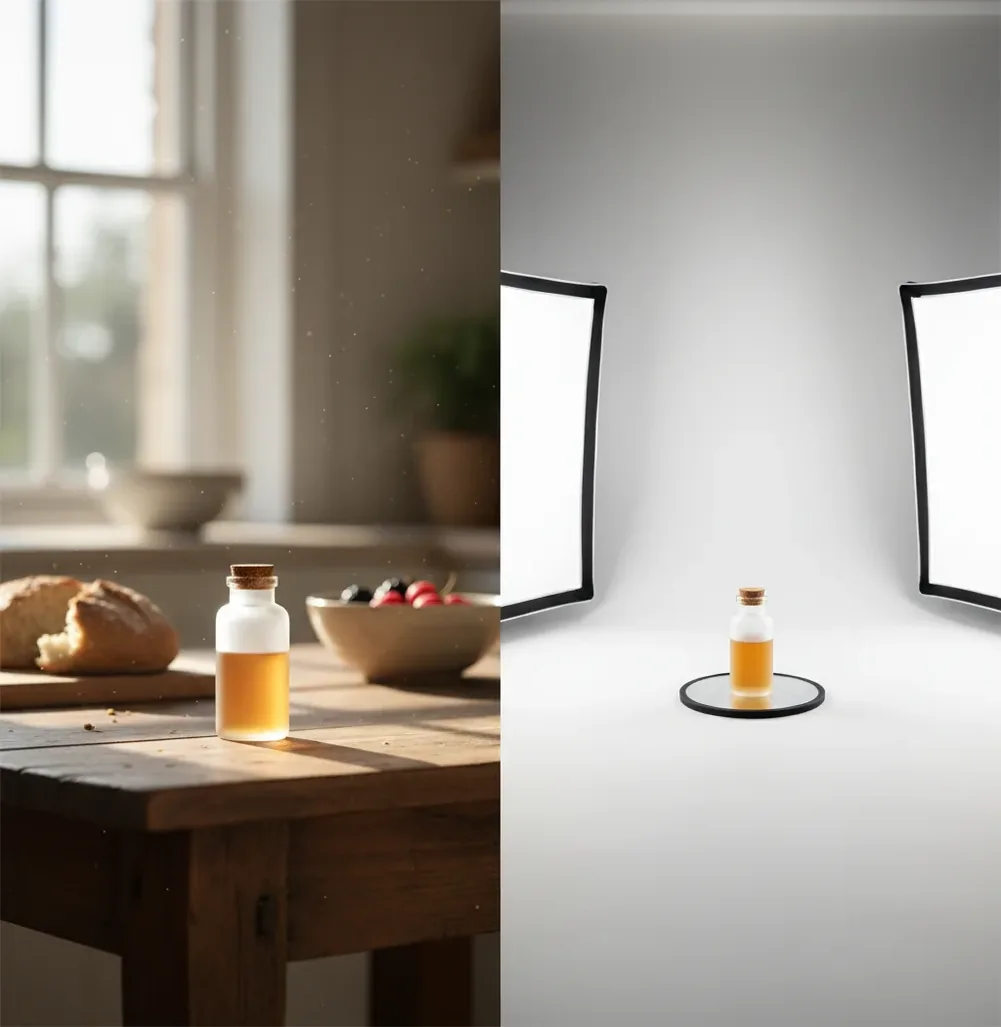
In 2026, choose AI product photos for background removal, clean ecommerce layouts, seasonal ad variations, and fast SKU consistency from decent source photos. Hire a photographer when the product has glossy, transparent, reflective, textured, or color-sensitive materials that require controlled lighting and true physical accuracy. Many small brands get the best result by shooting clean source images once, then using AI for repeat edits and variations.
What Is the Difference Between AI Product Photos and a Photographer?
AI product photography uses computer vision and generative models to edit an existing product image or create controlled variations, usually by changing the background, refining edges, adding shadows, cleaning dust, or producing lifestyle-style scenes. It is strongest when the product itself is already sharp, correctly exposed, and honestly represented.
A product photographer creates the original image using cameras, lenses, modifiers, styling, and retouching. That matters when light behavior is the image: glass bottles, chrome hardware, glossy cosmetics, jewelry, food, fabrics, and anything where texture or color drives the purchase. The real comparison is not just price; it is speed versus physical control.
How Does AI Product Photography Work in 2026?
Most AI product-photo tools start with segmentation, which predicts a pixel-level mask separating the item from its background. The model then uses that mask to remove the original environment, rebuild edge pixels, and place the product into a new scene with a white background, colored surface, studio gradient, or simple lifestyle setting.
Generative fill and diffusion models can synthesize missing pixels, contact shadows, props, and background texture based on the prompt and surrounding context. Tools such as Pict AI combine background replacement, cleanup, and catalog-style generation, but they still depend heavily on source quality. If the input photo is blurry, overexposed, or physically inaccurate, AI can make it cleaner without making it more truthful.
When Should You Use AI Product Photos Instead of Booking a Shoot?
Use AI product photos when the product is simple, matte, well-lit, and already captured clearly. The highest-value use cases are marketplace white backgrounds, consistent crops across many SKUs, social ad variations, seasonal backdrops, packaging mockups, and quick image refreshes for Shopify, Etsy, Amazon-style listings, email campaigns, or social posts.
AI also works well when you need volume. A small team can create hero images, square social crops, vertical story crops, and simple lifestyle variants in minutes instead of waiting for a studio slot. For candles, books, mugs, stationery, simple apparel flats, packaged goods, and handmade gifts, an AI-first workflow can give you clean commercial images without rebuilding a full studio every week.
When Is a Product Photographer Still the Better Choice?
Hire a product photographer when the product needs controlled light physics, tactile detail, or art direction that cannot be guessed from a flat image. Reflective metal, glass, transparent plastic, glossy cosmetics, jewelry, watches, textured leather, sheer fabric, food, and premium packaging often need real softboxes, flags, polarizers, props, and manual styling.
A photographer is also safer for hero campaigns, print ads, investor decks, premium portfolio pieces, brand launches, and products where color accuracy affects returns. If a customer buys because of the exact finish, surface grain, opacity, scale, or shine, the capture should be physical first. AI can still help afterward with cleanup, cropping, and alternate backgrounds.
How Do You Build an AI-First Product Photo Workflow?
Shoot one clean source set
Use a phone or camera on a stable surface, soft window light or a large diffuser, and a plain background. Capture the front, angle, detail, scale, and packaging views before editing.
Lock exposure and color
Keep lighting consistent across SKUs and photograph a neutral gray card or reference swatch if color matters. Avoid mixed lighting from windows and warm indoor bulbs.
Remove or replace the background
Upload the cleanest frame to an AI editor, isolate the product, refine the mask around handles, straps, leaves, labels, or fine edges, and generate a white or brand-colored background.
Create channel-specific crops
Export 1:1 for marketplace grids, 4:5 for social feeds, 9:16 for stories and short-form ads, and wider crops for landing-page banners.
Compare every export to the original
Check label text, color, material texture, contact shadows, scale, and edge detail at 100% and 200% zoom before publishing.
Which Product Photo Option Is Best for Your Use Case?
| Option | Best for | Main strength | Watch out for |
|---|---|---|---|
| AI product-photo tool, such as Pict AI | Fast catalog cleanup, white backgrounds, simple lifestyle variants, social crops | Minutes per image set when source photos are sharp and consistent | Can invent unrealistic reflections, shadows, props, or scale relationships |
| Freelance retoucher | Manual cleanup, compositing, color correction, edge repair, batch polish | Human judgment with more control than a one-click tool | Still needs a good original photo and clear revision instructions |
| Product photographer | Hero campaigns, reflective objects, premium branding, exact material rendering | Full control over capture, lighting, styling, lens choice, and physical accuracy | Higher cost, scheduling time, shot-list planning, and revision cycles |
| Free background remover | Quick cutouts, rough mockups, internal drafts, simple marketplace prep | Fast and accessible for basic edits | Limited controls, possible watermarks, unclear commercial terms, weaker masks |
For many ecommerce teams in 2026, the strongest pipeline is hybrid: photographer or careful in-house capture for the source images, AI for repeatable background systems, and manual review before publishing.
What Prompt Recipes Create Consistent AI Product Photos?
- Marketplace white: "Place the product on a pure white background, centered, realistic soft contact shadow, no props, no text changes, preserve exact label and shape, ecommerce catalog lighting."
- Soft studio gradient: "Keep the product unchanged. Add a warm light-gray studio gradient background, subtle floor reflection, softbox-style lighting from upper left, realistic shadow under the product."
- Brand color set: "Place the product on a matte [brand color] surface with a clean matching background, minimal props, premium skincare-style lighting, accurate scale, no extra logos."
- Seasonal social post: "Create a simple holiday-themed background with small out-of-focus props behind the product, shallow depth of field, realistic scale, product label fully readable."
- Gift or print mockup: "Show the product as a clean gift-ready object on a neutral tabletop, soft natural light, elegant negative space for copy, preserve all packaging details."
- Portfolio hero image: "Create a premium editorial product photo with controlled studio lighting, minimal composition, strong contact shadow, realistic material texture, no distortion."
What Are the Main Limitations of AI Product Photos?
- Reflective surfaces are hard because mirrors, chrome, glossy plastic, and glass depend on real reflected environments. AI may create highlights that look attractive but physically impossible.
- Transparent products can lose edge definition because the background is visible through the object. Bottles, acrylic, clear bags, and glassware often need controlled lighting and manual retouching.
- Fine edges may break during segmentation. Hair, lace, fringe, plant leaves, straps, tassels, and fuzzy textiles can show halos, missing fibers, or overly sharp cutouts.
- Color can drift between generations. For cosmetics, apparel, paint, ceramics, and food, compare exports against a calibrated reference or a real product swatch.
How Do You Check AI Product Images Before Publishing?
Zoom into the label and edges
Confirm that text, logos, seams, corners, and cutout edges are unchanged. Check at 100% for normal viewing and 200% for marketplace zoom behavior.
Verify color against a reference
Compare the export with the original file, physical sample, or color swatch. Be especially strict with apparel, cosmetics, art prints, and home decor.
Inspect shadows and grounding
Look for a believable contact shadow under the object. A floating product can make even a clean catalog image feel fake.
Test mobile and desktop crops
View the image in the actual storefront layout. A crop that works on desktop may cut off packaging, handles, or important text on mobile.
Confirm marketplace rules
Check background, margin, resolution, file type, and allowed prop rules for each platform before uploading final exports.
What Is the Simple Rule for Choosing AI or a Photographer?
Use AI when the product is already captured accurately and the task is presentation: cleaner backgrounds, better crops, consistent shadows, quick variations, and channel-specific exports. Use a photographer when the task is truth: accurate material behavior, difficult reflections, exact color, controlled styling, and images that must carry a premium campaign.
A practical 2026 rule is this: if the product would still sell from a clear phone photo, AI can probably improve it for ecommerce. If the product only sells because of how light moves across it, hire a photographer first, then use AI for secondary versions.
Keep building your product photo pipeline
Four Budget and Licensing Myths That Can Distort Your Decision
Myth: The lowest generation price means the cheapest product photos.
Fact: Compare cost per approved image, not cost per attempt. Include source photography, subscriptions, rejected outputs, retouching, and staff review time. A pict.ai vs dall-e comparison should account for how many usable images each workflow delivers from the same brief. Ten inexpensive variations offer little value if someone must repair labels or rebuild every crop.
Myth: A photographer’s quote and an AI subscription cover equivalent work.
Fact: A shoot quote may include styling, equipment, assistants, retouching, and specific usage rights; a subscription may cover only editing or generation. Before comparing totals, define the deliverables: SKU count, angles per item, final dimensions, revision rounds, and approval deadlines. For pict ai vs fotor, check which required tasks are included in the plan rather than comparing headline monthly prices alone.
Myth: Paying for an image automatically clears every commercial use.
Fact: Tool terms, photographer contracts, and third-party rights are separate issues. Check commercial-use permissions, licensing restrictions, and any recognizable people, artwork, or trademarks in the scene. In a pict.ai vs midjourney comparison, licensing deserves its own checklist. Permission to use an output commercially does not necessarily establish exclusive ownership or eliminate infringement risk.
Myth: An attractive generated scene can double as product evidence.
Fact: A lifestyle image can suggest a mood without reliably proving size, capacity, included accessories, or compatibility. Keep documentary photographs for those claims. If a generated scene adds a stand, cable, lid, or decorative attachment, buyers may assume it comes in the box. Separate illustrative campaign assets from images that demonstrate exactly what the customer receives.
Questions About Choosing AI or Studio Product Photography
A generated scene should not be treated as a measurement reference. AI can change apparent scale by altering perspective, nearby objects, or the product’s proportions. Use a real photograph with a ruler or a clearly labeled dimension diagram for size information. Add verified measurements manually, and check that arrows and labels correspond to the actual product.
Run a controlled image experiment on the same product, keeping price, copy, audience, and placement unchanged. Compare conversion rate and revenue per visitor, not just clicks. Monitor returns and complaints about appearance as well. Allow enough traffic before deciding; an attractive image that increases clicks but creates inaccurate expectations may perform worse overall.
AI is better for speed, volume, background changes, and consistent ecommerce layouts. A photographer is better for exact lighting, reflections, texture, color, and high-end brand images.
Yes, if the image accurately represents the product and meets the platform rules for background, crop, margins, resolution, and file format. Always check for distorted labels, incorrect color, and unrealistic shadows before upload.
Avoid relying only on AI for glass, chrome, jewelry, glossy packaging, transparent items, color-critical apparel, food, or any product where material accuracy affects purchase decisions.
They can if the edit changes color, size, texture, finish, included accessories, or product condition. Honest AI edits that only improve presentation are much less risky.
AI tools are usually faster and lower-cost for repeat edits, while photographers may charge by day, project, or final image depending on styling, usage, and retouching. The better value depends on whether you need visual consistency or physical capture quality.
AI can sharpen or clean a blurry image, but it cannot reliably recreate true product detail that was never captured. For labels, textures, and small hardware, reshooting is usually safer.
Matte, simple, well-lit products work best, including books, candles, mugs, stationery, boxed goods, simple accessories, and many handmade items. Clear edges and readable labels make AI edits more reliable.
Use high-resolution exports large enough for zoom, commonly at least 1500 to 2000 pixels on the long side, and create separate crops for marketplace squares, social feeds, vertical stories, and website banners.
Small brands should usually start with one clean, consistent source shoot, then use AI for background systems, social variants, and catalog consistency. Book a studio when the product finish, lighting, or campaign concept needs physical control.