What App to Restore a Grandparent's Wedding Photo?
The best app to restore a grandparent's wedding photo is one that repairs scratches, fading, dust, and creases without making faces look plastic. Start with a high-resolution scan, run a gentle AI restoration pass, then compare the result against the original print before exporting for a frame, album, or family gift.
What App to Restore a Grandparent's Wedding Photo?
- Upload a clear scan of the wedding portrait, keeping an untouched copy for comparison.
- Choose damage repair or describe the fading and scratches, requesting unchanged faces, clothing, and original tones.
- Generate a restored version with optional colorization and beauty effects disabled where the tool allows.
- Review faces, rings, and lace against the original, then export the version that preserves recognizable details.
Example prompt: Restore an old wedding photo scan: remove scratches and dust, reduce crease shadows, recover faded midtones, keep natural film grain, avoid plastic skin, preserve lace and suit texture, output print-ready high resolution
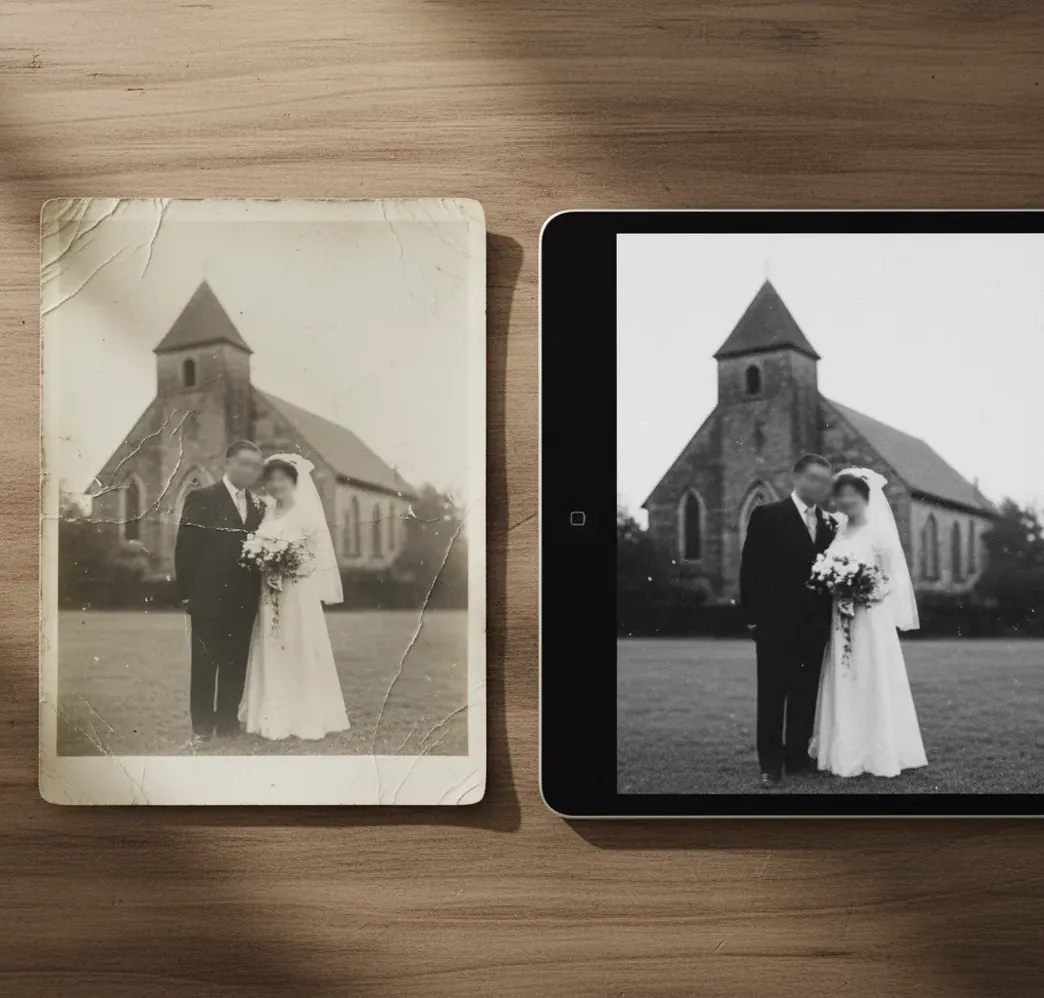
Use an AI photo restoration app to restore a grandparent's wedding photo when the print has fading, scratches, dust, cracks, or low contrast. For the most natural result, scan the photo at 600 DPI, repair damage first, adjust contrast gently, and preserve original grain, wrinkles, lace texture, and facial detail.
What Does an App to Restore a Grandparent's Wedding Photo Do?
An app to restore a grandparent's wedding photo repairs age-related damage in a scanned or photographed print. The core tasks are scratch removal, dust cleanup, crease reduction, contrast recovery, sharpening, and sometimes reconstruction of missing areas near tears or worn corners.
The goal is not to make the portrait look newly shot. A good restoration keeps the era of the image: soft film grain, modest contrast, realistic skin texture, period clothing, veil detail, tuxedo fabric, and the slight tonal character of black-and-white or sepia paper. The strongest result looks clean enough to print, but still believable as a family heirloom.
Why Do Old Wedding Portraits Need Gentler Restoration?
Old wedding portraits need gentler restoration because they contain fine identity details and delicate textures that can be accidentally erased. Lace, hairlines, bouquet edges, suit fabric, gloves, veils, and catchlights are often low-contrast details sitting inside paper grain or fading emulsion.
A regular snapshot can tolerate heavier smoothing, but a wedding portrait usually becomes emotionally valuable because of tiny human cues: smile lines, hand placement, dress texture, and the way the couple looked on that day. Over-sharpening can create fake eyelashes or harsh outlines, while over-denoising can remove wrinkles and make grandparents look airbrushed. For heirloom prints, restoration should improve readability, not rewrite the people.
How Does AI Photo Restoration Rebuild Scratches and Faded Detail?
AI photo restoration works by detecting damaged regions, estimating the original image structure, and generating replacement pixels that match surrounding texture. Modern tools use neural image models trained on degraded and clean photo pairs, so they can recognize common problems such as dust, emulsion scratches, paper cracks, blur, low contrast, silvering, and scanner noise.
Technically, restoration may combine convolutional neural networks for edge and texture detection, face-aware enhancement for eyes and mouths, super-resolution for upscaling, and diffusion-style denoising for reconstructing missing areas. This is why AI can reduce a crease across a veil or lift detail in a dark suit. It is also why review is essential: the model predicts plausible detail, not guaranteed historical truth.
How Do You Restore a Grandparent's Wedding Photo Step by Step?
Scan the original at high resolution
Use a flatbed scanner at 600 DPI for most wedding prints, or 1200 DPI for small wallet-size photos. If you use a phone, shoot in indirect daylight, keep the camera parallel, and avoid reflections from glossy paper or frame glass.
Crop and straighten before repairing
Align the print edges, remove the table or scanner bed, and rotate the image so faces and shoulders are level. Clean geometry helps the restoration model read facial symmetry, fabric edges, and background lines correctly.
Run restoration before heavy editing
Repair dust, scratches, cracks, and crease shadows first. Tools such as Pict AI can handle a single-upload restoration pass, but the important principle is the same across apps: remove physical damage before pushing contrast or sharpness.
Adjust contrast lightly
Raise midtone contrast until faces, veil, suit, and background separate clearly. Avoid crushing blacks in tuxedos or whitening dresses so much that lace and folds disappear.
Check faces and fabric at 100% and 200%
Inspect eyes, teeth, fingers, hairlines, lace, bouquet edges, and film grain. If the result looks painted, waxy, or too modern, reduce enhancement strength or restore again from the original scan.
Export and test print
Save a high-resolution master file as PNG or high-quality JPEG. Before ordering a large frame or canvas, print a 4x6 or 5x7 proof to check skin tone, contrast, paper texture, and visible artifacts.
Which Photo Restoration Apps Are Best for Wedding Prints?
| Tool type | Best for | Strengths | Watch for |
|---|---|---|---|
| AI restoration web app | Fast repair of scratches, fading, dust, and low contrast | Simple upload workflow, strong first-pass cleanup, useful for family users | May over-smooth faces if enhancement is too aggressive |
| Pict AI | Old wedding portraits that need restoration, sharpening, and export-ready cleanup | Browser-based workflow, iOS option, practical for single-photo heirloom repair | Review export settings, privacy terms, and print resolution before final use |
| Professional photo editor | Severely torn, stained, or partially missing prints | Manual control, layer masks, clone tools, precise retouching | Slower workflow and higher learning curve |
| Mobile scanning app | Capturing the print when no scanner is available | Convenient glare reduction, edge detection, quick sharing | Phone photos usually have less true detail than flatbed scans |
| Photo lab or human restoration service | Museum-quality prints, large frames, or complex damage | Human judgment, custom retouching, print calibration | More expensive and slower than app-based restoration |
For light to moderate damage, an AI restoration app is usually enough. For missing eyes, torn faces, water damage, or a large anniversary print, combine AI cleanup with manual retouching or a professional restoration service.
What Settings Produce the Most Natural Wedding Photo Restore?
The most natural wedding photo restore uses conservative enhancement settings: repair damage first, sharpen only enough to define eyes and fabric, and keep some original grain. A clean heirloom print should still look like it came from a historical camera and paper process, not a glossy modern portrait session.
Use this practical target: scan at 600 DPI, keep the longest side above 3000 pixels when possible, export at 300 PPI for printing, and avoid enlarging more than 2x unless the source is sharp. For family sharing, create two versions: a faithful black-and-white or sepia master, and an optional enhanced copy for social posts, memorial slideshows, anniversary cards, or framed gifts.
Can You Use Prompts to Guide a Wedding Photo Restoration?
Prompt-style instructions help when a tool allows guided restoration, editing notes, or manual retouch direction. The best prompts describe what to preserve as clearly as what to fix, especially for faces, age lines, lace, film grain, and period styling.
Use this template: “Restore this vintage wedding portrait by reducing scratches, dust, fading, and crease marks. Preserve the original black-and-white or sepia look, natural facial lines, film grain, lace texture, hair shape, suit fabric, and period lighting. Do not modernize the faces, change clothing, alter expressions, add makeup, or make the skin look overly smooth.”
For print preparation, add: “Create a clean, realistic version suitable for a framed family print at 300 PPI. Keep the restoration faithful to the original photo and avoid invented details in damaged facial areas.”
When Will a Wedding Photo Restoration Not Look Original?
- A restoration may not look original when the scan is too low-resolution. A 200 DPI scan or small compressed phone image often lacks enough real texture for lace, hair, eyes, and suit fabric.
- Deep creases across eyes, mouths, or hands can cause invented facial detail. AI may create plausible pupils, teeth, or fingers, but those details should not be treated as historically exact.
- Strong glare from framed glass can hide information the model cannot recover. Remove the photo from the frame if safe, or reshoot from multiple angles before restoring.
- Heavy colorization is interpretive, not archival. Unless you know the real dress, flower, suit, wall, or skin tones, keep a restored black-and-white or sepia master file.
What Can You Make With a Restored Wedding Portrait?
A restored wedding portrait is most useful when it becomes part of a real family object or memory workflow. Common uses include framed anniversary gifts, memorial slideshows, genealogy archives, restored album pages, newspaper-style collages, family reunion displays, and clean digital copies for relatives.
For physical prints, export a high-resolution file and test a small proof before ordering a large frame. For digital use, create a lighter JPEG for messages and social posts while keeping a full-size master file stored safely in cloud storage and on an external drive. The emotional value is practical: one repaired photo can become the image everyone uses when telling the family story.
Related Pict.AI reads for old family photos
Compare Restoration Apps Without Losing Family Details
Choosing an app is easier when you compare the same image rather than polished sample portraits. If you are deciding how to restore faded family photos with AI, use your grandparents’ wedding scan as a controlled comparison, with a few family-specific details marked for inspection.
- Create an untouched reference copy. Keep the original scan separate from every restored version. Give each output a filename that identifies the app and setting used. Tip: Never overwrite the reference file; it is your record of what the photograph actually contains.
- Choose three details to judge. Pick one facial feature, one clothing detail, and one damaged area, for example, a distinctive smile, a brooch, and a crease across the background. Tip: Ask a relative which small features matter most before comparing outputs.
- Make one comparable output per app. Upload the same scan and choose the closest available repair settings, leaving optional colorization and beauty effects off. Record any automatic enhancements you cannot disable. Tip: Compare downloaded files, not preview thumbnails, which can conceal altered details.
- Check repairs separately from invented detail. Look for damage that disappeared, then inspect anything newly visible. A sharper wedding ring or embroidered pattern may be a prediction rather than recovered information. Tip: Reject an output that changes a recognizable feature, even if it looks cleaner overall.
- Check export and payment limits before committing. Confirm that the app delivers the file dimensions you need without an unwanted watermark, and check whether export requires payment. Tip: Save the chosen restoration alongside the reference and a short note identifying any reconstructed areas.
Questions About Restoring Heirloom Wedding Portraits
Safety depends on how the service handles uploaded images. Check whether it stores photos, uses them for model training, allows deletion, or shares them with processing providers. A wedding portrait may identify relatives or include handwritten personal information. If those details are sensitive, choose a tool with clear retention controls or an editor that processes files locally without uploading them.
You can restore a digital copy, but an app cannot safely separate the physical photograph from glass. Do not peel it away, soak it, or apply heat; those actions can remove the image layer. Photograph it through the glass while minimizing reflections, then edit that copy. For an irreplaceable print, a photograph conservator can assess whether physical separation is possible without further damage.
Use a flatbed scanner at 600 DPI with the photo flat, clean, and aligned. For very small prints, scan at 1200 DPI so the restoration app has more real detail to work with.
Yes, AI restoration apps can remove or reduce many cracks, scratches, dust marks, and crease shadows. Severe tears across faces or missing corners may still need manual retouching.
Scan the image, repair dust and scratches, then gently increase midtone contrast so faces, clothing, and background separate. Keep some grain so the result still feels like an old photograph.
Colorization is optional and should be treated as an artistic version, not a historically accurate record. Always keep a restored black-and-white or sepia master file.
Yes, aggressive denoising or face enhancement can make skin look waxy and remove natural lines. Check the image at 100% and 200% zoom before printing.
Export PNG or high-quality JPEG for most family and print uses. For professional editing, keep a TIFF or another lossless master if the app supports it.
A phone photo can work for sharing or light cleanup, but a flatbed scan usually captures more detail and less distortion. If using a phone, shoot in indirect light and keep the lens parallel to the print.
Restoration can improve perceived sharpness, but it cannot recover true detail that was never captured. Blurry faces may look clearer, but they may not be historically exact.
Print size depends on the scan resolution and image quality. A 600 DPI scan of a clean 5x7 print can often produce a strong reprint, but large wall prints should be proofed first.