How to Create AI Barbie-Style Photos in 2026
AI Barbie-style photos are stylized portraits with glossy skin, bright catchlights, pastel color, and a polished toy-box finish. In 2026, the best workflow is to start with a sharp, evenly lit selfie, use a doll-inspired prompt, generate several variations, then lightly edit the version that still preserves your face.
How to Create AI Barbie-Style Photos in 2026
- Upload a sharp portrait with your face unobstructed and enough space around your hair and shoulders.
- Choose a doll-inspired style or describe pastel studio lighting, glossy highlights, clothing, and your preferred background.
- Generate several variations with moderate stylization, keeping facial proportions realistic rather than requesting oversized doll features.
- Review likeness, eyes, jewelry, and hair edges; correct visible artifacts, then export the chosen portrait at full resolution.
Example prompt: Doll-inspired glam portrait of the same person, high-key studio lighting, pastel pink and aqua background, glossy skin specular highlights, clean catchlights, fashion editorial styling, realistic proportions, sharp eyes, shallow depth of field, no text, no logo, 4k
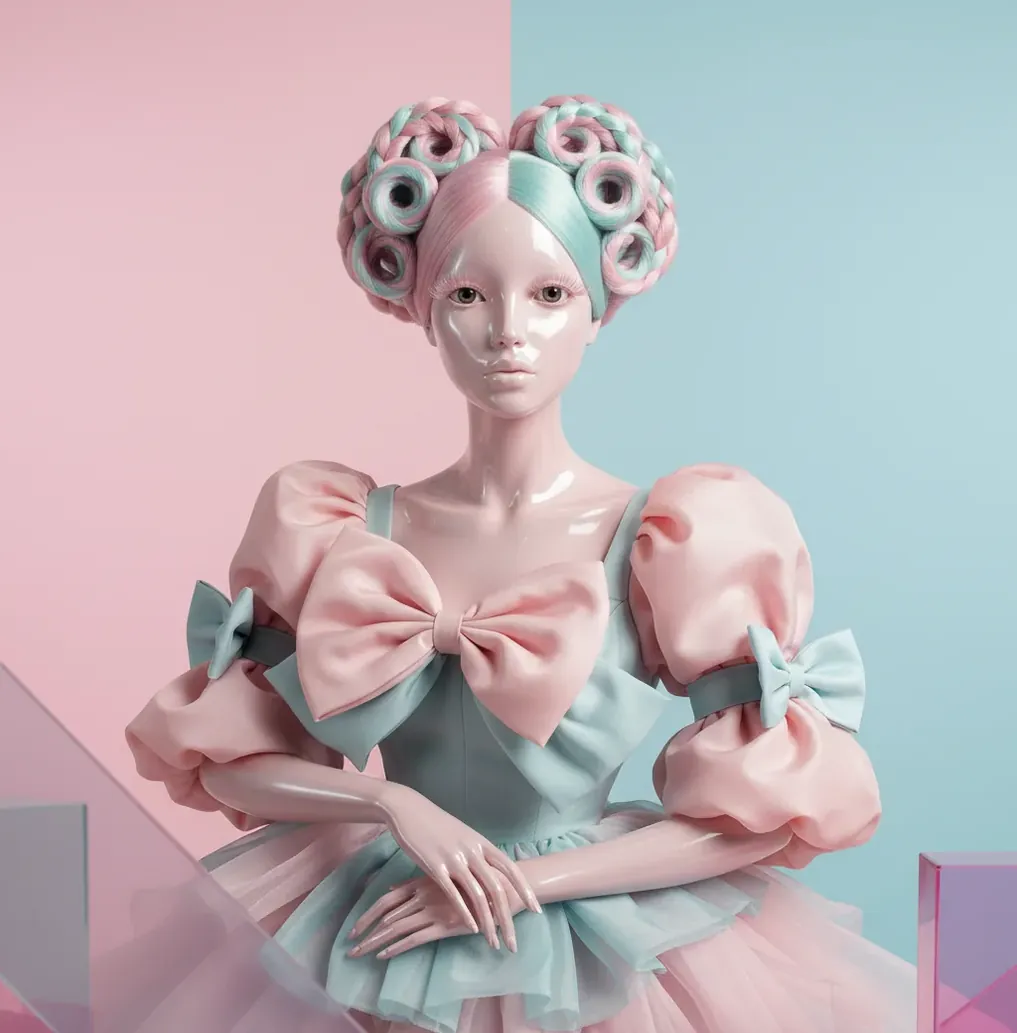
To create AI Barbie-style photos in 2026, use a clear front-facing selfie, describe the look with terms like “doll-inspired glam portrait,” “pastel studio lighting,” “glossy skin highlights,” and “realistic face proportions,” then generate 4-8 variations. Choose the version that keeps your nose, jawline, and expression closest to the original, and fix small artifacts around lashes, teeth, jewelry, and hair before posting.
What Are AI Barbie-Style Photos?
AI Barbie-style photos are portraits generated or edited to resemble a polished doll aesthetic: smooth plastic-like skin, bright eyes, defined lashes, pastel wardrobe colors, and high-key studio lighting. The style is not just “make everything pink”; it combines toy-like surface texture, clean product-photography highlights, symmetrical composition, and a soft glam beauty direction.
The strongest results still look like a stylized version of the person, not a completely new face. For social posts, birthday graphics, profile images, cosplay planning, prints, or playful brand mood boards, aim for “doll-inspired editorial portrait” rather than exact character imitation or logo-based branding.
How Do AI Barbie-Style Portrait Generators Work?
AI portrait generators usually create this look through text-to-image or image-to-image diffusion. In text-to-image, the model starts from noise and denoises toward the prompt. In image-to-image, it uses your selfie as a visual guide, then re-synthesizes skin texture, lighting, background, hair, and makeup according to the style instructions.
The doll effect comes from several visual changes: reduced skin texture frequency, stronger specular highlights, larger catchlights, smoother gradients, cleaner silhouettes, pastel color grading, and simplified background geometry. If the denoising or stylization strength is too high, identity cues can drift, which is why moderate settings usually produce better portrait likeness.
How Do You Create AI Barbie-Style Photos From a Selfie?
Shoot a clean selfie
Use a sharp, front-facing photo in window light or soft daylight. Avoid overhead kitchen lights, car interiors, harsh flash, heavy shadows, sunglasses, and motion blur because the model may convert those flaws into waxy skin or distorted eye reflections.
Crop before generating
Use a head-and-shoulders crop with the face clearly visible. Remove busy background clutter when possible, because doll-style outputs work best with simple studio, toy-box, mall-glam, or pastel gradient backgrounds.
Write a style-first prompt
Describe lighting, finish, wardrobe, lens feel, and color palette instead of asking for a “perfect face.” Use phrases like “doll-inspired glam portrait,” “glossy highlights,” “pastel studio backdrop,” “fashion editorial lighting,” and “realistic face proportions.”
Generate multiple variations
Create 4-8 versions, then compare them at full size. Pick the image that preserves your jawline, nose bridge, eye spacing, and natural expression rather than the one with the most exaggerated plastic finish.
Retouch only the artifacts
Fix doubled lashes, smeared teeth, melted earrings, uneven eyeliner, strange fingers, or hairline glitches. Keep skin smoothing light so the portrait reads as a glossy stylized photo rather than a flat mannequin render.
Export for the final use
Export at the highest practical resolution for your platform. Use 1:1 for profile images, 9:16 for Reels or TikTok covers, 4:5 for Instagram feed posts, and larger files for prints or invitations.
Which Tools Can Make Doll-Inspired AI Portraits?
| Tool type | Best for | Strengths | Watch out for |
|---|---|---|---|
| Pict AI | Browser and iOS portrait generation | Fast prompt-based image creation, selfie refinement, background changes, and quick artifact cleanup | Check current terms for commercial use and avoid uploading sensitive personal photos |
| Midjourney | Highly stylized fashion-editorial concepts | Strong aesthetics, lighting control, and polished fantasy portrait styles | Identity preservation from a real selfie can require careful reference workflows |
| ChatGPT image tools | Prompt-guided edits and conversational iteration | Good for asking for revisions in plain language and refining specific visual details | Results depend on image-editing availability, policy limits, and prompt specificity |
| Canva AI tools | Social graphics, invites, and template-based layouts | Useful for combining AI portraits with text, frames, stickers, and event designs | Less specialized for precise face preservation or advanced retouching |
| Photoshop with generative tools | Professional cleanup and compositing | Strong manual control for hair edges, backgrounds, color grade, and print preparation | More time-consuming and may require editing skill |
Choose a tool based on the output goal: fast social portrait, detailed character concept, branded layout, or print-ready retouch. For real-person portraits, prioritize identity preservation, export quality, privacy terms, and artifact editing over the most dramatic style preset.
What Prompt Should You Use for a Barbie-Style AI Photo?
Use a prompt that separates subject, finish, lighting, background, and realism constraints. A reliable template is: “Doll-inspired glam portrait of [person description], glossy skin highlights, bright catchlights, pastel [color] studio backdrop, soft fashion-editorial lighting, polished toy-box aesthetic, smooth but realistic skin texture, realistic face proportions, clean hair edges, high-resolution portrait.”
For a selfie edit, add preservation language: “Keep the same face shape, nose, smile, eye spacing, and hairstyle; stylize lighting, makeup, color, and background only.” Avoid prompts that say “make me look like a perfect doll” because they often over-smooth the face and push the model toward generic same-face beauty.
How Do You Keep the AI Portrait Looking Like You?
To keep the portrait recognizable, control stylization strength and prompt for preservation before beauty changes. The face usually changes most when the model is asked to fix attractiveness, exaggerate eye size, remove all texture, or create a fully plastic surface. Ask for realistic proportions and specify that only lighting, makeup, wardrobe color, and background should change.
When reviewing outputs, compare four anchors: eye spacing, nose shape, jawline, and smile. If two or more anchors are wrong, regenerate with lower strength or less aggressive style language. A believable Barbie-style edit should feel like a glossy themed photoshoot of the person, not a replacement identity.
Where Are AI Doll-Style Photos Actually Useful?
AI doll-style portraits are useful anywhere a playful, polished, pastel identity image makes sense. Common uses include Instagram covers, TikTok transformation posts, birthday invitations, party posters, cosplay makeup tests, sticker packs, creator profile images, mood boards for product shoots, and printable gifts for friends.
The emotional utility is the main reason the style keeps returning: it turns an ordinary selfie into a celebratory, glossy version of a person. For professional or dating contexts, label the image as AI-stylized so viewers understand it is a creative portrait rather than a documentary photo.
What Can Go Wrong With AI Barbie-Style Photos?
- Waxy skin appears when the prompt overemphasizes “plastic,” “perfect,” or “poreless.” Keep some realistic skin texture if you want the image to feel premium rather than artificial.
- Doubled lashes and uneven eyeliner are common when the input photo has heavy makeup, glitter, bangs, or low-resolution eye detail. Check the eye area at 100% zoom before exporting.
- Side-profile photos can reshape the nose, chin, and forehead because the model has fewer symmetrical facial landmarks to preserve. Front-facing or slight three-quarter portraits are safer.
- Small jewelry, braces, earrings, and hair accessories may melt into nearby skin or hair colors under high denoising. Retouch these details manually or regenerate with lower transformation strength.
When a doll-style edit helps - and when to keep the original
A Barbie-style portrait works best as a deliberately fictional image, not a substitute for every kind of photo edit. Before generating, decide whether you want a playful character portrait, a composite scene, or an accurate record. Those goals need different controls and different standards for judging the result.
Pros: a clear creative direction
- The doll aesthetic gives costumes, party graphics, and fictional character concepts a consistent visual language. If you are learning how to make ai photos of yourself, a tightly defined theme also makes variations easier to compare.
- Separate edits give you more control over a complicated scene. For anyone exploring how to merge two photos into one with ai, combine the subjects first and inspect their relative scale before applying the doll treatment.
- Era and finish can be specified separately. Learning how to create ai yearbook-style photos helps distinguish period clothing and portrait composition from the glossy surface treatment used here.
Cons: it can obscure what needs to stay accurate
- Stylization can invent details that were never visible. If your goal is to fix scratched old photos with ai, restore the photograph separately and retain an untouched scan rather than treating a doll render as historical evidence.
- Beauty effects can alter apparent age as well as texture. Tutorials on how to look younger in photos with ai address a different goal; doll styling should not automatically erase age-defining features.
- A polished render is not reliable product documentation. When considering how to make etsy listing photos with ai, keep actual item photographs primary: generated packaging, fabric, and accessories may misrepresent what buyers receive.
Verdict: Use the doll treatment for expressive portraits and clearly fictional concepts. Keep restoration, product accuracy, and multi-person compositing as separate tasks, with an original image available for comparison.
AI Barbie-style portraits: common questions answered
Commercial use depends on the generator’s terms and the image’s content. Permission to use an AI output does not automatically grant rights to Barbie names, logos, recognizable packaging, or another person’s likeness. For advertising or merchandise, favor an original doll-inspired design without branded elements. Obtain permission from pictured people and seek legal advice for uses closely tied to an existing brand.
Start with a full-body reference that shows both hands, both feet, and the complete outfit, with space around the subject. Specify the pose, clothing, and shoes rather than relying on a face selfie to supply them. Full-body generations can distort limbs and garment details, so inspect joints, finger counts, footwear, and body proportions before choosing an image.
They are AI-generated or AI-edited portraits with a doll-inspired look: glossy skin, bright eyes, pastel color, clean lighting, and toy-box polish. They can be made from text prompts or by transforming a real selfie.
The easiest method is to upload a well-lit selfie, apply a doll-inspired portrait prompt, generate several variations, and choose the version that preserves your face best. Then fix small artifacts around eyes, teeth, hair, and accessories.
Yes. Use a mobile-friendly AI image tool, start with a sharp selfie in natural light, and export in 9:16 for stories or 1:1 for profile images.
Try: “doll-inspired glam portrait, glossy skin highlights, bright catchlights, pastel studio backdrop, soft fashion-editorial lighting, realistic face proportions, clean hair edges.” Add “preserve the same face shape and smile” when editing a selfie.
Use moderate stylization strength and tell the model to preserve your face shape, nose, eye spacing, smile, and hairstyle. Avoid prompts like “perfect doll face,” which often create generic features.
No, but the input should be sharp, evenly lit, and uncluttered. A simple window-light selfie against a plain wall often works better than a dark or heavily filtered photo.
Waxy results usually come from too much denoising, too much skin smoothing, or prompt words like “plastic,” “poreless,” and “perfect.” Ask for glossy highlights with realistic skin texture instead.
They are generally safe to post if you own or have permission to use the original image and label real-person edits as AI-stylized. Do not use the image to impersonate someone or imply a brand affiliation.
Use 1:1 for profile pictures, 4:5 for Instagram feed posts, and 9:16 for Reels, Shorts, TikTok, or story covers. Always check the final image at full size before sharing.