How to Create a CV Photo With AI That’s Job-Ready
A job-ready AI CV photo starts with a sharp, honest selfie and ends with a neutral, well-cropped headshot that still looks like you. The goal is not glamour retouching; it is a clear professional portrait for resumes, recruiter profiles, portfolios, and job portals.
How to Create a CV Photo With AI That’s Job-Ready
- Upload a sharp, recent selfie cropped to exclude other people, private documents, and visible employee badges.
- Choose a professional portrait style or describe a neutral background while requesting unchanged facial features.
- Generate the CV headshot with restrained lighting corrections, avoiding changes to your age, expression, or appearance.
- Review the portrait beside your original, check application requirements, and export a clearly named image file.
Example prompt: Create a recruiter-friendly CV headshot from my selfie: neutral light-gray background, head-and-shoulders crop, natural skin texture (no plastic smoothing), subtle sharpening on eyes, true-to-life hair edges, business-casual look, realistic lighting, no dramatic color grading.
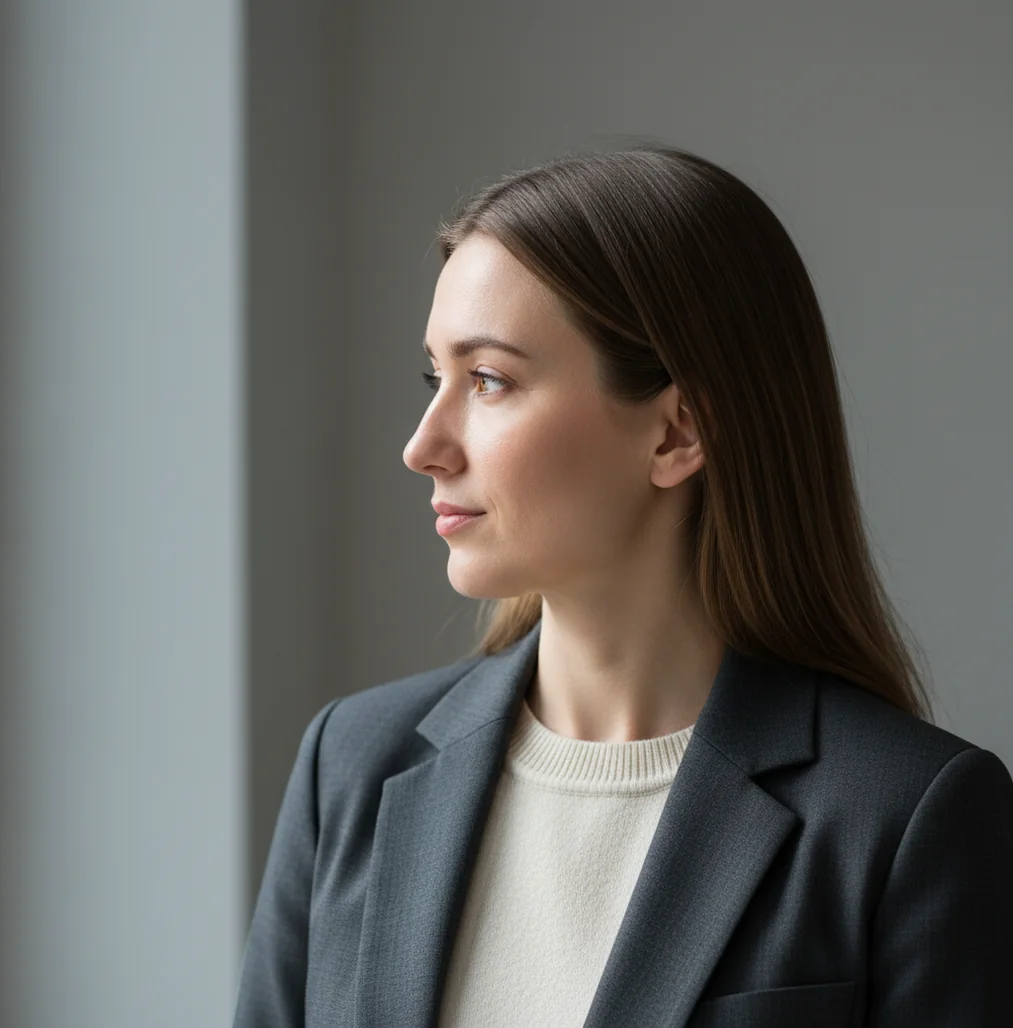
To create a CV photo with AI that is job-ready, use a clear front-facing selfie, generate a neutral background, crop it to a head-and-shoulders frame, and keep skin tone, eyes, hair, and glasses realistic. Review the image at 100% zoom before using it, because warped facial details, melted hair edges, or over-smoothed skin can make an application feel less trustworthy.
What Is a Job-Ready AI CV Photo?
A job-ready AI CV photo is a professional head-and-shoulders portrait made or improved with AI for resumes, job boards, LinkedIn, portfolio pages, and company bios. It should show your face clearly, use even lighting, sit on a plain or low-distraction background, and match how you look in real life.
The safest style is neutral rather than cinematic: eye-level camera angle, natural expression, visible shoulders, clean clothing, and a crop that leaves a little space above the hair. For most applications, light gray, off-white, or soft blue backgrounds look more natural than pure white because they avoid a cut-out passport effect.
How Does AI Turn a Selfie Into a CV Headshot?
AI headshot tools usually combine face detection, facial landmark mapping, background segmentation, relighting, and generative image editing. The system identifies features such as eyes, nose, mouth, jawline, shoulders, and hair edges, then separates you from the original background so it can replace clutter, smooth lighting, and rebuild missing detail.
Many modern tools use diffusion-style image models to predict cleaner pixels while preserving identity cues. This can fix a messy room, dull lighting, or a weak crop without a new photo session. However, the source selfie still matters: low resolution, motion blur, harsh shadows, reflective glasses, and hair against a similar-colored wall can all reduce realism.
How Do You Take the Best Source Selfie for an AI CV Photo?
Use soft front-facing light
Stand near a window or shaded outdoor area with light facing you. Avoid overhead bulbs, car interiors, bathroom mirrors, and strong side light because they create shadows that AI may flatten or misread.
Place the camera at eye level
Hold the phone straight, not below your chin or above your forehead. Eye-level framing keeps facial proportions natural and prevents the background from becoming the dominant visual element.
Choose a simple outfit
Wear what you would wear to an interview for the role: business casual, business formal, or polished creative attire. Avoid tiny stripes, loud patterns, and reflective accessories that can create screen artifacts.
Keep your expression natural
Use a relaxed mouth, slight smile, and direct eye contact. A CV photo should feel approachable and competent, not like a beauty filter, passport mugshot, or social media selfie.
Shoot several clean options
Take 5 to 10 photos and choose the sharpest one. Pick the image where both eyes are crisp, shoulders are visible, hair is not cut off, and the face is not blurred by motion or low light.
How Do You Create a CV Photo With AI Step by Step?
Upload one clear selfie
Start with the sharpest photo from your camera roll. A single strong selfie usually beats a batch of blurry, inconsistent images.
Select a professional headshot style
Choose a CV, resume, corporate, or profile-photo preset if the app offers one. If you are writing a prompt, ask for a realistic head-and-shoulders portrait, not a fashion editorial.
Set a neutral background
Use light gray, off-white, beige, or muted blue. Avoid office stock-photo backgrounds, fake boardrooms, plants, dramatic gradients, and anything that distracts from your face.
Crop for resume readability
Use a head-and-shoulders crop with the eyes around the upper third of the frame. Leave a small amount of space above the hair and keep the chin, neck, and shoulders visible.
Review at 100% zoom
Check eyes, teeth, hairline, ears, glasses rims, shirt collar, and skin texture. Regenerate if anything looks melted, duplicated, plastic, or unlike you.
Export for both print and web
Save a high-resolution version for your master file, then create a smaller copy for application portals. A square 800 x 800 px or larger file is usually enough for digital profiles, while resume PDFs should stay compressed and crisp.
Which AI CV Photo Tools Are Best for Different Needs?
| Tool | Best For | Strength | Watch Out For |
|---|---|---|---|
| Pict AI | Fast CV-style headshots from a phone selfie | Clean background replacement, realistic crops, and quick variations | Still requires manual review for hair, glasses, and identity accuracy |
| Canva | Resume layouts, profile templates, and manual design control | Strong cropping, background tools, and export control for PDFs | Photo realism depends on the original image and selected effects |
| Remini | Face enhancement and sharpening low-quality selfies | Can improve blur, facial clarity, and small-screen detail | May over-smooth skin or create an overly polished look |
| Adobe Express | Simple background removal and branded profile assets | Useful for matching a headshot to portfolio or personal-brand layouts | Less specialized for identity-preserving AI headshot generation |
| Fotor | Quick headshot generation and light retouching | Accessible presets for business portraits and social profiles | Output consistency can vary by source selfie quality |
Choose the tool based on the weakest part of your current image. If the issue is background, use a background-aware editor; if the issue is blur, use an enhancer; if the issue is resume layout, use a design tool.
What Prompt Should You Use for a Professional CV Headshot?
- General CV prompt: “Create a realistic professional head-and-shoulders CV photo from this selfie. Use soft even lighting, a neutral light gray background, natural skin texture, sharp eyes, and a clean business-casual look. Keep my identity accurate and avoid heavy retouching.”
- Corporate role prompt: “Generate a realistic corporate resume headshot with an eye-level camera angle, subtle smile, navy or charcoal business attire, plain off-white background, natural facial detail, and no glamour lighting.”
- Creative role prompt: “Create a polished but approachable portfolio profile photo with natural lighting, a muted neutral background, smart casual clothing, realistic skin tone, and a confident expression. Keep the result suitable for a CV and LinkedIn.”
- Academic or research prompt: “Generate a clean academic profile headshot with soft front lighting, simple clothing, neutral background, accurate facial features, and a professional expression suitable for a CV, conference bio, or university page.”
- Retouching prompt: “Improve this photo for a CV without changing my face. Correct exposure, reduce background distraction, sharpen the eyes lightly, keep skin texture natural, and crop to a professional head-and-shoulders frame.”
What Crop, Size, and File Format Should a CV Photo Use?
The most flexible CV photo crop is square or slightly vertical, usually 1:1 or 4:5, because it works in resume templates, job portals, company directories, and social profile frames. Keep the face centered, place the eyes near the upper third, and include the top of the shoulders so the image feels like a professional portrait rather than an ID scan.
For digital use, export at least 800 x 800 px for a square profile image. For a resume PDF, use a compressed JPG or PNG that looks sharp but does not make the file too large; many application systems prefer PDFs under a few megabytes. Use sRGB color so skin tone stays consistent across browsers, phones, and recruiter dashboards.
Where Can You Use an AI CV Photo Besides a Resume?
A good AI CV photo can also work as a LinkedIn image, portfolio avatar, speaker bio photo, company directory image, email signature, freelancer profile, Slack or Teams avatar, and personal branding asset. The same clean portrait helps recruiters connect your resume, social profile, and portfolio without visual mismatch.
For creative careers, the photo should still support the work rather than compete with it. Designers, photographers, writers, and founders can use slightly warmer styling, but the image should remain believable, calm, and easy to recognize at small sizes.
When Can an AI-Generated CV Photo Backfire?
- It can backfire if the image changes your identity, face shape, age, hairstyle, skin tone, or distinctive features enough that you would look different in an interview.
- Glasses are a common failure point because reflections, thick frames, and transparent edges can create warped rims or mismatched lenses.
- Hair segmentation can fray when flyaways, curls, or dark hair sit against a similar-colored background.
- Over-sharpening can make pores, beard stubble, fabric texture, and compression noise look harsh in a small resume photo.
Choose Your CV Photo Workflow by Application Requirements
Before uploading a selfie, check where the finished portrait will go and what that application permits. A recruitment portal, public portfolio, and identity-verification form can have different requirements. Use these five decisions to choose the right workflow rather than generating one image for every purpose.
- If the employer gives photo instructions, follow those before choosing an AI preset. Check whether the portrait belongs inside the CV or in a separate upload field. If the instructions prohibit edited images, use an original photograph. A polished result is not a substitute for meeting the stated requirements.
- If the upload is for identity verification, keep it separate from your CV headshot. Do not submit a generated portrait for a passport, right-to-work check, or verification selfie unless that process explicitly permits it. Those images serve a different purpose and may require live capture or an unaltered photograph.
- If the source contains private information, remove it before uploading. Crop out employee badges, documents, screens, and other people. Check the tool’s retention, model-training, and deletion controls; if the terms are unclear or unacceptable, choose another workflow rather than uploading a sensitive image.
- If you only need one small correction, choose a targeted edit. Background removal or exposure adjustment may be enough. Avoid regenerating your entire portrait merely to remove a distracting object; a narrower edit reduces the opportunity for unwanted changes to facial features or clothing.
- If you also create instagram ready images, save those as separate versions. Keep social styling out of the application file. Use descriptive filenames such as firstname-lastname-cv.jpg and store the original beside the edited portrait so you can supply an unedited alternative when requested.
Questions About AI-Edited CV Portraits
There is no single disclosure rule covering every employer or application. Follow any instructions about generated or edited photographs, and answer honestly if asked. Minor exposure correction is different from generating a new portrait or changing facial features. If the application requires an unedited image, disclosure does not make an AI-edited photo acceptable; provide an original instead.
Upload a cropped copy that excludes other people, badges, documents, and visible screens. Read the service’s rules on image retention, training use, third-party processing, and deletion before submitting your face photo. Remove location metadata if it is unnecessary. Deleting a generated image from your gallery does not necessarily delete the uploaded source from the service.
Yes, it is usually okay if the photo still looks like you and does not misrepresent your appearance. Avoid AI images that change your identity, age, facial structure, or professional context.
It depends on the country and industry. CV photos are common in some regions, while many employers in the United States, United Kingdom, and Canada prefer no photo to reduce hiring bias.
Light gray, off-white, beige, and soft blue are safe choices because they look clean without feeling fake. Avoid busy rooms, strong gradients, office stock-photo scenes, and pure white cut-out backgrounds.
Wear what you would wear to an interview for the role, usually business casual or business formal. Choose solid colors and avoid tiny patterns, logos, reflective jewelry, or clothing that blends into the background.
For digital profiles, use at least 800 x 800 px if possible. For resume PDFs, keep the image sharp but compressed so the final document remains easy to upload.
Yes, using the same professional image across your resume, LinkedIn, and portfolio can make you easier to recognize. Just make sure the crop works in both square profile frames and resume layouts.
Zoom in and check the eyes, teeth, ears, hair edges, glasses, skin texture, and collar. If details look melted, overly smooth, duplicated, or too glossy, regenerate or use a more natural source photo.
AI can improve mild blur, but it cannot reliably recover true detail from a very low-resolution or motion-blurred image. A sharp new selfie in soft light will almost always produce a better CV photo.
A slight natural smile is usually safest because it feels approachable without looking casual. The expression should match the role and remain calm, confident, and professional.