Consistent AI Characters Across Images Guide
Creating the same AI character across multiple images requires a repeatable identity workflow, not just one good prompt. The most reliable method is to combine a fixed seed, one stable character description, and 1-3 reference images, then change only scene variables such as pose, setting, outfit, and lighting.
Consistent AI Characters Across Images Guide
- Upload a clean character reference with the full hairline visible and enough resolution to inspect distinguishing facial features.
- Describe the new scene separately from identity details, then choose the output dimensions supported by your generator.
- Generate a small batch using the same reference, keeping reference-processing settings unchanged while comparing candidate images.
- Review facial proportions against the reference, save an approved master, and export separate crops for each intended placement.
Example prompt: Create a 12-image character sheet of the same fictional person: late 20s, oval face, small mole under left eye, blunt bangs, shoulder-length black hair, silver hoop earrings, athletic build, neutral expression, consistent outfit, 35mm lens, soft studio light. Views: front, 3/4 left, 3/4 right, profile, plus 7 simple poses. Seed: 18427.
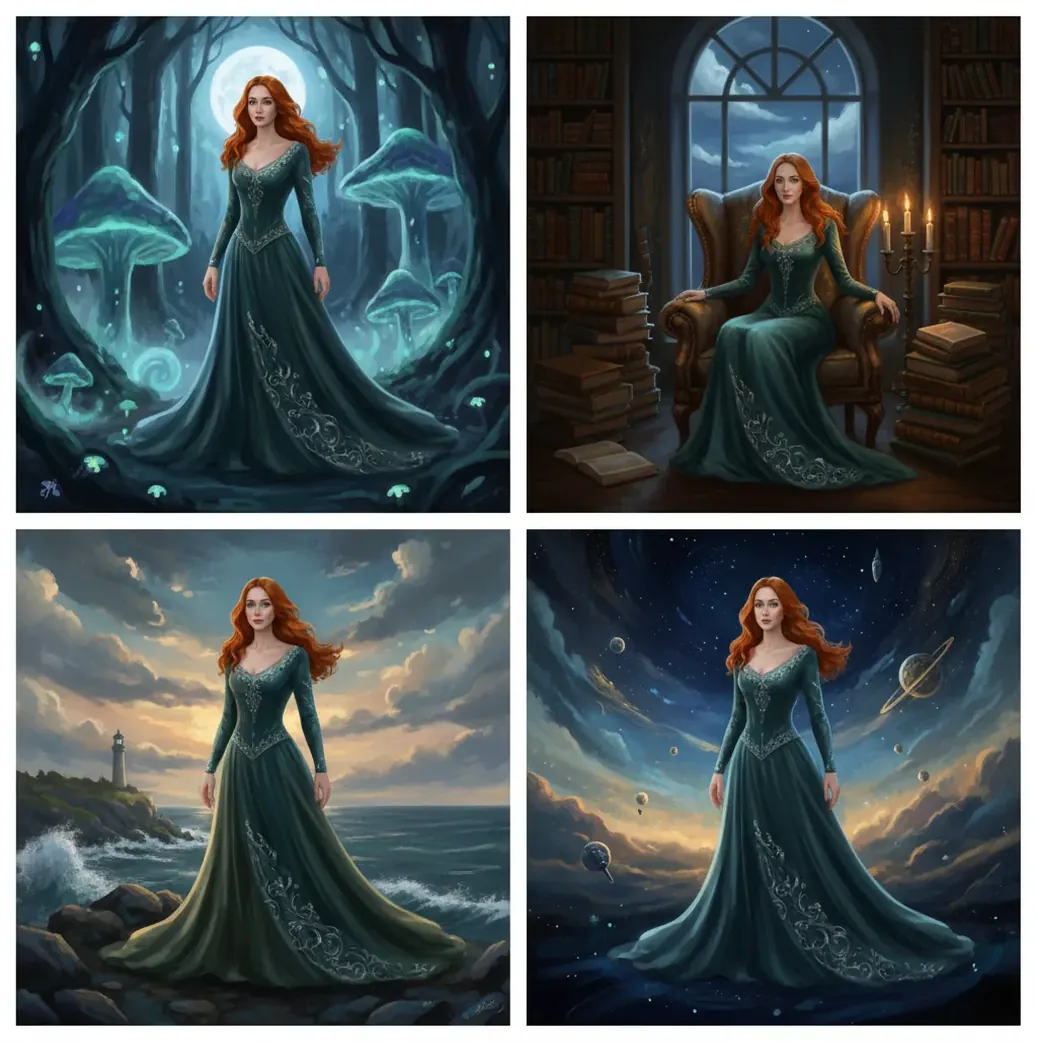
To keep AI characters consistent across images, reuse a fixed seed, a locked character description, and one or two clean reference images for every generation. Change only the scene, pose, outfit, or camera framing while keeping identity details such as face shape, hair, age, eye color, and signature marks unchanged. This reduces character drift, but every output still needs review because diffusion models can alter identity when pose, lighting, or composition changes heavily.
What Does Consistent Character Generation Mean?
Consistent character generation means producing the same fictional person across multiple AI images while preserving recognizable identity cues. The stable elements usually include face shape, hairline, hairstyle, age range, body proportions, eye color, skin tone, and signature details such as a scar, mole, glasses, earrings, or jacket.
In practice, consistency is not measured by whether every pixel matches. It is measured by whether a viewer recognizes the character without being told. A strong workflow keeps the character's identity fixed while allowing the scene to change: different rooms, poses, expressions, outfits, camera distances, and lighting setups.
Why Do AI Characters Change Between Images?
AI characters change between images because diffusion models generate from noise and resolve many competing instructions at once. The model tries to satisfy identity, pose, clothing, lighting, background, camera angle, style, and composition inside the same latent space.
When you add a difficult scene prompt such as "wide shot, running in rain, neon alley, dramatic motion blur," the model has fewer pixels and less attention available for small identity details. Features like freckles, jaw shape, bangs, ear shape, and eye spacing may drift. A seed and reference image help anchor identity, but they do not override every new visual constraint.
How Do You Keep the Same AI Character Across Scenes?
Define the character DNA
Write one permanent identity prompt that includes age range, face shape, hair, skin tone, body type, eye color, and 1-3 signature details. Do not rewrite this description between images.
Generate a small portrait batch
Create 6-12 clean portraits with simple lighting and minimal background detail. Avoid extreme expressions, heavy shadows, hats, masks, or stylized filters in the first batch.
Select anchor references
Choose one front-facing image and one 3/4-view image that clearly show the face, hairline, and signature traits. Add a profile view only after the first two angles are stable.
Lock the seed and reuse the references
Use the same seed, the same character DNA prompt, and the same reference images for each new generation. This reduces random variation and gives the model repeated identity anchors.
Change one scene variable at a time
Adjust only the location, outfit, pose, expression, camera distance, or lighting in each test batch. If the character drifts, you will know which variable caused the break.
Compare every output against a checklist
Check face shape, hair, eye color, age, jawline, body proportions, and signature details before accepting an image into the final set.
What Prompt Template Works Best for Character Consistency?
The best prompt template separates fixed identity details from changeable scene details. This prevents the model from reinterpreting the character every time you ask for a new pose, background, or composition.
Reusable template: "Same character as reference: [age range], [face shape], [skin tone], [eye color], [hair length/style/color], [body type], [signature detail 1], [signature detail 2]. Scene: [location], [action], [outfit], [time of day]. Camera: [shot size], [lens], [angle]. Style: [medium], [rendering style], [color palette]. Keep identity, face structure, hairstyle, age, and signature details unchanged."
Example: "Same character as reference: woman in her late 20s, oval face, warm brown skin, dark almond eyes, shoulder-length black hair with blunt bangs, athletic build, small mole under left eye, silver hoop earrings. Scene: reading on a subway platform, navy coat, evening commute. Camera: medium shot, 35mm lens, eye-level. Style: cinematic editorial portrait, soft contrast. Keep identity, face structure, hairstyle, age, mole, and earrings unchanged."
Which Settings Matter Most for Matching One Character?
The most important settings for matching one AI character are seed, reference strength, prompt stability, aspect ratio, camera distance, and style consistency. The seed reduces random variation, while references supply visual identity cues that text alone may not preserve.
A practical order of importance is: fixed identity prompt first, clean reference images second, stable seed third, then controlled changes to pose and scene. Keep the same aspect ratio during early testing, because switching from 1:1 portraits to 16:9 wide shots reduces face detail. Keep lens terms consistent too; jumping from 35mm portrait to ultra-wide action shot can distort facial geometry.
Which Tools Can Help Create Repeatable AI Characters?
| Tool type | Best for | Strengths | Watch out for |
|---|---|---|---|
| Pict AI | Fast character batches on web or iOS | Reference-first generation, quick retakes, mobile-friendly workflow | Check the export and commercial-use terms before publishing |
| Midjourney-style image generators | Stylized portraits, concept art, mood-rich character sheets | Strong aesthetics, fast ideation, useful image-reference features | Identity can drift across pose, angle, and style changes |
| Stable Diffusion workflows | Advanced control, custom models, LoRA training, local pipelines | High technical control over seeds, ControlNet, IP-Adapter, and fine-tunes | Requires setup knowledge and careful parameter management |
| Photoshop-style AI editors | Repairing faces, clothing, hands, backgrounds, and small mismatches | Good for inpainting, compositing, and final polish | Better for correction than generating a whole character set from scratch |
| Canva-style design tools | Social posts, thumbnails, lightweight brand visuals | Easy layout, templates, text, and export formats | Less control over identity locking and model parameters |
No tool guarantees perfect identity across every image. The strongest workflow is usually generation plus editing: create stable anchors, generate scene variations, then repair small drift with inpainting or manual edits.
Where Are Consistent AI Characters Most Useful?
Consistent AI characters are most useful when a project needs the same person to appear repeatedly across a visual sequence. This includes comic panels, children's book pages, storyboards, game NPC concept sheets, mascot campaigns, product explainers, sticker packs, YouTube thumbnails, social posts, and portfolio pieces.
The time savings are largest when you need 10-50 related images. Instead of redesigning the character in every prompt, you build a reusable identity kit: character DNA prompt, seed, front reference, 3/4 reference, negative prompt, preferred aspect ratios, and a visual checklist. That kit becomes the production system for gifts, prints, branding assets, pitch decks, and narrative art.
How Do You Fix Character Drift After Generation?
Identify the drift type
Separate identity drift from style drift. Identity drift affects face, age, body, hair, or signature marks; style drift affects rendering, lighting, color palette, or texture.
Return to a closer shot
If the face changed in a wide image, regenerate as a medium shot or portrait first, then expand the scene after the identity is stable.
Strengthen the reference
Use a clearer front or 3/4 anchor image with neutral lighting. Remove references where shadows, hats, glasses, or expressions obscure the face.
Use a negative prompt
Add direct exclusions such as "different face, different hairstyle, older, younger, different jawline, different eye color, missing mole, different earrings."
Edit instead of rerolling
When only one detail is wrong, use inpainting or a local edit. Full regeneration can accidentally change the parts that were already correct.
What Are the Limits of AI Character Consistency?
- A fixed seed reduces randomness, but it does not guarantee the same face after major changes in pose, angle, lens, lighting, or style.
- Wide shots make identity harder because the face occupies fewer pixels, especially in 16:9 scenes with full-body action.
- Heavy stylization can average out unique traits such as moles, scars, freckles, asymmetrical features, and subtle facial structure.
- Accessories mutate easily. Glasses, earrings, hats, bangs, tattoos, and jewelry often need explicit prompting or post-generation repair.
What Is a Simple 20-Image Consistency Standard?
A simple 20-image standard is to accept only images where the character remains recognizable in at least five identity areas: face shape, hair, age, eye color, body proportions, and signature details. If more than one major identity cue changes, reject or edit the image before adding it to the set.
Use a small scoring sheet: face match 0-2, hair match 0-2, age match 0-2, body match 0-2, signature details 0-2. A score of 8-10 is production-ready, 6-7 needs editing, and 5 or below should be regenerated. This gives creators a practical standard for comics, prints, brand mascots, character sheets, and social campaigns.
If you're fixing AI artifacts next
Reference File Sizes and Export Settings That Preserve Facial Detail
The practical question behind “how to keep same face in ai images” includes file preparation: can the generator actually see the distinguishing features? Keep an untouched master reference and prepare separate upload copies. The settings below are starting points, not universal requirements; a tool may resize uploads internally, so larger files do not automatically produce better identity matching.
| Setting | Practical starting point | Reason |
|---|---|---|
| Reference dimensions | 1,024-2,048 pixels on the longer edge, within upload limits | Preserves visible facial detail without unnecessarily large files. |
| Portrait crop | Include the full head, hairline, ears, and some shoulders | A tight face-only crop removes useful silhouette and proportion cues. |
| Reference format | PNG or a high-quality JPEG; avoid repeated JPEG saves | Compression can blur small marks and introduce edge artifacts. |
| Color handling | sRGB for web delivery; avoid beauty filters on references | Reduces avoidable differences in color appearance between applications. |
| Output dimensions | Generate at a supported native size before enlarging | Upscaling adds pixels but cannot reliably recover missing identity details. |
| Export copies | Keep a lossless master; make separate delivery crops | Allows new layouts without repeatedly compressing the approved image. |
Save generation settings beside each approved file. When diagnosing “why same prompt gives different ai images,” compare model versions, reference-processing options, and output dimensions, not just the wording.
If your next task is “how to optimize ecommerce images with ai,” keep character references separate from product references; an accurate face does not guarantee accurate packaging. The question “why ai images have broken text” needs a separate fix: add exact labels in a layout editor rather than trusting generated lettering.
To create instagram ready images, crop an approved master for the intended placement and inspect the face again after resizing. Before commercial delivery, check the generator’s terms of use and permissions for any real-person references.
Questions About Maintaining AI Character Identity
Give each character a separate reference and a clearly different visual description. Assign positions explicitly, such as “character A on the left” and “character B on the right.” If the tool supports regional conditioning or masked editing, apply each identity to its own area. Faces, hairstyles, and clothing can still blend, especially where characters overlap, so inspect both identities before accepting the image.
Yes. Generative upscalers and face-restoration tools may invent eyelashes, skin texture, teeth, or facial contours instead of simply enlarging existing pixels. That can make a sharper image look like a different person. Compare the enlarged result with the approved original at matched viewing sizes. Reduce enhancement strength, disable face restoration, or use non-generative resizing when preserving identity matters more than adding detail.
The best way is to reuse the same character description, fixed seed, and clean reference images while changing only the scene variables. Review each output against a checklist before adding it to the final set.
The same prompt can create a different character because image models generate from randomness and balance many visual constraints at once. Without a seed or reference image, the model may reinterpret facial features, age, hair, and body type.
Seeds help keep characters similar by reducing random variation, but they are not a complete identity lock. Large changes in pose, lighting, lens, or composition can still cause drift.
Start with two reference images: one front view and one 3/4 view. Add a profile view only after the first two anchors consistently match the character.
Yes. Close-ups and medium shots preserve more facial detail, while wide shots give the model fewer pixels to maintain identity.
Yes, but change outfits after the face, hair, age, and signature details are stable. Keep the identity prompt unchanged and describe clothing as a separate scene variable.
Use phrases like "different face, different hairstyle, different age, different eye color, missing mole, different jawline, different body type." Tailor the negative prompt to the exact traits that keep changing.
Yes, but it usually requires a controlled workflow with seed reuse, reference images, prompt stability, and editing. Expect to reject or repair some outputs in a 20-image set.
Only use a real person's face with clear permission, especially for commercial, public, or sensitive work. For safer projects, design a fictional character with original identity traits.