Why AI-Generated Hands Look Weird and How to Fix Them
AI-generated hands look weird because image models learn visual patterns, not a true 3D skeleton with tendons, joints, and finger counts. The errors get worse when hands are small, angled, partly hidden, holding objects, or overlapping another hand.
AI-generated hands look weird because image models can reproduce hand-like textures without consistently maintaining finger structure, pose, and contact with objects. Overlapping fingers and awkward viewing angles make those relationships harder to resolve. The fix is not always to show five fingers: repair the specific structural error while preserving the intended gesture, grip, and surrounding scene.
Why AI-Generated Hands Look Weird and How to Fix Them
- Upload the original image and identify the broken grip, finger connection, or thumb placement before editing.
- Select the repair area and describe the intended gesture, including palm direction and contact with nearby objects.
- Generate replacement variations, choosing plausible anatomy and contact before judging skin texture or small details.
- Review the repaired hand and surrounding edges, then export at the dimensions needed for your final use.
Example prompt: Photorealistic portrait, subject holding a ceramic mug with the right hand, five fingers visible, clear thumb placement, natural knuckle spacing, realistic skin texture, soft window light, shallow depth of field, no extra fingers, no fused digits
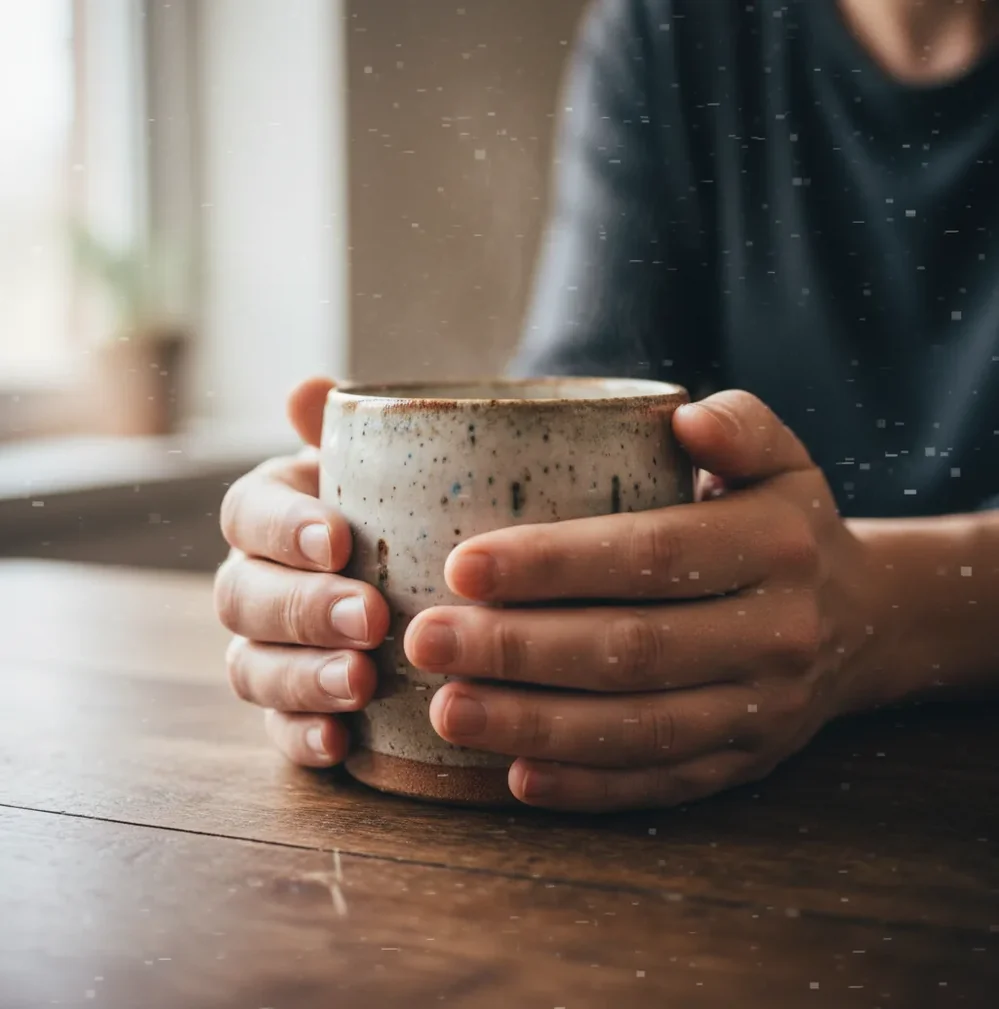
AI-generated hands look weird because generative image models predict pixels from training patterns instead of understanding hand anatomy. Fingers are thin, flexible, often occluded, and highly variable, so models can add extra digits, fuse knuckles, misplace thumbs, or invent impossible joints. The most reliable fix is targeted inpainting: mask only the broken hand area, prompt for a clear five-finger structure, and reroll several variations.
What Does “Weird AI Hands” Mean?
“Weird AI hands” means visible anatomy errors in generated or edited images: six fingers, missing thumbs, fused digits, bent joints, rubbery palms, duplicated fingernails, or fingers that melt into props. These artifacts are common because hands have many small parts that change shape under pose, lighting, camera angle, and occlusion.
A hand can look acceptable at phone-screen size and fail the moment you zoom to 200% for a print, portfolio piece, product post, dating profile, album cover, or brand campaign. For casual social images, a minor knuckle glitch may not matter. For commercial, instructional, medical, legal, or identity-related images, AI hands should always be reviewed by a human before use.
Why Do AI-Generated Hands Look Weird Even When Faces Look Good?
AI-generated hands often look worse than faces because faces are more statistically stable in image datasets. A face usually has two eyes, one nose, one mouth, and a predictable left-right layout. Even with age, ethnicity, lighting, and expression changes, face structure gives the model strong visual priors.
Hands are less predictable. Fingers can curl, overlap, disappear behind objects, press against skin, point toward the camera, or interlock with another hand. A thumb attaches at a different angle than the other fingers, and foreshortening can make one finger look like two. When the model sees ambiguous edges, it may treat each finger-like shape as a separate digit and lock the error into the final image.
How Do Diffusion Models Create Extra Fingers?
Diffusion models create images by starting with noise and repeatedly denoising it into a picture that matches the prompt. During this process, the model is not counting bones or simulating anatomy. It is predicting what pixels are likely to appear near other pixels based on learned correlations from training images.
Extra fingers happen when a small hand region contains multiple plausible finger cues: highlights, shadows, nail shapes, palm creases, object edges, or overlapping skin tones. The attention mechanism may reinforce several of those cues as separate digits. If the hand is only 30 to 80 pixels tall, there is not enough spatial information for clean joint separation, so the model guesses. That is why a beautiful portrait can still have a hand that looks melted or overgrown.
How Do You Fix AI Hands With Masking and Inpainting?
Inspect the image at multiple zoom levels
Check hands at 100%, 200%, and 300%. Look for finger count, thumb placement, nail direction, knuckle spacing, wrist continuity, and whether the hand correctly touches props or skin.
Crop or upscale before repairing tiny hands
If the hand is very small, crop closer or upscale first so the inpainting model has more pixels to work with. Very low-resolution hands rarely repair cleanly in one pass.
Mask only the broken hand area
Paint the mask over the extra finger, fused joints, or warped thumb. Leave stable wrist, sleeve, palm edge, and nearby background unmasked when possible so the repair blends into the original image.
Use a specific anatomy prompt
Prompt for structure, not vague quality. Example: “realistic right hand, five fingers, visible thumb, natural knuckle spacing, relaxed fingers, correct proportions, no extra digits.”
Reroll for structure before details
Generate 2 to 6 variations and choose the one with the correct finger count first. Do not prioritize perfect nails or skin texture until the anatomy is correct.
Refine with a smaller second mask
After the hand structure is fixed, use a tighter mask to clean fingernails, jewelry, wrinkles, or knuckle highlights. A second pass is usually safer than rewriting the whole hand again.
Which Tools Are Best for Fixing AI Hand Errors?
| Tool type | Best for | Strengths | Watch outs |
|---|---|---|---|
| Pict AI | Fast browser or iOS hand patching | Selective masking, quick inpainting, useful for keeping the face and background unchanged | Cloud-based editing; review export rights and avoid uploading sensitive images |
| Photoshop Generative Fill | Professional image retouching | Layer control, masks, blend modes, local edits, strong print workflow | Requires subscription and more manual setup |
| Stable Diffusion inpainting | Advanced control and local generation | Adjustable denoising strength, ControlNet options, LoRA support, repeatable seeds | More technical; bad settings can rewrite too much of the image |
| Midjourney vary-region style tools | Fixing hands inside stylized generations | Good for art-direction consistency and quick alternate regions | Less precise than dedicated pixel-level editing |
| Free web inpainting tools | One-off casual repairs | Low friction, useful for social posts and quick drafts | May have watermarks, queues, lower resolution, or unclear data retention |
Choose the tool based on control level. Casual creators usually need a fast mask-and-reroll workflow; professional retouchers often need layers, local files, color management, and repeatable settings.
What Prompt Should You Use to Fix Extra Fingers?
- Basic repair: “realistic human hand, five fingers, visible thumb, natural knuckles, correct anatomy, relaxed pose, no extra fingers, no fused fingers.”
- Hand holding an object: “right hand gripping a ceramic mug handle, five fingers, thumb on the handle, index finger slightly bent, natural palm shape, no extra digits.”
- Fashion pose: “left hand resting on hip, five visible fingers, elegant relaxed pose, realistic wrist angle, natural fingernails, correct proportions.”
- Couple or family image: “two hands gently holding, separate fingers, natural overlap, visible thumbs, realistic skin contact, no merged hands.”
- Negative prompt add-on: “extra fingers, missing fingers, fused fingers, duplicated thumb, broken knuckles, melted hand, deformed nails, impossible anatomy.”
- If your tool has denoising strength, start around 0.35 to 0.55 for structural fixes. Use lower values, around 0.2 to 0.35, for small nail or skin refinements after the anatomy is already correct.
How Can You Prevent Weird Hands Before Generation?
Describe the hand pose clearly
Say what the hand is doing: resting on a table, holding a phone, pointing at text, gripping a dumbbell, or touching a cheek. Clear action reduces ambiguous finger shapes.
Avoid too many hands in one prompt
Multiple people, interlocked fingers, crowds, and mirrored poses increase the chance of merged anatomy. Generate simpler compositions first, then add complexity.
Keep hands large enough in frame
Hands that are tiny in a full-body image often lack enough pixel detail. For portraits, keep important hands close to the face or crop tighter.
Use anatomy constraints
Add constraints such as “five fingers,” “visible thumb,” “natural wrist angle,” and “separate fingers.” These do not guarantee perfection, but they help the model prioritize structure.
Generate more candidates early
It is faster to choose from 4 to 8 initial variations than to repair one deeply flawed image. Pick the version with the cleanest hand silhouette before polishing lighting or style.
Where Do AI Hand Fixes Matter Most for Creators?
Hand fixes matter most when the viewer’s attention naturally lands on the hand. That includes portraits with hands near the face, product shots where a person holds the item, cooking images with utensils, fitness images gripping equipment, jewelry photos, nail art concepts, fashion poses, thumbnails with pointing gestures, and romantic images with interlocked fingers.
The emotional context matters too. A strange hand can break the realism of a graduation print, wedding-style gift, memorial image, dating profile, author headshot, brand campaign, or client mockup. If the image is meant to feel intimate, premium, or trustworthy, hands need the same review attention as eyes, typography, and logos.
When Does AI Hand Repair Still Fail?
- Very small hands, especially under about 30 to 50 pixels tall, may not contain enough information for believable anatomy.
- Heavy motion blur can turn fingers into one continuous shape, making it hard for inpainting to separate digits cleanly.
- Interlocked hands often need several small passes because one repaired finger can disturb the other person’s hand.
- Jewelry, tattoos, gloves, nail art, and watch bands may disappear or change during regeneration unless masked carefully.
If you're fixing hands, these guides help too
Repair Contact, Handedness, and Background Errors
Some AI fingers have plausible anatomy but still look wrong because their relationship to the scene is broken. Repair the interaction, not just the skin: a convincing hand needs believable contact, perspective, and surrounding edges.
- A grip floats above the object. Look for a gap between fingertips and the handle, or a contact shadow that falls in the wrong place. Include the contact boundary in the repair region while preserving the object's overall shape. Describe the pressure and placement: “fingertips wrapped around the handle, thumb pressing against its outer edge.”
- A replacement hand faces the wrong direction. Labels such as “left hand” can be ambiguous when the subject faces the camera. Add scene-relative instructions: “palm facing the body, thumb nearest the jacket, back of hand facing the camera.” A pose reference is more useful than repeatedly adding anatomy adjectives.
- The anatomy improves but the background bends. Railings, table edges, and clothing seams can warp around a repaired hand. Restore these straight or continuous edges from the original on a separate layer, where available. Then refine only the skin-to-background boundary rather than regenerating the entire patch.
- New hands appear when the canvas expands. An ai image extender may invent fingers where an arm meets the original frame. Extend the composition first, decide where the wrist should end, and repair the resulting hand afterward. Otherwise, a later expansion can undo an earlier correction.
An ai image describer can help turn a reference pose into a starting description, but its interpretation may miss an obscured thumb or confuse overlapping hands. Compare the description with the actual reference before using it as a repair prompt.
File and Crop Settings That Protect a Hand Repair
These are workflow starting points, not universal upload requirements. An editor may resize inputs or process a crop at a fixed resolution, so a larger uploaded file does not necessarily give the model more usable hand detail.
| Setting | Practical choice | Why it matters |
|---|---|---|
| Repair crop | Include the hand, wrist, contact surface, and some surrounding context. | A tightly isolated finger loses clues about pose, scale, and lighting. |
| Working dimensions | Try a 1024 × 1024 crop if supported; preserve its proportions. | This provides working space, but enlarging a tiny hand cannot recover missing anatomy. |
| Intermediate format | Use PNG or a lossless layered document when available. | Repeated JPEG saves can introduce edge artifacts that obscure subtle repair defects. |
| Reference orientation | Match camera angle and palm direction; check whether the reference is mirrored. | A sharp reference from the wrong viewpoint can steer the replacement into an incompatible pose. |
| Final export | Keep the required pixel dimensions and evaluate the actual delivery file. | Resizing and compression can change finger separation and contact-edge visibility. |
For print, pixel dimensions matter more than changing a resolution label. A 2400-pixel-wide image prints eight inches wide at 300 pixels per inch; setting a smaller file to 300 PPI does not create detail. When using an ai poster generator, check the hand in the final layout, especially if it overlaps a headline or product.
Questions about pict.ai or another editor should focus on crop handling, reference support, and export dimensions. Keep a copy of the original so you can compare the repair without relying on memory.
Three Misconceptions That Lead to Worse Hand Edits
- Myth: Every realistic hand must show five separate digits.
- A closed fist, side view, or grip may conceal several fingers. Forcing every digit into view can create a fan-shaped hand or change the intended gesture. Judge whether visible fingers connect plausibly to the palm and whether hidden ones could fit behind the object.
- Myth: Anatomically correct hands prove an image is a photograph.
- Generated hands can be convincing, and photographs can look unusual because of motion, perspective, injury, or natural anatomical differences. Neither a strange finger nor a clean repair establishes an image's origin.
- Myth: A hand repair also fixes whatever the hand covers.
- Reconstructing skin does not guarantee accurate lettering, logos, watch faces, or jewelry. These elements need separate attention, particularly where fingers cross their edges. Preserve recognizable product details rather than letting a repair invent replacements.
An ai image detector cannot certify that a hand is anatomically sound or establish authenticity on its own. Likewise, an image translator online cannot reliably recover lettering that generation has already distorted. For a hand holding a labelled package, use the original package artwork as the reference for restoring text.
Common Questions About AI Hand Anatomy and Repair
Holding an object requires the image model to coordinate finger placement, hidden anatomy, object geometry, and contact shadows. A hand can have the expected number of fingers yet appear to pass through a cup or float above a handle. Repair the contact boundary and describe the grip explicitly, while preserving the object's recognizable shape.
Upscaling can make edges clearer and provide a larger working image for editing, but it does not reliably correct finger count, joint placement, or an impossible grip. It may sharpen the original error or invent additional detail. Correct the structure with a targeted repair first, then upscale and inspect the exported image for newly introduced artifacts.
AI hands get extra fingers when the model interprets overlapping edges, shadows, nails, or object contours as separate digits. The model is predicting likely pixels, not counting bones.
Faces have a more consistent structure across images, while hands bend, overlap, rotate, hide behind objects, and appear at many scales. That makes hand anatomy harder for image models to learn reliably.
Yes. The usual fix is targeted inpainting: mask the broken fingers or thumb, prompt for a realistic five-finger hand, and generate several local variations.
Use a structural prompt such as “realistic hand, five fingers, visible thumb, natural knuckle spacing, correct wrist angle, no extra digits.” Add the hand’s action if it is holding or touching something.
Thumbs attach at a different angle and rotate differently from the other fingers, so models often misread the thumb base during denoising. Props, palms, and shadows make the thumb even more ambiguous.
A clean repair often takes 2 to 6 inpaint attempts. Choose the first version with correct anatomy, then do a smaller second pass for nails, skin texture, or jewelry.
Mask only the broken area when the wrist and palm are already good. Mask the full hand only when the pose, finger count, and thumb placement are all incorrect.
In full-body shots, hands are often small and low-detail, sometimes only a few dozen pixels tall. With less spatial information, the model has to guess finger separation and joint placement.
Negative prompts can reduce common artifacts like “extra fingers” or “fused fingers,” but they do not guarantee correct anatomy. Clear pose descriptions and post-generation inpainting are more reliable.