How to Make TikTok AI Trends With Your Face
To make TikTok AI trends with your face, start with one sharp, front-facing selfie, generate a consistent set of AI-styled portraits, then export them as vertical frames for a TikTok slideshow or transition edit. The best results come from clean lighting, minimal filters, and regenerating any frame where the eyes, teeth, or jawline stop looking like you.
How to Make TikTok AI Trends With Your Face
- Upload a clear selfie with both eyes visible and enough space around your head for vertical framing.
- Choose a trend style or describe the outfit, setting, and lighting while requesting unchanged facial proportions.
- Generate several portraits from the same reference, changing one style instruction at a time for controlled variation.
- Review likeness and framing, export the strongest portraits, then arrange them into a beat-matched TikTok sequence.
Example prompt: Use my uploaded selfie as the identity reference. Create 9 consistent portrait variations in a clean TikTok transition set: soft studio lighting, neutral background, same face shape and eye spacing, styles: 90s yearbook, anime, vintage film, cyberpunk, clean editorial, watercolor, clay, comic, noir.
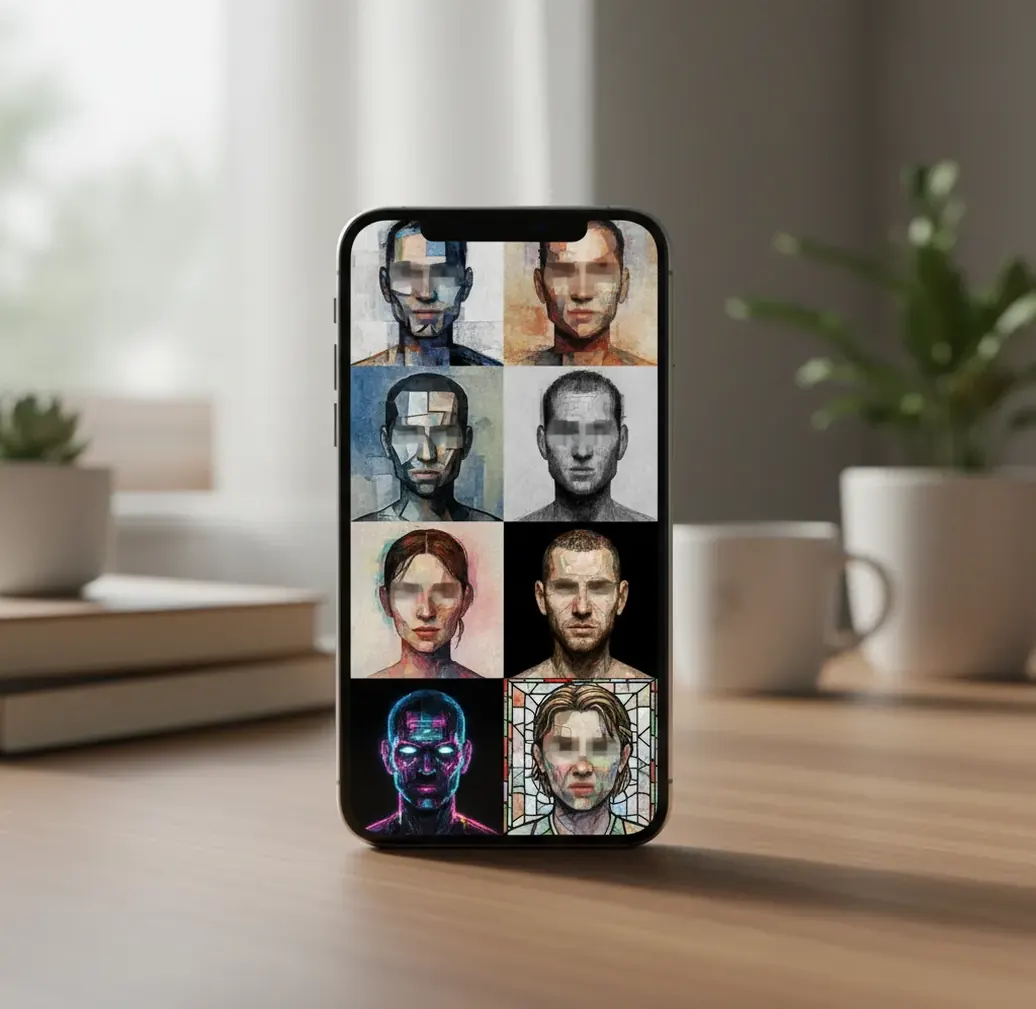
You make TikTok AI trends with your face by uploading one clear selfie to an AI image editor, generating 6 to 12 styled versions, and arranging the exported images in TikTok as a photo sequence or fast-cut transition. Use a frontal portrait with even light, avoid beauty filters, and reject outputs where pupils, teeth, or facial proportions shift.
What Are TikTok AI Trends With Your Face?
TikTok AI trends with your face are short-form video formats where an AI tool restyles your selfie into multiple recognizable versions of you. Common styles include yearbook portraits, anime avatars, cinematic posters, old-money fashion, glam edits, vintage film looks, cartoon profile pictures, and fantasy character concepts.
The goal is not to create a random AI person. The goal is identity-preserving restyling: your face shape, eye spacing, mouth position, hairstyle silhouette, and overall expression should stay stable while the outfit, background, lighting, or art style changes. Creators usually post the images as a beat-synced slideshow, glow-up sequence, before-and-after edit, or transition loop.
How Does AI Keep Your Face Recognizable?
AI face trend tools keep you recognizable by extracting identity cues from your source photo and using them as constraints during image generation. Technically, the system may rely on face landmarks, embeddings, segmentation masks, depth cues, and diffusion-based denoising to preserve facial structure while changing the visual style.
Face landmarks help locate features such as the eyes, nose tip, mouth corners, jawline, and hairline. An embedding is a compressed representation of visual identity, while diffusion generation creates a new image by iteratively refining noise into pixels that match the prompt and the reference face. This is why a clean, frontal selfie usually works better than a dramatic side angle or a heavily filtered photo.
How Do You Make TikTok AI Trends With Your Face?
Choose one clean selfie
Use a sharp, high-resolution portrait with even window light, both eyes visible, and minimal beauty filtering. A plain camera photo is better than a pre-edited selfie because AI tends to amplify smoothing, shadows, and lens distortion.
Crop for a vertical trend frame
Crop to a head-and-shoulders composition with space above the hair and below the chin. If the final TikTok is vertical, prepare for a 9:16 layout or export square images that can be centered cleanly.
Generate 6 to 12 style variations
Keep the same base selfie and change only the style prompt. Generate enough frames for a slideshow, beat drop, or transformation sequence, but avoid mixing different source photos unless you want a deliberately chaotic effect.
Check identity details
Reject frames where pupils point in different directions, teeth merge, the jawline changes shape, or the face looks like a different person. Regenerate those frames before editing the final video.
Export high-quality images
Export as PNG or high-quality JPG. For TikTok, a 1080 x 1920 vertical frame is ideal, but clean square images can also work if you use TikTok Photo Mode or add a background blur.
Assemble the TikTok edit
Import the frames into TikTok, CapCut, VN, or another mobile editor. Match brightness across frames, cut on the beat, and use short durations such as 0.2 to 0.5 seconds for fast transitions.
What Tools Can Make AI Face Trend Frames?
| Tool type | Best for | Strengths | Watch out for |
|---|---|---|---|
| Pict AI | Fast selfie-to-style batches for TikTok frames | Browser and iPhone workflow, useful for consistent portrait variations and quick exports | Still needs manual review for eye, teeth, and jawline consistency |
| CapCut AI features | Editing the final TikTok after images are generated | Strong timeline tools, templates, beat cuts, captions, and mobile-first export | AI portrait generation quality varies by effect and template |
| Canva AI tools | Social graphics, profile images, and branded layouts | Easy resizing, text overlays, templates, and design polish | Less specialized for identity-consistent face trend sets |
| Midjourney-style generators | Highly stylized art direction and cinematic looks | Excellent aesthetics, lighting, fashion, and fantasy concepts | May require more prompt control and reference tuning to keep identity stable |
| Free web generators | Quick experiments before committing to a trend | Low friction and good for testing prompt ideas | Watermarks, queues, unclear image retention, or inconsistent face preservation |
Choose the tool based on the job: generate consistent portraits first, then use a video editor for timing, music, captions, and TikTok export. No tool removes the need to inspect facial details frame by frame.
What Prompts Work Best for TikTok Face Trend Edits?
- Yearbook prompt: "Turn this selfie into a 1990s yearbook portrait, soft studio flash, natural skin texture, realistic eyes, same face shape, same hairstyle silhouette, neutral school photo background."
- Anime prompt: "Restyle this portrait as a clean anime character, expressive but recognizable, same eye spacing, same jawline, soft cel shading, detailed hair, vertical TikTok frame."
- Cinematic poster prompt: "Create a dramatic movie poster portrait from this selfie, moody rim light, sharp facial features, realistic skin, same identity, dark gradient background, high-fashion styling."
- Old-money prompt: "Transform this selfie into an elegant old-money editorial portrait, cream blazer, soft daylight, polished hair, luxury magazine look, preserve facial structure and natural expression."
- Fantasy character prompt: "Make this person a fantasy character portrait, ornate costume, magical background, realistic face, same nose, eyes, lips, and face proportions, detailed but not over-smoothed."
- Branding headshot prompt: "Convert this selfie into a polished creator headshot, clean background, confident expression, realistic skin texture, same identity, soft professional lighting, social profile crop."
How Do You Export AI Face Frames for TikTok?
Export AI face trend frames at the highest practical quality, then format them for TikTok’s vertical feed. The safest target is 1080 x 1920 pixels in a 9:16 ratio, especially if the edit uses full-screen transitions, captions, or zoom effects.
For a simple slideshow, export 6 to 12 images and keep the face in the same approximate position in every frame. For a beat-synced transition, use 8 to 16 frames and align the eyes or nose bridge across images so the edit feels intentional instead of jumpy. PNG is best for crisp graphics and text overlays; high-quality JPG is fine for realistic portrait sets and smaller file sizes.
Where Do AI Face Trends Break Down?
- Side-angle selfies can shift eye spacing, cheek shape, and jaw width because the model has less symmetrical face data to preserve.
- Heavy beauty filters often create waxy skin, softened nostrils, blurred eyelids, and inconsistent facial texture across frames.
- Teeth are difficult for image models because small alignment errors can turn into merged teeth, extra teeth, or warped smiles.
- Messy hair, hats, glasses, and hands near the face can confuse segmentation and create halo edges or distorted accessories.
What Should You Know About Consent and Safety?
Only make AI face trends with your own face or with clear permission from the person in the photo. Even playful edits can become harmful if they imply someone endorsed a style, brand, relationship, location, or identity they did not choose.
Avoid deceptive impersonation, fake screenshots, explicit edits, political manipulation, or using a private person’s face without consent. If you plan to use the images for a portfolio, print, merch, or creator branding, check the tool’s terms and make sure the source photo, styling, and final output are rights-safe.
More AI photo ideas that pair well with TikTok edits
Six Terms to Know Before Generating TikTok Face Portraits
- Seed
A seed controls the starting noise used during generation. An ai image generator for tiktok may expose this setting so you can reproduce a composition. Keeping the seed fixed can reduce variation, but it does not lock your identity when prompts, models, or reference settings change.
- Reference strength
This setting controls how strongly the generator follows an uploaded image. If you are learning how to keep same face in ai images, adjust it gradually: stronger reference influence may preserve likeness but also carry over the original clothes and background. Labels and scale directions vary between tools.
- Landmark alignment
Landmarks locate features such as eye centers and mouth corners. Tools found through a face shape detect online search may classify facial proportions, but that classification is not an identity lock. For transitions, aligning eye positions between frames helps prevent distracting jumps.
- Geometry warping
Warping moves pixels to alter proportions rather than simply changing texture or color. Before exploring how to reshape face with ai, decide whether you want stylization or a different facial structure. Warping can bend glasses, earrings, and nearby background lines along with the face.
- Trend template
A template combines a visual treatment with timing, transitions, and sometimes audio. Searching for viral ai photo trends 2026 can surface both templates and standalone filters. Check what the format actually requires before generating portraits; a morph sequence needs different framing from a static slideshow.
- Upload retention
Retention describes how long a service stores your source portraits and generated files. Deleting a project may not delete every stored copy. If you need to contact pict ai about an upload, identify the relevant project and ask specifically about source-image deletion, retention periods, and any separate training controls.
TikTok AI Face Trends: Common Questions
TikTok requires labeling for AI-generated content that contains realistic images, audio, or video. A convincing synthetic portrait of you can fall into that category even when you supplied the original selfie. Use the available AI-content disclosure when posting, and check the current rules for your format. A label does not make otherwise prohibited impersonation or misleading content acceptable.
Yes, but a morph works best when neighboring portraits have similar head angles, eye positions, and framing. Align the images before adding a morph or interpolation effect in a video editor. Large differences in hair, accessories, or pose can create stretched features between frames. If those distortions remain visible, use a direct cut instead of forcing a smooth transformation.
It means using AI to restyle your selfie into multiple recognizable versions of you, then posting the images as a TikTok slideshow, transition, or beat-synced edit.
Usually no. One sharp, front-facing selfie often gives more consistent results than several photos with different lighting, angles, or expressions.
Use a high-resolution portrait with even light, both eyes visible, natural skin texture, and no heavy filter. Avoid harsh shadows, sunglasses, extreme angles, and blurry mirror selfies.
Eyes and teeth are high-detail areas where small generation errors are easy to notice. Regenerate frames with pupil drift, crossed eyes, merged teeth, or a smile that changes your identity.
Most TikTok AI face trends work well with 6 to 12 images. Use fewer frames for a clean glow-up reveal and more frames for a fast transition or character set.
A 1080 x 1920 pixel image in 9:16 vertical format is ideal for TikTok. Square images can also work if you center the face and use a background blur or template.
Yes. You can generate the images in a mobile AI editor, save them to your camera roll, and assemble the final video in TikTok, CapCut, or another phone editor.
Use a plain, sharp source photo and prompts that say to preserve the same face shape, eye spacing, nose, lips, and hairstyle silhouette. Delete and regenerate any output that changes your core features.
Only use another person’s face if they clearly gave permission. Do not post deceptive, embarrassing, explicit, or impersonation-style edits of someone else.