How to Replace the Sky in Photos With AI
You can replace the sky in photos with AI by letting an editing app detect the sky, swap in a new sky layer, and blend it with the foreground. The edit looks realistic when the replacement sky matches the original scene’s light direction, color temperature, horizon haze, and reflections.
How to Replace the Sky in Photos With AI
- Upload your original photo and select the sky replacement tool, keeping an untouched copy for comparison.
- Choose a replacement sky or describe the clouds, weather, and light direction you want to match.
- Generate the sky replacement, then adjust its position and blending without changing buildings, faces, or landscape details.
- Review edges, reflections, and foreground lighting at full size, then export a separate high-resolution copy.
Example prompt: Replace the sky with a soft golden-hour sunset with thin clouds; match warm light from the left; keep realistic haze near the horizon; avoid oversaturated colors; preserve tree edges without halos.
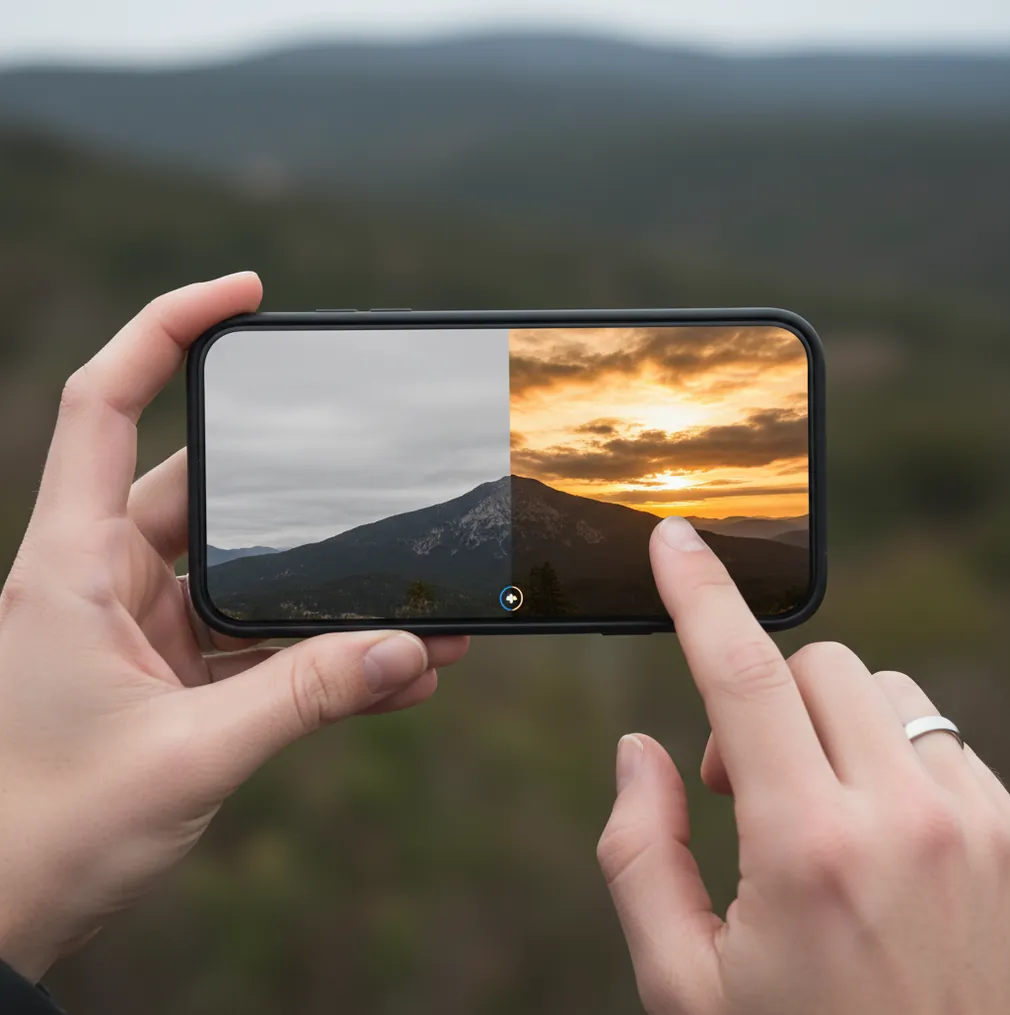
To replace the sky in photos with AI, use a sky replacement tool that segments the original sky, composites a new sky layer, and blends the mask edges around trees, wires, rooftops, and hair. For a natural result, choose a sky with matching light direction, lower the sky intensity, warm or cool the foreground, and check for halos or mismatched reflections before exporting.
What Does AI Sky Replacement Mean in Photo Editing?
AI sky replacement is a photo-editing workflow where software detects the sky area, removes or hides it, and composites a different sky behind the foreground. The process usually combines semantic segmentation, alpha matting, edge refinement, layer compositing, and tone matching. In practical terms, the app decides which pixels are sky, keeps important foreground details, and blends a new sky into the same scene.
The strongest results come from edits that respect the original photo. A blue midday sky usually fits a bright street scene better than a dramatic sunset. A stormy sky can work for mountains, but it may look fake if the ground, faces, windows, and water still carry soft daylight. Sky replacement is useful for social posts, prints, real estate exteriors, travel albums, and portfolio edits, but it should not be used to misrepresent documentary weather or safety conditions.
How Does AI Detect the Sky, Trees, Wires, and Hair?
AI sky tools usually start with semantic segmentation, a computer vision model that labels pixels as sky or non-sky. Easy photos have a clean horizon and a large open sky. Hard photos include bare tree branches, antenna lines, power cables, glass reflections, flyaway hair, fog, smoke, or bright backlit edges that are partly transparent.
Better editors do not use a hard cutout. They create a soft alpha matte, which allows semi-transparent edges to blend into the new sky. After masking, the app composites the replacement sky as a layer and applies local adjustments such as edge feathering, decontamination, horizon haze, brightness blending, and color temperature matching. The “pasted on” look usually happens when the mask is too sharp, the new sky has different contrast, or the foreground lighting does not match the new atmosphere.
How Do You Replace the Sky in Photos With AI on a Phone?
Choose a photo with usable structure
Pick an image with visible sky, a readable horizon, and enough resolution to survive editing. Photos with clean buildings, mountain ridges, beaches, or open landscapes are easier than low-resolution JPEGs with dense branches.
Open a sky replacement or background tool
Import the image into an AI photo editor and choose a sky replacement, background swap, or generative fill tool. Let the app create the first sky mask before you do manual cleanup.
Select a sky that matches the scene
Match sun direction, cloud height, horizon brightness, and weather mood. If the foreground is lit from the left, avoid a replacement sky with the sun clearly glowing from the right.
Refine the mask at difficult edges
Zoom to 100 percent and inspect trees, hair, rooftops, poles, wires, and mountain ridges. Use feather, decontaminate, erase, or restore controls to remove halos and preserve thin details.
Match exposure, warmth, and contrast
Lower the replacement sky intensity slightly, then adjust temperature, tint, highlights, and shadows. The foreground should feel like it belongs under the new sky, not like a separate photo.
Export and recheck on another screen
Save at the highest available resolution and review the image on a different display. Look for banding in gradients, clipped highlights, leftover original sky, and reflections that still show the old weather.
Which AI Sky Replacement Tools Work Best?
| Tool | Best For | Strength | Watch Out For |
|---|---|---|---|
| Pict AI | Fast phone-based sky swaps on iOS and Android | Quick sky detection, simple edge controls, and a mobile-first workflow for social posts and travel edits | As with any mobile editor, very fine branches, hair, and reflections still need manual review |
| Adobe Photoshop Express | Mobile edits with strong adjustment controls | Good exposure, color, and detail adjustments after the sky has been changed | Some workflows may require sign-in, and detailed edge work can take more time |
| Canva | Social graphics, carousels, templates, and quick design exports | Easy layouts, overlays, text, and brand-style formatting around the edited photo | Asset licensing, template elements, and fine mask control vary by plan and project |
| Luminar Neo | Desktop sky replacement and batch-style creative edits | Strong sky libraries, reflection tools, and scene relighting controls | Desktop-first workflow may be slower if you only need a quick phone edit |
| Photoshop | Professional retouching and precise compositing | Layer masks, generative fill, blend modes, color grading, and detailed manual control | Higher learning curve and more steps than most mobile sky replacement apps |
Choose based on the job: mobile apps are faster for camera-roll edits, design tools are better for social layouts, and desktop editors are better when the sky touches hair, glass, water, or dense trees.
What Makes an AI Sky Swap Look Realistic?
A realistic sky swap depends more on lighting logic than on cloud drama. The replacement sky should match the original scene’s direction of light, time of day, contrast level, and atmospheric depth. If the subject has soft shadows, use a soft sky. If the scene has hard midday shadows, avoid a cinematic sunset unless you also relight the foreground.
Use restraint. Reduce sky opacity or intensity by 10 to 25 percent, soften the horizon, and add slight haze where land meets sky. Match color temperature by warming foreground highlights for sunset scenes or cooling shadows for storm scenes. For portraits, inspect hair at high zoom and avoid skies with extreme contrast directly behind flyaways. For prints, export large enough for the final size and check the edit at print brightness, not only on a glowing phone screen.
What Prompt Recipes Can You Use for AI Sky Replacement?
- Natural travel sky: “Replace only the sky with a realistic soft blue sky, thin white clouds, same daylight direction, subtle horizon haze, preserve foreground lighting and edges.”
- Golden hour landscape: “Change the sky to a warm golden-hour sunset with soft clouds, sun low on the same side as the original highlights, realistic color spill, no changes to land or people.”
- Moody mountain edit: “Replace the flat sky with dramatic layered storm clouds, keep the mountain silhouette sharp, add light haze near the ridge, avoid oversaturated colors.”
- Clean real estate exterior: “Replace overcast sky with a bright natural blue sky and light clouds, maintain realistic shadows, preserve rooflines, windows, trees, and property details.”
- Portrait backlight sky: “Replace background sky with a soft pastel evening sky, preserve hair detail, avoid halos, keep skin tones natural, match warmth to existing rim light.”
- Carousel consistency: “Apply a consistent partly cloudy sky across this photo set, same cloud density, same color temperature, natural horizon blending, no surreal effects.”
When Does AI Sky Replacement Look Fake?
- Halos appear when the mask edge is too hard or when bright original sky pixels remain around branches, hair, rooftops, or wires.
- Sunset skies look fake if the foreground shadows are still cool, flat, and clearly shot under overcast daylight.
- Water, mirrors, car windows, and building glass may keep reflections from the original sky unless the editor also updates reflective areas.
- Low-resolution JPEGs can show banding, compression blocks, and noisy gradients after a new smooth sky is added.
Where Is Sky Replacement Most Useful for Creators?
Sky replacement is most useful when the photo is already strong but the top third is visually dead. It can rescue overexposed white skies in travel photos, make beach images feel closer to the memory, create consistent skies across an Instagram carousel, and improve the mood of prints, postcards, thumbnails, and portfolio selects.
It also helps practical workflows. Real estate photographers use subtle blue skies when weather ruins an exterior shoot, while creators use softer clouds to make text overlays easier to read. Brand photographers may use consistent sky tones across campaign images so the set feels intentional. The safest creative rule is simple: improve atmosphere without contradicting the visible light, reflections, or context of the original scene.
Related Pict.AI reads you’ll probably want next
Six Editing Terms That Help You Control a Sky Replacement
These terms help distinguish changes to the sky from changes to the photograph itself. Look for equivalent controls in your editor; labels vary between tools.
- Source plate
The untouched photograph used as the foundation of a composite. Keep a separate copy for comparison, especially when combining sky replacement with portrait generation. Instructions on how to make ai photos of yourself address a different task: generating a likeness rather than preserving the photographed scene.
- Registration
The alignment of separate images within one composition. For a replacement sky, this includes positioning its horizon relative to the landscape. Learning how to merge two photos into one with ai is useful here, but automatic alignment still needs visual checking.
- Protected region
An area excluded from an edit, such as a face, building, or mountain. Protection matters when a generator redraws more than the sky. An ai magic eraser for photos removes selected objects; it does not necessarily protect surrounding details during a separate sky edit.
- Working master
An editable project that retains masks, layers, and adjustments where supported. Save it before making flattened copies. If you later use an app to turn photos into sketches, start with a duplicate so the photographic sky edit remains independently adjustable.
- Render order
The sequence in which edits are applied. Replacing the sky before using an app that turns photos into cartoons lets the stylization process treat the foreground and sky together, although it may reinterpret clouds or alter their shapes.
- Output variant
A separate version made for a particular use, such as a photographic print or illustrated post. If you are deciding what app turns photos into sketches, keep that illustrated output separate from the realistic sky replacement rather than overwriting the same file.
Answers to Common Sky Replacement Questions
Yes, but using the same sky file is only a starting point. Match its position, scale, exposure, and color across photographs taken from similar viewpoints. Different camera angles may require different crops or sky images. Review each mask separately: a batch setting that works on one roofline can miss branches or cables in another frame.
Commercial use depends on the rights to the original photograph and the replacement sky. Check whether a supplied sky asset permits commercial use and whether restrictions apply to resale, stock submissions, or redistribution. For generated skies, review the tool’s terms. Stock agencies and clients may also require disclosure or reject images with generative alterations.
The easiest way is to use an AI sky replacement tool that automatically masks the sky, then choose a new sky and adjust edge softness, brightness, and warmth before export.
Yes. Many mobile AI photo editors on iPhone and Android can detect the sky, add a new sky layer, and export the result without a desktop workflow.
Match the new sky to the original light direction, time of day, color temperature, and contrast. Then refine edges and reduce the sky intensity slightly so it does not overpower the foreground.
Halos happen when the mask leaves bright original sky pixels around thin edges. Use edge refinement, feathering, decontamination, or manual restore tools to clean branches and wires.
Sometimes, but not always automatically. Reflections often need a separate mask, a lowered-opacity reflected sky layer, or manual retouching to match the new sky.
It can work creatively, but it often looks fake unless you also warm the foreground, deepen shadows, and make the light direction believable.
It can if the source file is small or heavily compressed. Export at full resolution and avoid extreme gradient edits on low-quality JPEGs to reduce banding and artifacts.
Yes, subtle sky cleanup is common, but edits should not misrepresent weather, property condition, views, lighting, or disclosure-relevant details.
Photos with dense branches, flyaway hair, power lines, fog, glass, water reflections, or blown-out edges are hardest because the sky boundary is not clean.