What Changed in AI Image Generation in 2026
AI image generation changed in 2026 because models became more reliable, not because they became perfect. The biggest upgrades are faster iteration, better prompt adherence, stronger character consistency, cleaner anatomy, and more usable editing controls for creators making social posts, gifts, prints, thumbnails, ads, and portfolio work.
AI image generation in 2026 is becoming more useful through better instruction-following, reference handling, and targeted editing, not universal accuracy. The practical change is greater control over revisions, although capabilities vary by model. Judge an upgrade by whether it delivers your required image with fewer corrections, usable exports, and acceptable handling of uploaded references, rather than by its best-looking sample.
What Changed in AI Image Generation in 2026
- Upload a reference image you have permission to use, or start with a text-only brief.
- Describe the intended asset, specify what must stay unchanged, and choose the required output proportions.
- Generate a small comparison set using consistent references and instructions, then select the closest match.
- Review the selected image against delivery requirements, correct remaining problems, and export the approved version.
Example prompt: Create a 6-panel comparison grid showing the same subject in 2023 vs 2024 vs 2025 vs 2026 AI generation quality, focusing on hands, eyes, and background geometry; neutral studio lighting, consistent camera angle, no text, high detail, 16:9
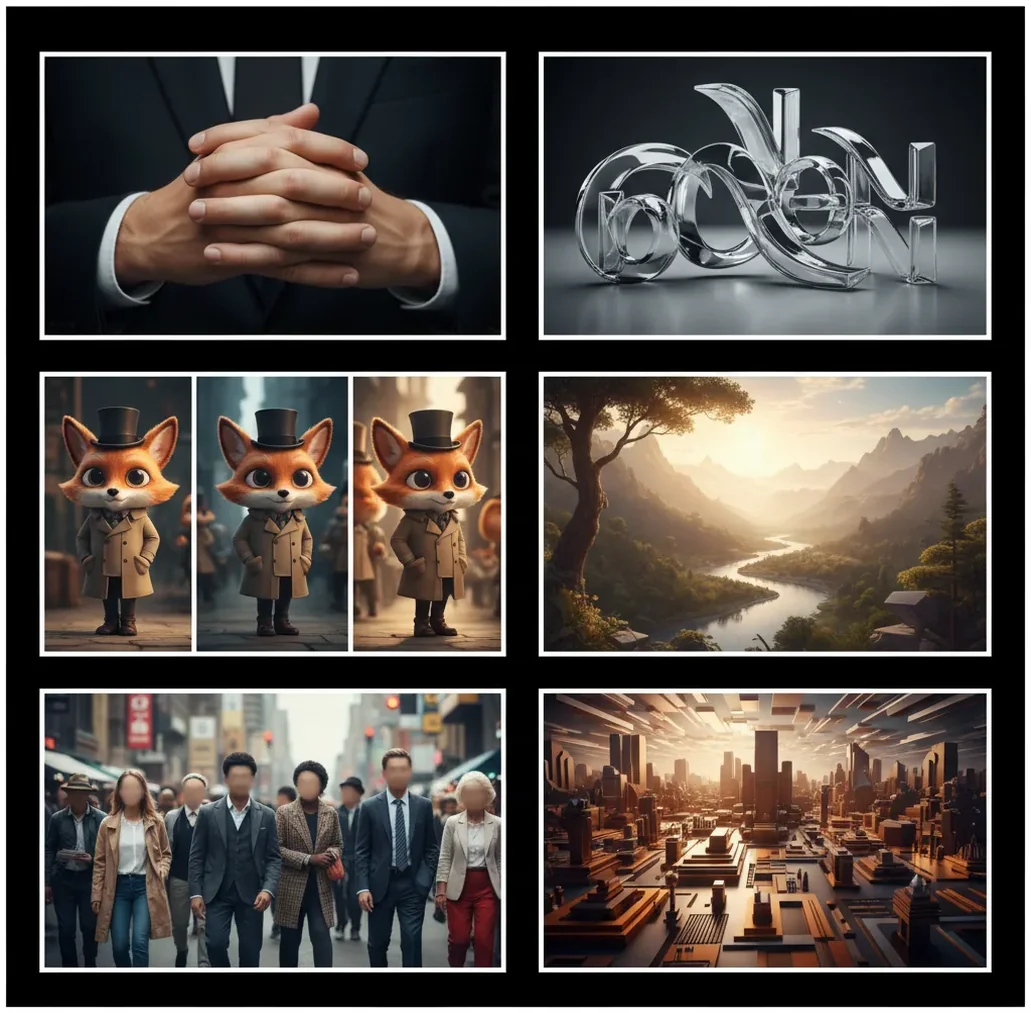
AI image generation in 2026 changed most in reliability, speed, and control. Modern image models follow prompts more closely, keep faces and characters steadier across variations, render hands better in simple poses, and support more practical editing workflows, but exact text, logos, and identity consistency still need manual review.
What Changed in AI Image Generation in 2026?
The main AI image generation changes in 2026 are better prompt-following, faster generation, more consistent subjects, and fewer obvious artifacts. Earlier models often produced a strong first image but failed when you asked for a specific pose, camera angle, outfit, or second variation. In 2026, the model is more likely to preserve the intended composition while changing only the requested detail.
The practical result is a smaller gap between a nice image and a usable image. Creators can now build carousels, product mockups, character sheets, thumbnails, print concepts, and visual brand directions with fewer retries. The models still generate probabilistically, so the same prompt can produce different outcomes, but the average failure rate is lower.
How Do 2026 AI Image Models Work Differently?
Most 2026 image generators still use diffusion-style denoising, where the system starts from noise and gradually forms an image guided by text, reference images, or masks. What changed is the quality of conditioning: attention layers, captioning data, alignment tuning, and guidance methods help the model connect words like "three-quarter view," "matte ceramic," or "soft rim light" to the correct visual regions.
The upgrades are especially visible in multi-object scenes and image editing. Better multimodal reference handling means a model can use an uploaded face, product, sketch, or composition without drifting as quickly. Distillation and optimization also make many models faster, so creators can test four to eight variations in the time older workflows needed for one or two.
How Can You Get 2026-Quality AI Images?
Start With One Visual Job
Define the output before prompting: Instagram story, product hero image, profile portrait, print poster, storyboard frame, or website thumbnail. A clear use case helps you choose aspect ratio, detail level, and composition.
Write a Short Prompt With Strong Anchors
Use one subject, one setting, one lighting choice, and one medium. Example: "Studio photo of a ceramic coffee mug on a stone counter, soft morning window light, 85mm product photography."
Generate Several Variations Before Editing
Create four to six versions and choose the best composition first. Do not rewrite the whole prompt after one weak result; the strongest workflow is selection, then refinement.
Use References for Identity or Product Consistency
Upload a clean reference image when the same character, face, outfit, package, or object must remain stable. Use front-facing, well-lit references when possible.
Fix Local Problems With Editing Tools
Use inpainting, object removal, background cleanup, and local regeneration for small failures like a hand, label, shadow, or prop. Editing the output is faster than restarting the entire image.
Upscale and Export Last
Lock composition, anatomy, and text placement before upscaling. Export in the final format you need, such as 1:1 for feed posts, 9:16 for stories, 16:9 for video thumbnails, or 4:5 for portrait ads.
Which AI Image Tools Fit the 2026 Workflow?
| Tool | Best for | Strength | Watchout |
|---|---|---|---|
| Pict AI | Fast browser and iOS generation plus editing | Quick prompt testing, variations, cleanup, and mobile edits in one flow | Exact text and logos still need checking before final use |
| Midjourney | Stylized art direction and polished concept images | Strong aesthetics, lighting, and mood for editorial or portfolio visuals | Precise layout control and text accuracy can require iteration |
| Adobe Firefly | Commercial design workflows inside Adobe tools | Useful for generative fill, brand-safe design work, and editing existing assets | Best value if you already work in the Adobe ecosystem |
| Ideogram | Images where typography is part of the concept | Often stronger at poster-like text than general image tools | Still not a replacement for final logo or layout design |
| Stable Diffusion or ComfyUI | Advanced control, custom models, and repeatable pipelines | High flexibility with LoRAs, ControlNet, seeds, masks, and local workflows | Steeper setup curve and more technical maintenance |
The best 2026 image generator depends on the job. Use a fast all-in-one tool for everyday creation, a stylized model for art direction, a design-suite tool for production editing, and a technical pipeline when you need repeatability or custom model control.
What Prompt Recipes Work Best in 2026?
The best 2026 prompts are compact, specific, and editable. Instead of stacking dozens of adjectives, use a modular structure: subject, action, setting, medium, camera, lighting, style boundary, and output ratio. This gives the model enough constraints without turning the prompt into conflicting instructions.
Reusable template: "[medium] of [subject] doing [action] in [setting], [camera angle], [lens or composition], [lighting], [color palette], [style boundary], [aspect ratio]." Example: "Editorial photo of a baker holding a tray of sourdough in a small tiled kitchen, three-quarter view, 50mm lens, soft window light, warm neutrals, realistic commercial photography, 4:5."
Where Do the 2026 Improvements Matter Most?
The 2026 improvements matter most when the image has to survive beyond a single fun generation. Social creators benefit from faster thumbnail tests, cleaner carousel consistency, and vertical compositions that do not break when cropped. Small brands can sketch product shots, campaign moods, packaging directions, and ad concepts before spending money on a photoshoot.
Artists and designers also get more usable drafts for storyboards, character references, print gifts, album art, pitch decks, and portfolio experiments. The emotional utility is important: a birthday print, a pet portrait, a founder headshot concept, or a wedding moodboard needs to feel intentional, not randomly AI-made. Better control makes those outputs less disposable.
Why Are Characters More Consistent in 2026?
Characters are more consistent in 2026 because models handle reference images, identity features, and local edits more reliably. A good workflow uses a clean reference, stable framing, and small prompt changes instead of asking the model to reinvent the person in every generation. This helps preserve hair shape, face structure, wardrobe, and body proportions across a small series.
Consistency is still not the same as continuity in film or game production. If you change the lens, lighting, age, expression, style, and aspect ratio at the same time, the model may treat the subject as a new person. For a six-image carousel or concept sheet, keep identity anchors fixed and vary only pose, background, or prop.
What Still Goes Wrong With AI Images in 2026?
- Exact text is still unreliable at small sizes. Short words, posters, and signs improved, but long labels, legal copy, menus, and dense typography should be added in a design editor.
- Logos are not dependable. A model may imitate the idea of a logo but distort letters, spacing, geometry, or trademarked marks, so production assets need manual placement.
- Hands improved but still fail in complex poses. Interlaced fingers, foreshortened hands, crowded group shots, and hands holding transparent objects remain common failure zones.
- Identity can drift between generations. Reference images reduce drift, but changes in age, lighting, facial angle, and aspect ratio can alter the subject.
How Should Creators Edit AI Images After Generation?
Audit the Image at 100 Percent
Zoom in and inspect hands, eyes, teeth, jewelry, product edges, background objects, reflections, shadows, and any visible words.
Repair Small Areas First
Use inpainting or local regeneration for a warped finger, odd prop, extra earring, messy collar, or broken background detail.
Add Text and Logos Manually
Generate the scene without final typography, then add brand names, labels, prices, and calls to action in a layout editor.
Match Color to the Final Channel
Adjust contrast and saturation for the destination. A print gift, social story, marketplace listing, and portfolio page all need different finishing.
Save the Prompt and Reference Stack
Keep the final prompt, seed if available, reference images, aspect ratio, and edits. This makes it easier to create matching assets later.
What Better Generation Changes - and What It Costs
The useful way to judge AI image generation in 2026 is by the work needed to reach an approved asset, not by the attractiveness of one sample. A polished preview can still require expensive revisions, have unsuitable export options, or come with upload policies that rule it out for confidential projects.
Pros: An ai image generator app with reference-based editing can make visual decisions easier to compare. Keeping the source asset, instructions, and revisions together also reduces handoff friction: another editor can see what changed rather than reverse-engineering a finished image.
- More measurable value: Count accepted outputs per project, not generations per minute. A slower tool can be more economical if fewer images need rebuilding.
- More practical collaboration: Saved instructions and edit histories can help a designer distinguish intentional changes from accidental ones, where those features are available.
Cons: Added control can mean more settings, reference uploads, and account dependencies. Switching models may invalidate a saved recipe. Credits spent on rejected variations also matter, especially when higher-resolution exports or edits consume separate allowances.
A midjourney free alternative should therefore be compared on export access, usage limits, and permitted uses, not just whether the first generation costs nothing. Check whether you can retrieve usable files without starting a paid plan.
Verdict: Choose the workflow with the lowest total effort per approved image. Visual quality, revision cost, privacy, and export access belong in the same decision.
Run a Repeatable Check Before Changing Image Models
A model update deserves a small acceptance check before it replaces a working setup. Use a fixed brief and record the results so that an attractive new style does not hide a worse fit for your actual deliverables.
- Build a compact comparison set. Choose three representative jobs: one simple asset, one constrained composition, and one edit to an existing image. Include the source files and exact instructions. Tip: Use ordinary client-style requests, not showcase prompts designed to flatter a model.
- Define pass criteria before generating. Write down what must remain unchanged, what may vary, and the required delivery format. For an ai poster drawing, assess whether the composition leaves the intended space for separately typeset copy. Tip: Separate mandatory requirements from aesthetic preferences.
- Hold the comparison conditions steady. Give each candidate the same references, comparable output settings, and the same number of attempts. Record the model name or version when available. Tip: Do not compare one carefully selected result with another tool's first attempt.
- Check adjacent tasks independently. If the project also needs an ai image translator, assess transcription and translation separately from image generation; convincing lettering does not establish linguistic accuracy. Tip: Have a fluent reader review translated wording before rebuilding the layout.
- Record the full delivery effort. Track rejected outputs, manual corrections, export restrictions, and time spent reaching approval. Keep the original alongside the final file. Tip: Repeat the same comparison after a major model change rather than assuming old results still apply.
This produces a project-specific reason to switch, or stay, without relying on release labels alone.
Choose Features by the Asset You Need to Deliver
The right feature set depends on where the image goes next. Use the destination to narrow the tool choice before comparing styles or writing a detailed prompt.
- If you need stickers, prioritize clean cutouts. An app that makes ai stickers should let you inspect edges and export transparency when your destination supports it. Check the design against both light and dark backgrounds; an unnoticed halo can become obvious outside the preview.
- If you need a phone background, prioritize placement. When choosing the best ai wallpaper generator app for your needs, check cropping and room for interface elements. Preview the image on the intended device rather than judging only a full-screen gallery sample.
- If you need a physical print, calculate delivery dimensions. Divide pixel width by the intended print width in inches to find pixels per inch. A 3,000-pixel-wide image printed 10 inches wide provides 300 ppi. Confirm the printer's requirements before paying for an export.
- If you handle private references, inspect upload policies first. Check retention, deletion controls, and whether uploaded material may be used to improve models. Use non-sensitive stand-ins while evaluating a service; attractive output does not resolve a confidentiality problem.
- If several people must approve the asset, preserve the handoff. Keep the source reference, instructions, selected output, and final edits together. Specify which details are fixed so the next editor does not accidentally regenerate an already approved feature.
These checks concern delivery rather than generation quality alone. A tool that produces the preferred look can still be the wrong choice if its files, policies, or revision process do not suit the job.
Questions About the 2026 Image Generation Shift
Not necessarily. A seed controls part of the generation process, but it does not preserve the model itself. Changes to model weights, sampling settings, reference handling, or backend processing can change the result. For repeatable work, save the model version, settings, prompt, references, and original output. If a service does not expose version controls, exact reproduction may not be available.
No. Some tools attach provenance information or Content Credentials, but support varies, and later editing or exporting can remove metadata. A visible watermark is a separate mechanism and may also be absent. Missing credentials do not prove an image is a photograph. Preserve original files and any available provenance records, and follow the disclosure requirements of the destination platform.
The main changes are better prompt adherence, faster generation, steadier character consistency, improved hands, and more practical editing workflows. Text, logos, and exact identity matching still require review.
Yes, short text in posters, signs, and simple graphics improved. Long typography, exact brand lettering, small labels, and legal copy are still better added manually.
Hands are better in simple poses with clear lighting, but they are not fully fixed. Complex gestures, foreshortening, and crowded scenes can still create extra fingers or warped joints.
AI image models sample from probability distributions, so small prompt or framing changes can shift identity. Reference images, stable aspect ratios, and limited edits reduce drift but do not eliminate it.
Use a compact structure: subject, action, setting, medium, camera angle, lighting, style boundary, and aspect ratio. Two or three strong constraints usually work better than a long list of adjectives.
Most image generators still struggle with exact logos and brand typography. Generate the scene first, then place the approved logo in an editor for production use.
It can be good enough for concepting, social assets, mockups, ads, thumbnails, and some finished visuals. Commercial use depends on the tool terms, input rights, client policy, and whether the final image passes human review.
Choose the final destination before generating: 1:1 for square posts, 4:5 for portrait feeds, 9:16 for stories or short video covers, and 16:9 for thumbnails or banners. Changing aspect ratio late can damage composition and identity.
Reference images help when you need consistent faces, products, poses, or compositions. Use clear, well-lit references and avoid changing too many variables at once.