Flower Language Filter in Pict.AI App
Make TikTok-style flower meaning cards, AI bouquet wallpapers, profile covers, and lock screens from a prompt or your own photo. Pict AI helps turn floral symbolism into clean, share-ready edits for iPhone, Android, and web.
A flower language filter creates a bouquet or floral card from a name, selected flowers, or a symbolic message. For a name-based design, choose a letter-to-flower key; for a meaning-based card, choose blooms that express your intended sentiment. Then arrange the flowers and add labels so the recipient can understand the result.
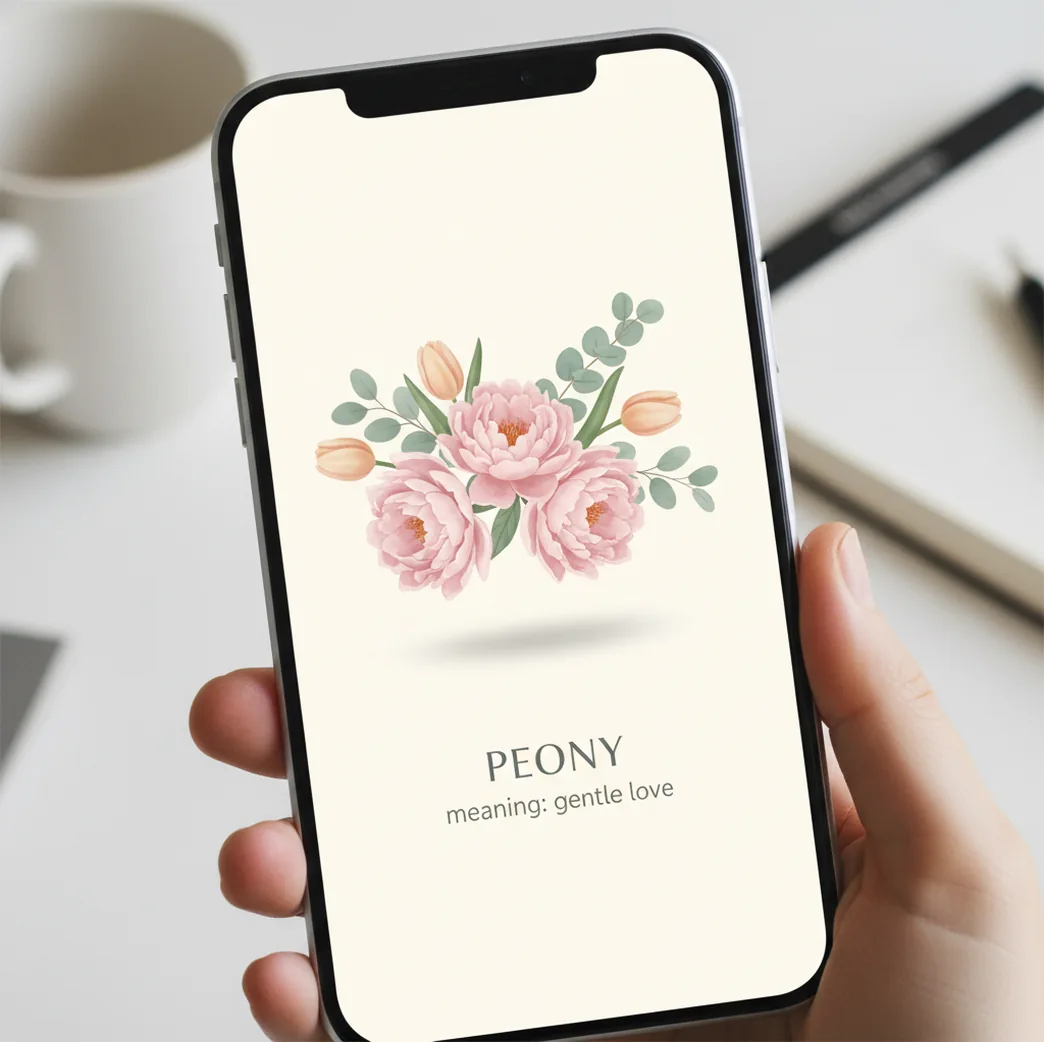
Turn any photo into a flower language card: generate a bouquet, remove the background, add the flower name and meaning, then export for TikTok, Stories, or a lock screen.
A flower language filter in Pict.AI app is a visual edit that pairs a flower or bouquet with its symbolic meaning, such as rose for love or lily for purity. The workflow usually combines AI bouquet generation, background removal, text overlays, and export sizes for TikTok, Stories, profile cards, or lock screens. It is best for creators who want a personal floral design rather than a single preset effect.
What Is Flower Language Filter in Pict.AI App?
A flower language filter is an edit style that turns flower symbolism into a social-ready visual. It usually shows a single bloom or bouquet, the flower name, and a short meaning line, then formats the result as a wallpaper, profile card, TikTok cover, or Instagram Story.
The style works because it feels personal without needing a long caption. A creator might choose peony for romance, sunflower for loyalty, lavender for calm, or two flowers to represent a relationship. In the app workflow, you can start from a selfie, a blank canvas, or an AI-generated bouquet, then add typography and export the design in a mobile-friendly ratio.
How an AI Flower Meaning Filter Works
An AI flower meaning filter works by combining image generation, subject isolation, layout editing, and text compositing. A diffusion model can generate a bouquet from a prompt such as “white lilies and eucalyptus, soft studio light,” while background removal uses segmentation and edge detection to separate a portrait, object, or bouquet from the original image.
After the cutout is created, the editor stores transparent areas in an alpha channel so the subject can sit over a gradient, floral scene, or minimal card background. Text layers are then placed above the image for the flower name, meaning, date, initials, or short label. The final step is export: 9:16 for lock screens and Stories, 4:5 for feeds, and 1:1 for profile cards.
How to Make a Flower Language Filter
Choose your source image
Start with a portrait, a blank canvas, or an AI-generated bouquet. For a personal card, use a clear face or upper-body photo with enough space around the subject for flowers and text.
Generate or select the flower
Write a prompt with flower type, color palette, mood, and lighting, such as “pink peonies, ivory roses, soft film grain, cream background.” If you already have a flower photo, import it instead.
Remove or replace the background
Cut out the subject or bouquet, then place it on a clean gradient, paper texture, floral backdrop, or AI scene. Keep the background simple if the meaning text needs to be readable on a phone screen.
Add the flower meaning text
Place the flower name as the headline and the meaning as a short line below it. Meanings of 3 to 8 words usually read best, especially on TikTok covers and lock screens.
Export for the final format
Save in 9:16 for lock screens, Reels, and Stories; 4:5 for feed posts; or 1:1 for profile cards. Leave safe margins near the top of lock screens so text does not sit under the clock.
Flower Meaning Filter Features
AI bouquet generation
Generate bouquets, single blooms, floral frames, or flower backgrounds from prompts that specify flower types, color palette, season, lighting, and visual style.
Background removal
Cut out portraits, objects, or bouquet elements so the final design looks like a clean card rather than a pasted screenshot.
Meaning text overlays
Add the flower name, symbolic meaning, initials, date, zodiac sign, or short label with font, size, spacing, color, and placement controls.
Wallpaper and social ratios
Create 9:16 lock screens, 4:5 feed posts, 1:1 profile cards, and vertical covers that fit common TikTok, Reels, and Stories workflows.
Color grading for floral edits
Adjust warmth, contrast, saturation, and softness so the bouquet, portrait, and background feel like one designed image.
Reusable card layouts
Build a repeatable style for flower-of-the-day posts, name-to-flower cards, couple bouquets, friendship notes, and matching aesthetic packs.
Flower Language Filter vs Canva, CapCut, and YouCam Perfect
| Tool | Best For | Flower Workflow | Text and Layout | Export Options |
|---|---|---|---|---|
| Pict AI | AI photo editing with bouquets, cutouts, and card-style exports | Prompt-based floral generation plus background removal | Flower name, meaning line, subtitles, and profile-card layouts | 9:16, 4:5, 1:1, and share-ready image formats |
| Canva | Template-based graphic design and quick social layouts | Works well with uploaded flower images, stock graphics, and manual layouts | Strong typography controls and many preset templates | Excellent for posts, PDFs, presentations, and brand kits |
| CapCut | Short-form video edits, TikTok-style captions, and motion templates | Good for animated flower meaning videos or slideshow covers | Strong video text effects, captions, and timing controls | Best for TikTok, Reels, Shorts, and vertical video |
| YouCam Perfect | Beauty edits, photo retouching, stickers, and mobile photo effects | Useful for portraits with floral stickers or decorative overlays | Simple text tools for quick personal edits | Good for mobile posts, selfies, and casual social sharing |
Choose a tool based on the finished asset: static AI bouquet cards, polished templates, motion videos, or beauty-focused portrait edits.
Who Uses Flower Meaning Filters
Artists building visual prompts
Illustrators and concept artists use flower meaning cards as references for character moods, color palettes, album art, and poster studies.
Creators making TikTok series
Short-form creators can make recurring formats such as “your flower by birth month,” “your name as a bouquet,” or “flowers that match this relationship.”
Social media profile aesthetics
Users create matching headers, avatars, lock screens, and highlight covers with the same bouquet, typography, and color grade.
Personal gifts and messages
A flower card can become a birthday note, friendship post, anniversary graphic, or private lock screen with initials and a meaning line.
Prints, journals, and scrapbooks
Creators export floral meaning designs for small prints, journal inserts, memory boards, and scrapbook pages with symbolic captions.
Tattoo reference boards
People exploring floral tattoos use meaning cards to compare symbolism, placement ideas, and bouquet combinations before talking to an artist.
Portfolio and mood-board work
Designers can show floral identity systems, editorial cards, typography tests, and emotionally driven visual treatments in a portfolio.
Flower Language Filter Limitations
- Flower meanings are not universal. A rose, lily, chrysanthemum, or lotus can carry different symbolism across cultures, eras, and personal contexts.
- The app does not automatically verify botanical meanings. Check a reliable flower-language source if accuracy matters for a gift, memorial, tattoo, or public post.
- AI-generated bouquets may invent petals, leaves, or hybrid flowers that look beautiful but are not botanically exact.
- Small text can become unreadable after compression on TikTok, Instagram, or messaging apps. Test the export at phone size before posting.
Fix Name-to-Flower Mix-Ups Before Designing the Card
A name-based bouquet needs a clear translation rule before it needs a visual style. Decide whether each letter represents a flower, each person gets one bloom, or the whole name inspires a single arrangement. Mixing these approaches makes the finished card difficult to explain.
- Repeated letters produce an overcrowded bouquet. A name such as Anna can represent four stems or two flower types. Choose one rule: preserve every letter for a literal spelling, or combine repeated letters for a simpler arrangement. Include a small legend if the letter-by-letter reading matters.
- A nickname and full name produce inconsistent cards. Set the exact spelling before generating anything, including spaces, hyphens, and accented letters. For a matching set, use the same treatment throughout rather than shortening one person's name and keeping another person's full name.
- Two people's flowers cannot be distinguished. Separate the arrangement into two clusters and label each with initials. Color alone is a weak identifier, especially when the card is viewed in grayscale or by someone with color-vision differences.
- Decorative foliage looks like part of the code. Keep filler leaves outside the letter legend. If every visible stem is meant to represent a letter, remove unassigned greenery or label it explicitly as decoration.
- A style change obscures the chosen flowers. When combining a bouquet with a studio ghibli filter aesthetic, preserve recognizable flower silhouettes. If the design becomes too stylized to identify, include a separate flower list rather than expecting viewers to decode the illustration.
Export Sizes and File Choices for Name Bouquets
Choose dimensions for the destination, not simply the largest export available. These are practical working targets rather than guaranteed settings in every editor. Keep an editable master with separate bouquet, labels, and background layers wherever the tool supports them; a flattened export is harder to revise when a name changes.
| Use | Working size or setting | Why it matters |
|---|---|---|
| Vertical bouquet card | 1080 × 1920 pixels | A useful 9:16 canvas for a static card or vertical video frame. Keep essential labels away from interface overlays. |
| Portrait feed card | 1080 × 1350 pixels | Provides room for a bouquet and a letter legend without shrinking both into a square. |
| Transparent bouquet asset | PNG with transparency | Preserves the cutout for placement on another background. JPEG cannot retain transparency. |
| Finished card with flat colors | PNG at final dimensions | Lossless compression avoids JPEG artifacts around small labels and sharp graphic edges. |
| Photographic card for sharing | High-quality JPEG, sRGB | Usually produces a smaller file; sRGB is a practical color-space choice for screen sharing. |
| 4 × 6-inch print | 1200 × 1800 pixels at 300 pixels per inch | Matches that print size without relying on a resolution tag to add missing detail. |
| Animated name reveal | 6-10 seconds as a starting point | Allows a short name and its flower key to remain visible long enough to read. Longer names need more time. |
For edge-to-edge printing, ask the printer for its bleed specification before exporting. Adding bleed can change the required canvas dimensions. For video, pause on the completed bouquet instead of moving immediately to an end card; the letter key should remain readable without requiring viewers to pause playback.
Four Misconceptions About Flower Name Filters
- Myth: Every flower name filter uses the same alphabet.
Fact: A letter-to-flower key belongs to a particular effect, template, or creator. There is no single standard alphabet governing all name bouquets. When recreating someone's result, copy their key as well as their spelling; otherwise, the flowers may differ even when both designs follow their own rules correctly.
- Myth: A name bouquet reveals someone's personality.
Fact: The arrangement is a creative assignment, not a personality assessment. Letter mapping reflects spelling; a mood-based prompt reflects the description supplied by the person making it. Present the card as a personal interpretation rather than evidence of someone's character, compatibility, or future.
- Myth: A name bouquet and a birth-flower bouquet are interchangeable.
Fact: They answer different questions. A name bouquet can encode letters, while a birth-flower bouquet selects flowers associated with a birth month. If combining both, explain which flowers represent the name and which represent the birthday so the recipient can understand the design.
- Myth: A decorative bouquet is a ready-to-order florist recipe.
Fact: An illustration does not establish stem quantities, seasonal availability, or the physical scale of each bloom. To commission a real arrangement, send the florist a separate flower list, preferred colors, budget, and delivery date. Allow substitutions rather than expecting an exact replica of the image.
Flower Language Filter Questions Answered
Different effects can assign different flowers to the same letters, and generative tools can vary the arrangement between attempts. Spaces, nicknames, and repeated-letter rules can also change the result. To reproduce a bouquet, save the exact spelling, letter-to-flower key, flower list, and reference image. Reusing a saved design is more dependable than generating it again from the name alone.
First check whether the chosen letter-to-flower key includes accented characters. If it does not, choose a consistent rule: map the accented letter to its base letter, or assign it a flower yourself. Keep the person's correct spelling in the visible name label. Add a short note explaining the mapping if the bouquet is intended to be decoded letter by letter.
It is better described as an editing workflow. You generate or import flowers, add meaning text, adjust the layout, and export the finished card.
Yes. Start with a camera-roll photo, remove the background if needed, then place the subject with a bouquet, floral backdrop, and meaning text.
Not automatically. You choose the meaning text, so it is worth checking a trusted flower-language list for symbolic accuracy.
Use a 9:16 vertical layout. Keep important text away from the top clock area and leave room near the bottom for notifications.
Roses, peonies, lilies, tulips, lavender, sunflowers, daisies, and orchids work well because they are recognizable and have familiar symbolic meanings.
Yes. Use two flower types, place both meanings on the card, and write one combined line that explains the relationship or shared mood.
Keep the main meaning between 3 and 8 words. Short phrases are easier to read on TikTok covers, Stories, and lock screens.
Yes, but export at the highest available resolution and avoid tiny type. Social-size graphics are best for small prints, cards, journals, and scrapbook pages.
It can help with early reference boards and symbolism choices. Bring the idea to a tattoo artist so they can redraw it for skin, placement, and line weight.