How to Boost Sales With AI Product Photos
To boost sales with AI product photos, use AI editing to make products easier to understand in less than a second: clean background, accurate color, sharp edges, and consistent framing. The goal is not to make the item look fake or overly perfect; it is to remove visual doubt so shoppers can judge size, condition, texture, and value faster.
How to Boost Sales With AI Product Photos
- Upload a sharp photograph of the actual product, including its complete outline and visible identifying details.
- Choose background removal or describe a setting, asking the editor to preserve product shape, labels, and color.
- Generate the edited image, keeping the original photograph available for a direct comparison of product details.
- Review edges, accessories, and material texture, then export a copy that meets your sales channel’s image requirements.
Example prompt: Create a clean ecommerce main image: keep the product unchanged, remove clutter, set a soft light-gray background (#f2f2f2), add a subtle realistic shadow under the product, and keep colors true to the original photo.
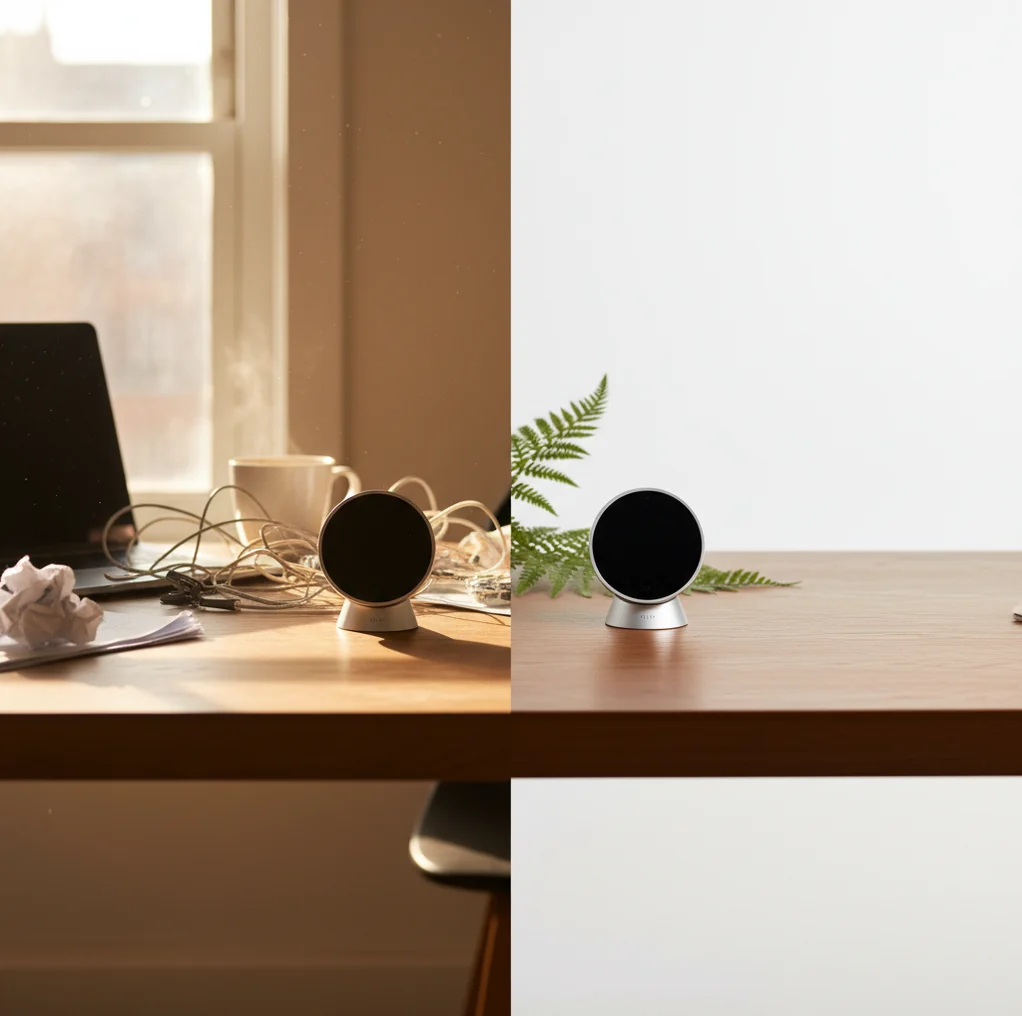
AI product photos can boost sales by improving thumbnail clarity, removing distracting backgrounds, standardizing listing images, and making products look more trustworthy. The best results come from clean input photos, realistic shadows, accurate color, and a consistent crop across every SKU. Sellers should still check edges, logos, defects, and marketplace rules before publishing.
How Do AI Product Photos Boost Ecommerce Sales?
AI product photos boost ecommerce sales by making listings easier to understand, compare, and trust. In marketplace grids, shoppers often decide from a small thumbnail, so a product with clean edges, balanced exposure, and a simple background usually reads faster than one photographed on a messy counter or under mixed lighting.
The conversion lift usually comes from practical improvements: removing clutter, correcting dull lighting, matching crops across variants, and making texture or condition visible. AI does not replace product quality, pricing, reviews, or shipping speed, but it can reduce visual friction. For sellers on Etsy, eBay, Shopify, Amazon, Facebook Marketplace, or Vinted, better photos can increase clicks, save editing time, and make a small catalog feel more professional.
What Makes a Product Photo More Clickable in Search Results?
A clickable product photo has one clear subject, enough contrast, accurate color, and a crop that makes the item readable at thumbnail size. The main image should answer the shopper’s first question immediately: what is this, what condition is it in, and does it look legitimate?
For most ecommerce listings, a neutral or white background works better than a decorative scene because it keeps attention on the product. Soft shadows help the item feel grounded, while overdone effects can make it look artificial. Consistency also matters: if every listing uses the same aspect ratio, margin, shadow strength, and background tone, the store feels more organized and easier to browse.
How Do AI Background Removers and Image Enhancers Work?
AI product photo tools usually combine segmentation, matting, background generation, and image enhancement. Segmentation models identify which pixels belong to the product and which belong to the background. Matting refines semi-transparent or soft edges, such as fabric fibers, glass, jewelry chains, hairline straps, or shoe laces.
Enhancement models can adjust sharpness, exposure, denoise grain, upscale resolution, and rebuild small details. The technical weak point is the edge boundary: reflective metal, clear acrylic, white products on white surfaces, and fuzzy textiles can confuse the model. That is why the original photo still matters. A sharp image shot with one light source and strong subject-background contrast gives AI more accurate information to work with.
How Do You Create Store-Ready AI Product Photos in 10 Minutes?
Shoot in clean, indirect light
Place the product near a window, turn off yellow indoor bulbs, and avoid harsh direct sun. Use a plain surface with contrast against the product so the AI can detect edges cleanly.
Capture three useful angles
Take a front shot, a 45-degree shot, and one close detail shot showing texture, scale, label, or condition. For used items, photograph wear honestly so the listing does not create return risk.
Choose the sharpest frame
Zoom in before editing. If the logo, stitching, material grain, or product edge is blurry, reshoot instead of relying on AI sharpening.
Remove or replace the background
Use a white, off-white, light gray, or category-appropriate neutral background for the main listing image. Add a subtle shadow so the product does not look like it is floating.
Crop consistently
Use the same aspect ratio across the catalog, commonly 1:1 for marketplaces or 4:5 for social commerce. Keep similar margin around each item so the store grid feels intentional.
Export and inspect
Export at the highest practical resolution allowed by the platform, then check edges, color, text, logos, transparent areas, and small defects before publishing.
Which AI Product Photo Tools Are Best for Sellers?
| Tool | Best For | Strengths | Watchouts |
|---|---|---|---|
| Pict AI | Mobile sellers who need fast background cleanup and consistent listing shots | Quick product cutouts, background swaps, simple store-ready framing on phone | Still requires manual review for tricky edges, transparent items, and color accuracy |
| Canva | Sellers who need product images plus templates, banners, ads, and brand assets | Strong layouts, brand kits, marketplace graphics, social post formats | Template workflow can be slower if you only need a clean product cutout |
| Remove.bg | Fast background removal for simple product images | Very quick cutouts and easy exports for basic background cleanup | Less complete if you need lighting correction, layout design, or full catalog styling |
| PhotoRoom | Marketplace sellers creating clean product photos and batch-style edits | Product-focused backgrounds, shadows, and seller-friendly presets | Some advanced exports or features may depend on plan limits |
| Adobe Express | Creators who want AI edits inside a broader design workflow | Useful for branded content, ads, quick resizing, and creative variations | May be more design-oriented than necessary for simple listing cleanup |
Choose based on workflow, not hype. A reseller listing 20 items from a phone needs speed and consistency; a brand building ads may need templates, brand controls, and campaign formats.
What AI Photo Prompts Work Best for Product Listings?
The best AI product photo prompts are specific, restrained, and conversion-focused. Ask for realistic studio lighting, neutral backgrounds, soft shadows, and accurate scale rather than dramatic scenes. Avoid prompts that change the product’s material, color, logo, shape, size, or condition.
Main image prompt: Clean ecommerce product photo on a matte white background, centered composition, realistic soft shadow, accurate colors, no extra props, no text, no reflections, high detail.
Lifestyle prompt: Product on a simple modern desk near natural window light, minimal props, realistic scale, shallow background blur, product remains unchanged, clean commercial photography.
Premium catalog prompt: Neutral warm-gray studio background, softbox lighting from upper left, subtle contact shadow, crisp edges, true-to-life color, centered product, luxury ecommerce style.
Used-item honesty prompt: Clean neutral background, natural light, visible texture and condition, do not remove scratches or wear marks, accurate color, realistic shadow, marketplace listing photo.
Should You Use White Backgrounds or Lifestyle Backgrounds?
Use white or neutral backgrounds for main listing images when the shopper needs speed, clarity, and comparison. This is usually best for marketplaces, catalogs, search grids, variant pages, and products where size, shape, color, and condition matter more than mood.
Use lifestyle backgrounds for secondary images, ads, social posts, gift guides, portfolio pages, and brand storytelling. A candle can sell better in a warm bathroom scene, and a backpack may feel more valuable in an outdoor context. The risk is visual noise: if the background competes with the product, the shopper may miss the item entirely. A practical workflow is neutral first image, lifestyle second image, detail third image, and scale or use-case fourth image.
How Should Sellers Measure Whether AI Photos Improve Sales?
Measure AI product photos by tracking click-through rate, conversion rate, add-to-cart rate, return rate, and time-to-sale before and after the image update. Do not judge performance from one listing alone; compare groups of similar products with similar price, demand, seasonality, and shipping terms.
A simple test is to update 10 to 30 listings with cleaner AI-edited main images while leaving a similar group unchanged for two to four weeks. Track marketplace impressions, clicks, saves, and purchases. If clicks rise but purchases do not, the thumbnail improved attention but the price, description, reviews, or product-market fit may still need work. If returns increase, the images may be too flattering or inaccurate.
What Are the Limits of AI Product Photos for Online Selling?
- AI can misread transparent products such as glass, clear acrylic, polybags, bottles, and packaging windows because the background shows through the object.
- Reflective products such as jewelry, chrome, watches, and glossy shoes may produce strange highlights, warped edges, or unrealistic reflections.
- Over-smoothing can hide scratches, fabric pilling, dents, stains, or wear marks, which can lead to disappointed buyers and higher return risk.
- AI upscaling cannot fully fix motion blur, missed focus, or a photo taken at very low resolution. A sharp original image is still the best starting point.
Choose an AI Photo Workflow by Product and Sales Channel
Choose the editing workflow by what the image must prove, not by which effect looks most impressive. These five situations call for different levels of automation.
- If the product has difficult materials, invest in capture first. When weighing AI product photos vs photographer, consider whether buyers need to judge gemstone clarity, polished metal, or sheer fabric. A photographer can control reflections and lighting during capture; AI background editing cannot reliably recover material properties missing from the source image.
- If you need lifestyle scenes, keep scale verifiable. For sellers learning how to generate lifestyle shots for products with AI, start with a real product cutout and specify the surface and setting. Avoid scenes that imply unverified capacity, fit, or dimensions. Keep a separate photographed size reference in the listing.
- If your home is your studio, standardize the setup. The practical answer to how to make pro product photos at home with AI is a repeatable capture station. Mark the camera and product positions with tape, lock exposure when possible, and save one editing preset. This reduces correction work when adding inventory later.
- If Amazon is the destination, separate capture from compliance. Learning how to shoot Amazon ready product photos with AI requires checking the current rules for the relevant category and image slot. Capture the actual sale item first. Use AI for permitted cleanup, then verify that props, added text, and included accessories meet those requirements.
- If Etsy buyers need craftsmanship evidence, protect those details. To create Etsy product images, preserve real photographs of engraving, glaze variation, stitching, or handmade irregularities. Use AI primarily around the item rather than regenerating its surface. For personalized products, show a clearly identified sample instead of implying that its lettering matches every order.
AI Product Photo Questions Sellers Ask
Use a separate source photo for each color whenever appearance affects the purchase. AI recoloring can change highlights, stitching, labels, or material texture along with the intended surface. If you create a variant mockup, identify it as a visualization and check the sales channel’s rules. For the listing’s factual color reference, photograph the actual variant under consistent lighting.
JPEG is a practical choice for photographic product images when transparency is unnecessary. PNG preserves transparency but can produce larger files. WebP or AVIF can reduce file size when the storefront supports them. Keep a high-quality master, then export a compressed delivery copy. Check fine text, gradients, and product edges after compression, and avoid repeatedly resaving the same JPEG.
AI product photos can increase sales by making listings clearer, cleaner, and more consistent, which helps shoppers decide faster. They are most effective when they improve trust without changing the actual product.
A white, off-white, or light gray background is usually best for main ecommerce images because it keeps attention on the product. Lifestyle backgrounds work better as secondary images for branding, social posts, and use-case examples.
Yes, AI product photos can improve conversion rate when they fix visual problems such as clutter, poor lighting, inconsistent crops, or weak thumbnail readability. They will not fix bad pricing, weak demand, slow shipping, or inaccurate descriptions.
AI-edited product photos are generally acceptable when they represent the real item accurately, but platform rules differ by category. Always check requirements for backgrounds, watermarks, text, props, and image manipulation.
Yes, used or handmade items should show important defects, wear, scale, and texture honestly. Hiding flaws with AI can create disputes, returns, and negative reviews.
Use the highest resolution recommended by the selling platform, often at least 1000 pixels on the longest side for zoom and marketplace quality. Keep aspect ratios consistent, such as 1:1 for marketplace grids or 4:5 for social commerce.
Lifestyle images can help sell emotion, context, and gifting potential, but they are usually better as secondary images. For the main image, a clean product-first photo often performs better in search results and comparison grids.
Use the same crop ratio, background color, shadow style, lighting direction, and product margin across every listing. Save a repeatable editing recipe so each new SKU follows the same visual system.
AI can sharpen mild softness and upscale resolution, but it cannot reliably recover a badly blurred product, unreadable label, or missed focus. Reshooting is usually faster and more accurate.